elsiedeluxe
Participant
August 23, 2018
Question

PHOTOSHOP TOOLS expand and contract and transform

  • August 23, 2018
  • 2 replies
  • 644 views

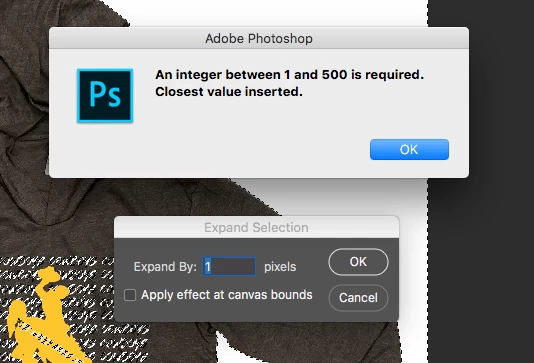
When using the expand and contract tool why cant we expand by 0.5 points only by 1 points? Why can't it be like illustrator.

When enlarging or making an image small why cant we type in the size we want. Like the illustrator tool TRANSFORM.

If adobe is scared they will loose photoshop they wont. You need both photoshop and illustrator no matter what. not everyone uses both because they don't know how to. I use both because each program has its unique things we need to use as graphic designers. They are my main tools.
    This topic has been closed for replies.

    2 replies

    davescm
    Community Expert
    Community Expert
    August 23, 2018

    Hi

    JJMack has hit the nail right on the head.

    Photoshop is a pixel editor. So the minimum selection is one pixel and the minimum change in a selection is one pixel. When transforming a raster layer (picel layer) the minimum transformation is, you've guessed it, one pixel.

    When dealing with vector shapes, Photoshop can transform these by less than a pixel but then it has to simulate the half pixel transform by shading the pixel in which the vector edge now lies to an interim value (so where a black vector shape on a white background is placed at half a pixel - the  pixel on which the edge lies becomes grey).

    Dave

    JJMack
    Community Expert
    Community Expert
    August 23, 2018

    The setting in Photoshop is in pixels not points where there are something like 72pixels in a point so a .5 point would be 36pixels.  So try 36px for .5pt AI is also a vector editor no a pixel editor like Photoshop.  AI is more formulas rather than pixel

    JJMack
    elsiedeluxe
    Participant
    August 23, 2018

    THANK YOU!!!! Now that makes more sense. I was thinking in points not pixels.