
Participant
September 7, 2018
Answered

Photoshop video timeline error?

  • September 7, 2018
  • 1 reply
  • 1185 views

Hello, I'm new to the Adobe Forum!

I sometimes use photoshop to make animations. Recently i switched from the frame timeline to the video timeline so I could be more organized with timing.

But I always seem to run into this problem. The clips sometimes end between frames on the timeline, and it's really confusing. Is there anyway to stop this?

Heres an image to help see what I mean:
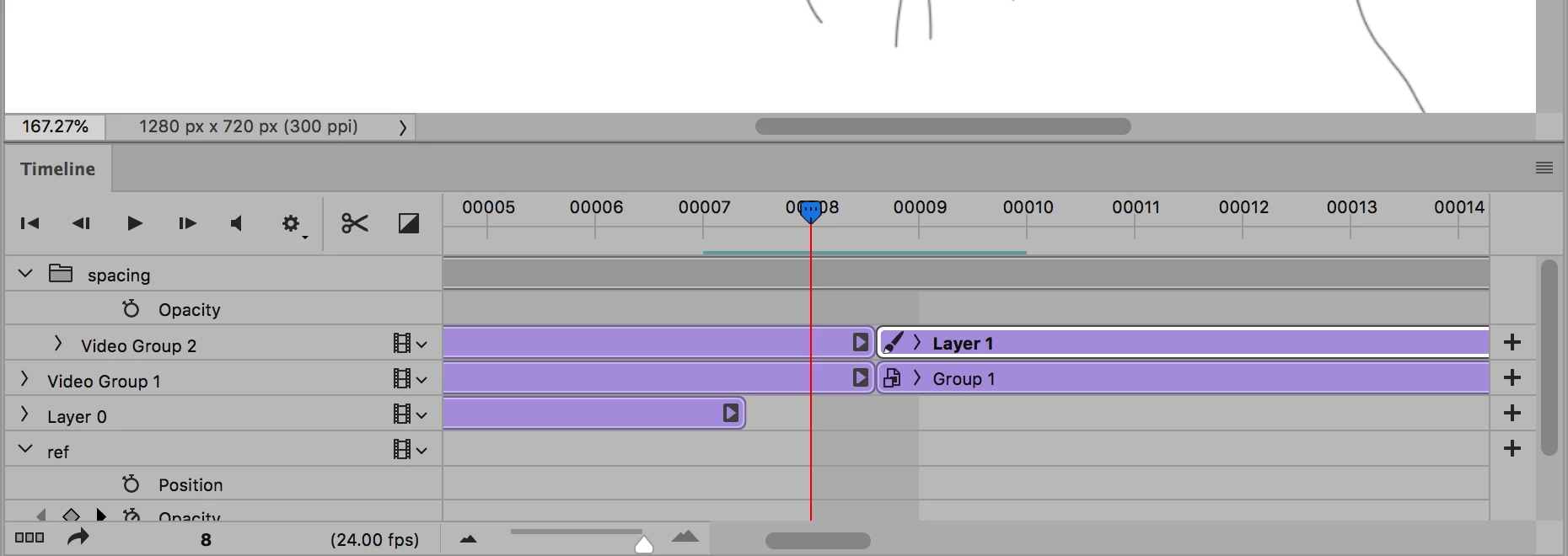
As you can see after the playhead, the layer/clip ends between frame 8 and 9.

This topic has been closed for replies.
Correct answer JJMack

You can Drag out or shorten the duration of a video clip so the will be the length required.  You can also use 3d layers and animate the 3d object. Rendering out Video will give you better color and may even be smaller the the gif and could can also add an audio track.

Animated 3d Photo Collage

1 reply

JJMack
Community Expert
JJMackCommunity ExpertCorrect answer
Community Expert
September 7, 2018

You can Drag out or shorten the duration of a video clip so the will be the length required.  You can also use 3d layers and animate the 3d object. Rendering out Video will give you better color and may even be smaller the the gif and could can also add an audio track.

Animated 3d Photo Collage

JJMack