
Participant
April 13, 2021
Answered

Photoshop Wet Brush messing with regular brushes

  • April 13, 2021
  • 1 reply
  • 3768 views

Hello,


I was playing around with some basic brushes (hard round/soft round, etc...) and switched over to a wet brush (from the Wet Media Brush pack included with photoshop cc), not my basic hard round brush is behaving like a wet brush when I switch back and I can't turn it off.  See below screenshot:
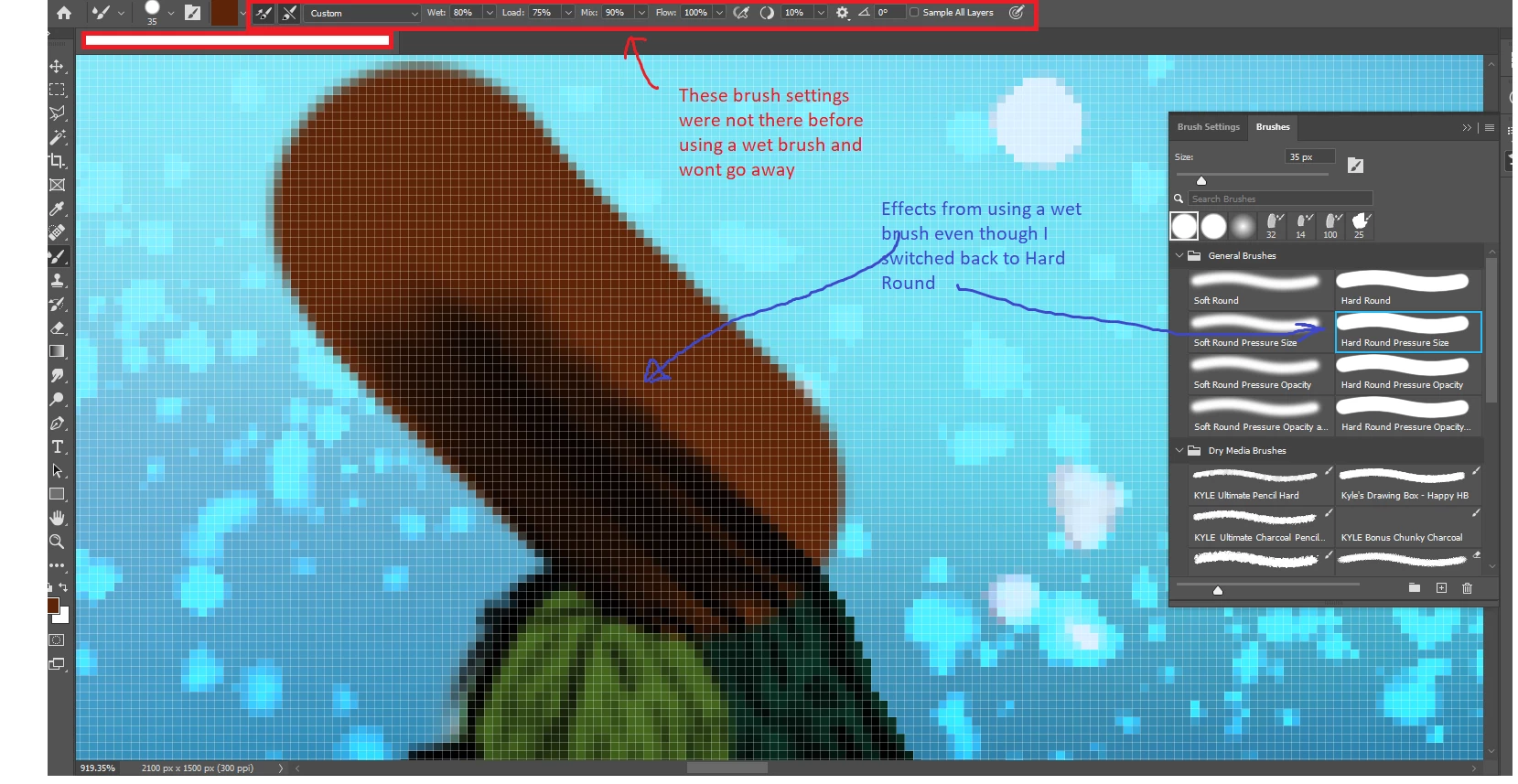
 

I came across this issue before and wound up having to completely re-install photoshop to fix my basic round brushes.  Is there a setting or something I'm missing to fix this?  I DO NOT want the wet brush settings on my basic round brushes at all.


Thanks!

This topic has been closed for replies.
Correct answer davescm

No need for a reinstall, just a little more understanding of Photoshop brushes.


When a brush is defined it can include, or not include a tool preset. If it includes a preset then the tool is switched to that preset tool when the brush is selected. e.g. that preset might be the brush tool, the mixer brush tool, the smudge tool etc  However some brushes are defined without a preset and the brush shape will change but whatever tool is currently selected will remain selected, which is what you are seeing. In that case you will also need to switch tools (B for the brush tool) if you want to use that brush shape with a particular tool.


You can tell which brushes have a tool preset, which do not, and if they do which tool will be selected by the preset by looking at the small icon symbol in the top right of each brush preview in your screenshot.


Dave

1 reply

davescm
Community Expert
davescmCommunity ExpertCorrect answer
Community Expert
April 13, 2021

No need for a reinstall, just a little more understanding of Photoshop brushes.


When a brush is defined it can include, or not include a tool preset. If it includes a preset then the tool is switched to that preset tool when the brush is selected. e.g. that preset might be the brush tool, the mixer brush tool, the smudge tool etc  However some brushes are defined without a preset and the brush shape will change but whatever tool is currently selected will remain selected, which is what you are seeing. In that case you will also need to switch tools (B for the brush tool) if you want to use that brush shape with a particular tool.


You can tell which brushes have a tool preset, which do not, and if they do which tool will be selected by the preset by looking at the small icon symbol in the top right of each brush preview in your screenshot.


Dave

Participant
April 14, 2021

This was it!  I did not realize that my brush was changing from a "brush" to a "mixer brush".  Thanks!

Trevor.Dennis
Community Expert
Community Expert
April 14, 2021

You need Show Aditional Preset Info turned on to see the brush tip.

You can force any preset to stay with the current tool by Ctrl (Cmd) clicking it.