
Photoshop workspace layout bug?
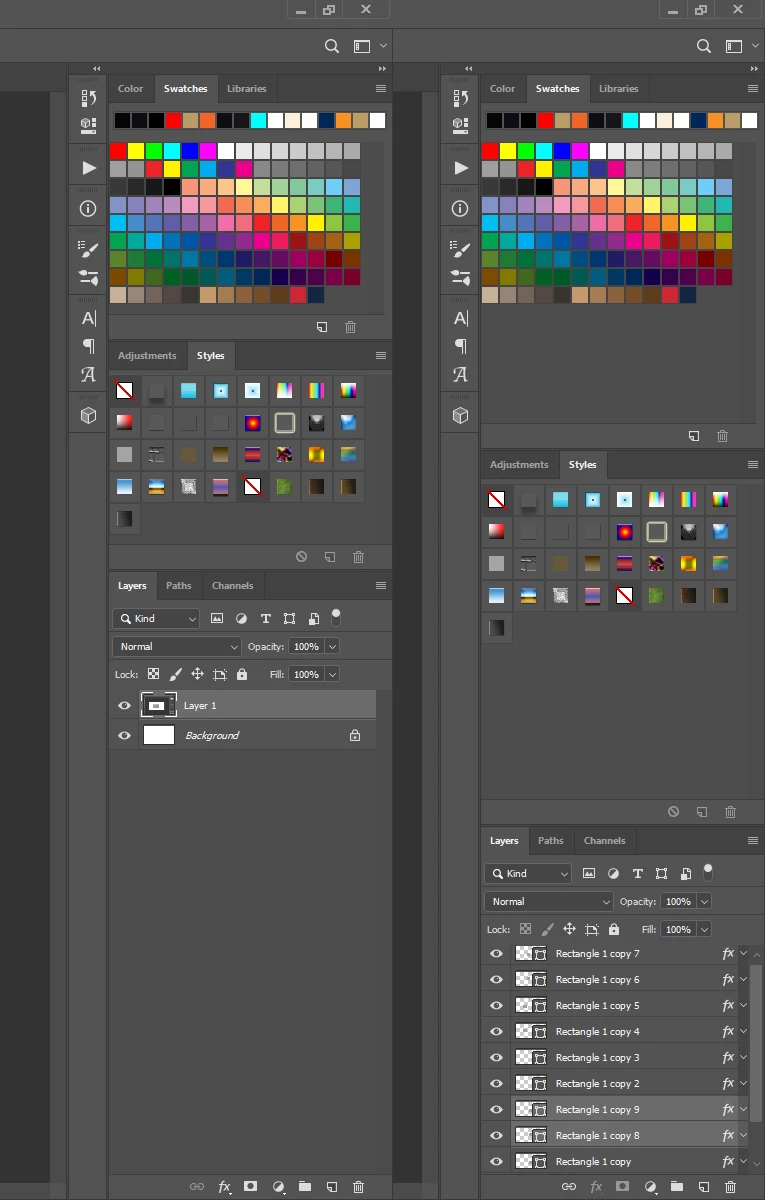
See attached image. I adjust my panels on the right side of my workspace in my layout to allow maximum height for my layers panel. The panels shown on the left in my image are my ideal layout/spacing/height. But if I take Photoshop out of fullscreen (Maximize window) to Restore Down size and then make it fullscreen again, my panels reset -- panels on the right in my image -- so each panel is equal in height (making layer panels shorter again). I have to keep resizing my panels so I can get the taller layers panel. Can this be fixed?
Related to this issue, everytime I copy something within Photoshop to my clipboard (say a mask/clip of an image) and paste it elsewhere (say Word or Outlook), Photoshop will automatically go out of "Maximize" and into "Restore Down" size.... and I lose my panel layout again. Frustrating for the past few photoshop updated versions.
Thanks for any input.
 AdChoices