Participating Frequently
April 16, 2020
Answered

Problème de couleur entre photoshop et export

  • April 16, 2020
  • 5 replies
  • 7036 views

Bonjour,


Depuis peu certaines de mes couleurs ne correspondent plus entre ma version dans photoshop et le fichier exporté (que ce soit en png, jpeg etc.). Voir l'image jointe. Dès que je me rends sur le panneau d'exportation on voit déjà que les couleurs sont modifiées.

Quelqu'un aurait une idée ?

Version de photoshop : la dernière (2020)

Macbook pro 16"

Os Catalina
This topic has been closed for replies.
Correct answer Per Berntsen

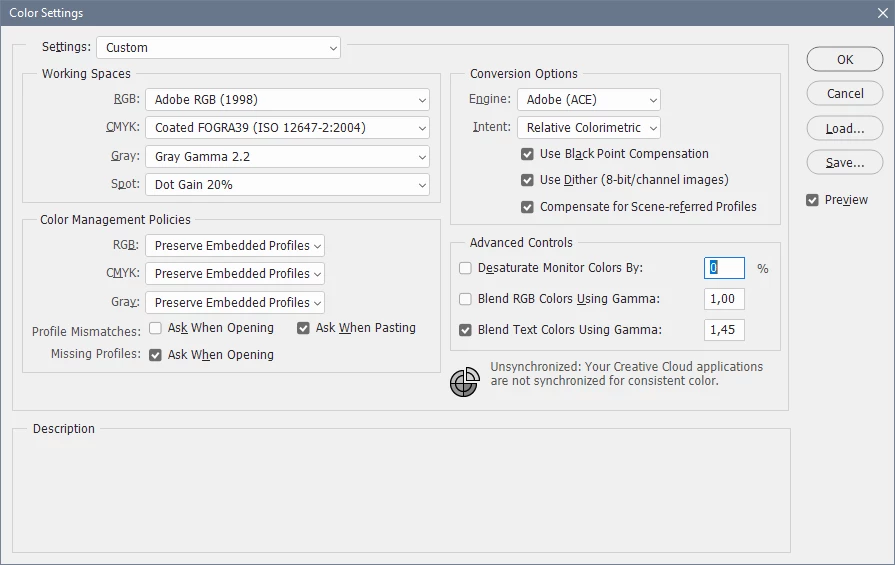
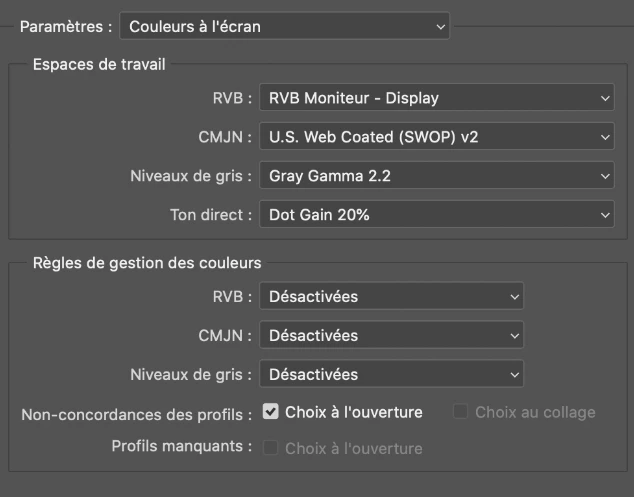
You have set the monitor profile as the RGB working space, which is probably (partially or completely) the cause of the problem.

Don't ever do this, it disables color management.

Use a standard profile like sRGB or Adobe RGB as your working space.

And Color management policies should be set to Preserve embedded profiles.


This is how my color settings are set up.


5 replies

Per Berntsen
Community Expert
Per BerntsenCommunity ExpertCorrect answer
Community Expert
April 16, 2020

You have set the monitor profile as the RGB working space, which is probably (partially or completely) the cause of the problem.

Don't ever do this, it disables color management.

Use a standard profile like sRGB or Adobe RGB as your working space.

And Color management policies should be set to Preserve embedded profiles.


This is how my color settings are set up.


D Fosse
Community Expert
Community Expert
April 16, 2020

Oh my. I missed that. Well, then, case closed.


D Fosse
Community Expert
Community Expert
April 16, 2020

You need to check "Embed Color Profile". It is unchecked by default in Save For Web, for some reason I never could understand. It should always be checked.


Also, set Preview to "Use Document Profile". This shows the fully color managed version. "Monitor Color" displays the image without any color management at all. Again, a default setting that only causes problems.


With  these settings, Photoshop and Save For Web will display the image identically and correctly. Any other color managed viewer/browser will too. If not, all bets are off and it cannot be trusted.

thibAuAuthor
Participating Frequently
April 16, 2020

ok great to know, I will think about that for my next saves. thanks

Unfortunately it didn't solved my color issue for this image but maybe I don't use a good colors setting for my document. 
I don't know as I didn't touch anything and never had this issue before 😕😕


D Fosse
Community Expert
Community Expert
April 16, 2020

If you're viewing the file in an application without color management, it will never be correct anyway. There is no way to correct for your display. If you got a new display since last time, it look be different with the new display.


This is why color management was invented. It takes the display out of the equation and represents the file correctly on screen regardless of its characteristics.


There has to be full color management. Photoshop does that, Save For Web can be set up to do it by checking a few boxes. But many applications can't, they don't support it. Nothing you can do about that.

thibAuAuthor
Participating Frequently
April 16, 2020

Hello guys, thanks for your answers.

Yes, the option Convert to SRGB is checked, and the preview is set to Monitor Color.


Here is a screenshot of my document profile.


I use the brand new MacBook pro 16" with no calibration software.
I use photoshop since 10 years and never seen that, I don't understand what changed.

It's like in photoshop viewport it's oversaturated and when I save or export it's lesssaturated.

 
c.pfaffenbichler
Community Expert
Community Expert
April 16, 2020

The image is unprofiled so again: What are Photoshop’s Edit > Color Settings? 

c.pfaffenbichler
Community Expert
Community Expert
April 16, 2020

Please set the Status Bar to »Document Profile« and post more meaningful screenshots on this Forum directly. 

What is the image’s Color Space and what are Photoshop’s Edit > Color settings? 

nikunj.m
Community Manager
Community Manager
April 16, 2020

Hi there,


We are sorry about the experience due to the difference in colors between Photoshop and the exported file.


Once the Save for Web window, please see if the option to Convert to sRGB is checked and what the Preview is set to? 


Do you use any calibration software to calibrate your monitor?


Regards,

Nikunj