
Copy link to clipboard
Copied
It seems like the batch command has gone crazy. I created an action to create a 1920 pxl jpeg from a larger PSD, and then save the jpeg in a particular folder. Nothing special. The source files are labeled like Image #1, #2, etc. up to #98. So, I open the batch command and point it at the correct source folder, identify the destination folder, which is the same one used in creating the Action. I do not check "override" for anything, though I've tried it that way also. Then I hit go. It then opens every file in the source folder and puts it unchanged in the destination folder. It also opens and reopens Image #1 continuously, but leaves each copy open, unsaved. It will open #1 indefinitely, until I force quit PS. This all seems a little odd. Then I tried a different source folder, same images but larger, and turned it loose again. This time it alternately opened Image #1 and Image #11 until I force quit. It would open other images in the folder if I hit cancel while it was processing #1 or #11, it would go to the next number in the sequence, do that, then try to open 1 or 11 again.
I am using the Cloud based PS on a Mac running 10.13.6
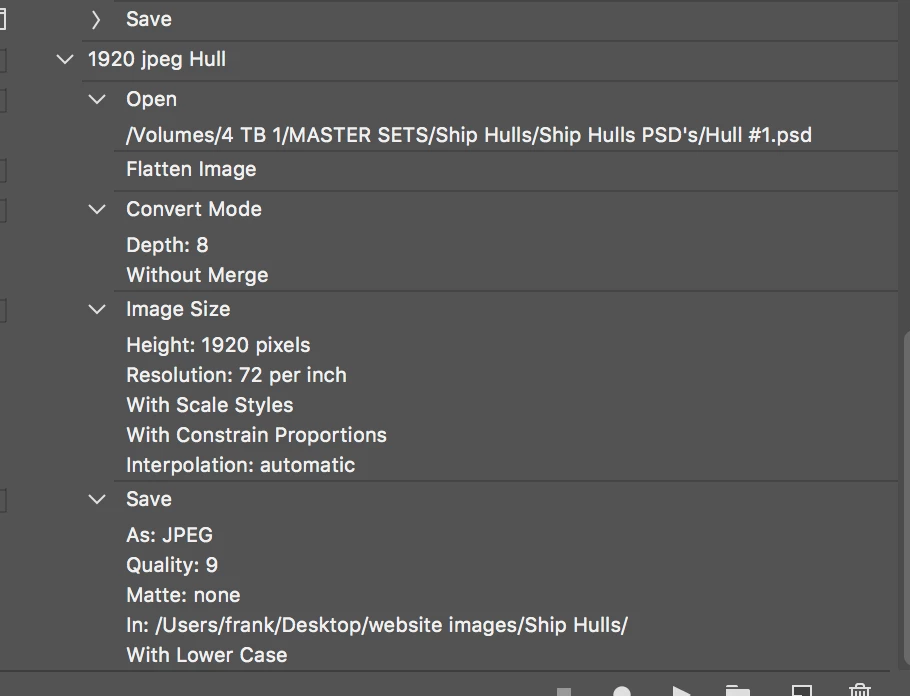
If below is action which you are using with hard coded open step you will have problem because it is hard coded to open Hull #1.psd file and that will be the only file processed if you do not use override open command. You can not process folder of files using action below without overriding Open step, do you understand why? Try with Override Action Open Command in Batch dialogue checked.
Copy link to clipboard
Copied
OK, it has now gotten even weirder. I have just tried the Action I created on a different set of images in a different folder. Now it alternately opens each sequential image in the new folder, and then reopens the old Image #1, WHICH IS NOT IN THE SOURCE FOLDER! Has Adobe decided to save money by hiring cretins? I know we are supposed to be respectful but this is just ridiculous. We all have deadlines, and that includes me right now.
Copy link to clipboard
Copied
Why did you not post your action so we can see its steps and the setting recorded for each action step. How would we know what your action does.
Copy link to clipboard
Copied
good point...screen shot now attached to 2nd post.
Copy link to clipboard
Copied
Not helpful the steps are not expanded we can not see the steps recorded settings. Your Action has an Open there is no close. It will stay open.
Crafting Actions Package UPDATED Aug 10, 2014 Added Conditional Action steps to Action Palette Tips.
Contains
Copy link to clipboard
Copied
Copy link to clipboard
Copied
Expanded action palette just uploaded below. I use a pretty simple, straightforward method of creating actions, and it has worked, more or less, for 15 years: open an image needing the work the action will accomplish, start recording, go through the steps the action needs to do, then hit stop recording. That is the close essentially. A mistake in this particular action maybe is that the action contains an open command linked to a particular image, instead of starting with the image already open...could that be it?
Copy link to clipboard
Copied
I see no close. I think you would need to override the open in batch. There is no need to convert to 8 Bit or fatten Jpeg only support 8 Bit Photoshop will covert to 8 Bit when it save a flat jpeg from a layered document. The Open does not seem to be needed batch will open your files for your action. The Image Size to a height of 1920 seem odd I would have thought I would have seen 1920 the width for a 1080p display and the automate Fit Image would be used with 1920 width and 1080 height. The Image Size in the Action could wind up with a document that has a very large width. What is the intent of you Image Size in the action?
The action may not be needed at all . Menu File>Scripts>Image Processor.... may be all you need to use. It can process your layered files and save Jpeg file fitted to size.
Copy link to clipboard
Copied
Copy link to clipboard
Copied
As already asked, can you upload action somewhere to check it?
Another useful info would be Batch dialogue to see what options you have set. Did you tried to use some other batch script like Image Processor or Image Processor Pro?
Copy link to clipboard
Copied
Just uploaded above! Thanks
I only used the regular Adobe PS system for creating actions: start record, go through the various steps, stop recording.
Copy link to clipboard
Copied
If below is action which you are using with hard coded open step you will have problem because it is hard coded to open Hull #1.psd file and that will be the only file processed if you do not use override open command. You can not process folder of files using action below without overriding Open step, do you understand why? Try with Override Action Open Command in Batch dialogue checked.
Get ready! An upgraded Adobe Community experience is coming in January.
Learn more