
Participant
March 11, 2020
Question

profile conversion between photoshop and illustrator not matching

  • March 11, 2020
  • 6 replies
  • 658 views

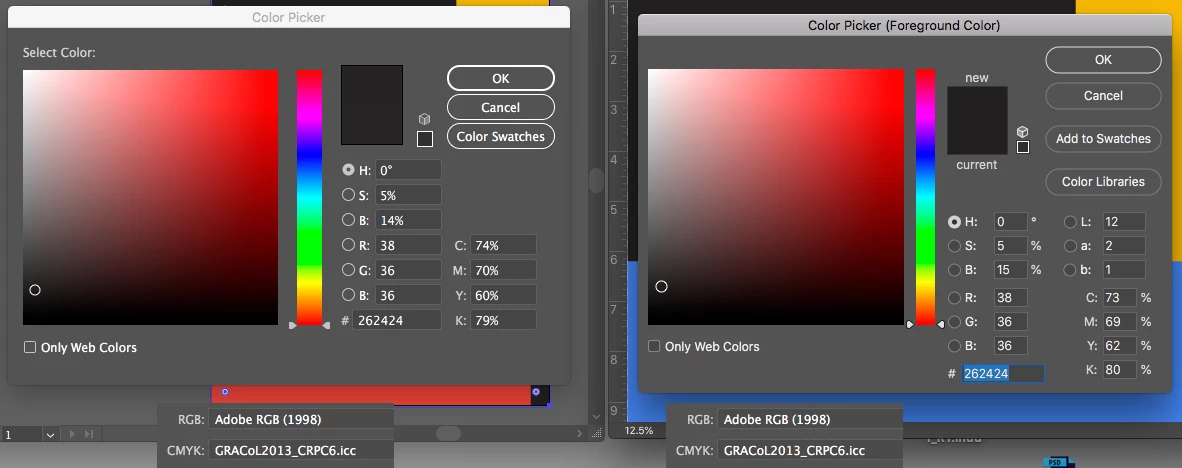
I was told Illustrator uses exactly the same profiles and algorithms for Color Management as Photoshop. But the grime reality said otherwise. See the attach image, both illustrator and photoshop use the same profile. But even a simple color tint of black is convering to cmyk with different result. Does anyone know why? 
 

    This topic has been closed for replies.

    6 replies

    Sammy001Author
    Participant
    March 12, 2020

    NB, colourmanagement
    Community Expert
    Community Expert
    March 12, 2020

    I wonder if the AI setting of 'CMYK: Preserve numbers (ignore linked profiles)' could be part of this? That setting would affect exisiting documents opened into AI.

    It seems, though, that you are discussing creating a colour in the palette and how that is affected by "profile conversion", tell us how you are doing that please, if you type in the same numbers in each application how come they differ in the earlier screenshots?

    I think I know your answer, but better to not presume that .


    IF there is an issue with conversion its worth checking you do not have duplicates of any of the selected profiles on your system - which COULD lead you to select different profiles (with simlar names) in each app.


    thanks

    neil barstow, colourmanagement.net :: adobe forum volunteer

    [please do not use the reply button on a message in the thread, only use the one at the top of the page, to maintain chronological order]

    Stephen Marsh
    Community Expert
    Community Expert
    March 12, 2020

    Before posing more questions that may be answered by a previous request for more info...


    Please provide cropped screenshots of Color Settings from both Illustrator and Photoshop.

    Sammy001Author
    Participant
    March 12, 2020

    Thanks for all your reply. Stephen pointed out the HSB values are not the same between the 2 program on my screen shoot. I went back and re examine the file. I find out when I make a color in Illustrator the HSB value is always different from Photoshop. Maybe that is why the RGB to cmyk conversion never match between the 2 program. But again why would that happen?

    NB, colourmanagement
    Community Expert
    Community Expert
    March 11, 2020

    Hi

    Of course you need to choose the exact same tint in photoshop and illustrator

    as Stephen wrote, you have :"HSB 0/5/14% on the left and HSB 0/5/15% on the right"

    then there's the mattter of the ICC profiles used for RGB and CMYK.

    in the case of the colorpicker, those are set as defaults in color settings

    they need to be the same

    also the rendering intent needs to be set the same between the two applications


    For converting between colourspaces we generally use photoshop's edit/ convert to profile


    If you take a test image [such as the RGB one here https://colourmanagement.net/index.php/downloads_listing ]

    convert (edit/convert to profile) to CMYK using, say coated GRACoL 2006 (which is included in Adobe's installation)

    Now set up a coated GRACoL 2006 Illustrator document and open the image same there, they should be identical in appearance and colour numbers (using the eyedropper).


    Please let us know how it goes


    I hope this helps


    neil barstow, colourmanagement.net :: adobe forum volunteer

    [please do not use the reply button on a message in the thread, only use the one at the top of the page, to maintain chronological order]


    Stephen Marsh
    Community Expert
    Community Expert
    March 11, 2020

    Please provide cropped screenshots of Color Settings from both Illustrator and Photoshop.


    Why is the HSB 0/5/14% on the left and HSB 0/5/15% on the right?

    lambiloon
    Community Expert
    Community Expert
    March 11, 2020

    Hi, there is a difference because Photoshop is mainly RGB oriented and illustrator has CMYK difficult color properties so that is the reason....regards

    Ali Sajjad / Graphic Design Trainer / Freelancer / Adobe Certified Professional