
Piontek
Inspiring
December 21, 2020
Answered

Program Error in V 22.1.0

  • December 21, 2020
  • 2 replies
  • 775 views

Hello,

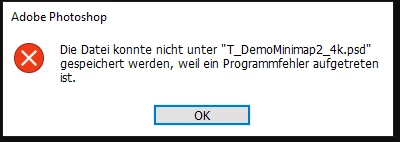
I am getting regularly a program error with V22.1.0 when I want to save a file. It then says: 
"The file could not be saved to "..." because a program error occurred."

I tried to reinstall Photoshop but it didn't helped. It occurs sometimes, but not always.
Sometimes it also helps to just restart Photoshop and it's gone. But it's too bad when you are working on a file and spend like 10 minutes into it and then you can't save it.
This topic has been closed for replies.
Correct answer PECourtejoie

Hi! You should update to Photoshop 22.1.1 as it fixes the "program error" issue: https://helpx.adobe.com/photoshop/kb/fixed-issues.html

If the update does not appear in the CC app, go to help>check for updates.

2 replies

PECourtejoie
Community Expert
PECourtejoieCommunity ExpertCorrect answer
Community Expert
January 19, 2021

Hi! You should update to Photoshop 22.1.1 as it fixes the "program error" issue: https://helpx.adobe.com/photoshop/kb/fixed-issues.html

If the update does not appear in the CC app, go to help>check for updates.

Participant
March 25, 2021

I am having this problem all the way up to 22.3.  When I revert back to 21.2.6 the problem is not present.  I get this error upon opening and even when attempting to exit PS-CC (Win64).  To exit I must go to Task Manager and kill the applicaiton.


Participant
December 21, 2020

Same problem here. For now the only solution is to delete your preferences or to uninstall version 22.1.0 to reinstall version 22.0.1

It's quite obvious that Adobe rushed out 22.1.0 without any quality control, given the number of similar reports here. I had troubles with the last 3 updates of Adobe Photoshop (brush doesn't work properly, ...). Instead of making 'useless' filters like the neural filter, Adobe should focus on the real problems. 
I'm really getting a Microsoft vibe with Adobe ;-).

Piontek
PiontekAuthor
Inspiring
December 21, 2020

Thanks for the info. After my post I also saw the other reports here. Glad that I'm not the only one. I also noticed a very strange bug, because sometimes when I opened a file in PS, my whole workspace was gone (including the toolbar left etc.). I then had to get the workspace back with Window -> Workspace (I don't know how it's called in the english PS version).