



pdob
Participant
July 2, 2021
Répondu

PS 2021 Search Function for Document Layers

Greetings, everyone. Can anyone tell me how to restore the old search function (command-F, I'm on a Mac) to locate specific layers by name within a document? Some of my illustrations have many layers before finishing and flattening, and can be difficult to locate. The search function used to be perfect for this, but now I see nothing in search results when I search for a layer by name. Thanks in advance for the help.
Ce sujet a été fermé aux réponses.
Meilleure réponse par Bojan Živković11378569

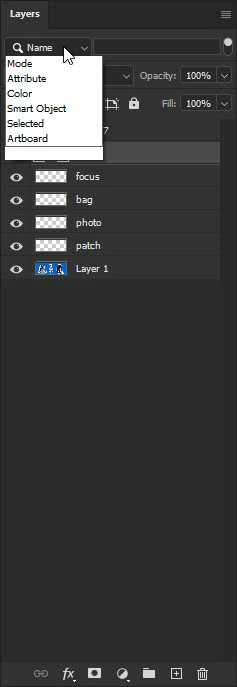
You can search for layer(s) with specific name(s) from the Layers panel search box(functionality).


Choose Name from the Pick a filter type drop down list then start typing name in the text field that will appear.

1 commentaire

Bojan Živković11378569
Community Expert
Community Expert
July 2, 2021

You can search for layer(s) with specific name(s) from the Layers panel search box(functionality).


Choose Name from the Pick a filter type drop down list then start typing name in the text field that will appear.

pdob
pdobAuteur
Participant
July 2, 2021

Thanks, Bojan! It was right in front of me. haha