Participating Frequently
October 22, 2020
Question

PS 2021 Wont shut down

  • October 22, 2020
  • 5 replies
  • 775 views

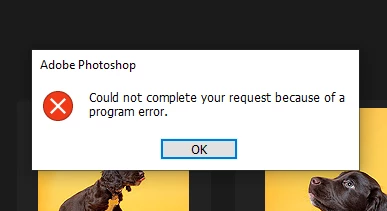
when trying to close PS2021 ( just done an update via CC app)
get this message  ... Requires Ctr Alt Del & Task Manger to close 
 

This topic has been closed for replies.

5 replies

Participant
March 21, 2021

Here is what I had to do to get it to work. Uninstall Photoshop and do not keep previous settings. After I did a clean install, everything works fine. My graphics processor was checked, and the plugins generator is unchecked. I tried unchecking all these in previous post but the clean reinstall is working fine with the 2021 update.

Participant
December 16, 2020

I tried the last suggestion of unchecking graphics accelerator.  PS2019 still works.  I scan a photo, tweak it and try to save it as a jpg.  sometimes it eventually saves but usually it takes too long so I forcequit the program.

Help!

Participant
October 24, 2020

I was able to fix it by reinstalling the older version (21.2.4). With both versions installed, I was able to open and close the 2021 version properly. Then I opened it and changed my settings for not using a graphics processor (Edit>Preferences>Performance). I closed it. After that, I removed the older version, and now the newest one works perfectly on my pc. I don't have a graphic processor, that's why it's not working. The major problem is that a was not able to close photoshop properly and then even deselecting the "use graphic processor", this new setting was never saved and I couldn't get rid of the problem.   

Participant
October 24, 2020

같은 문제가 발생합니다..... 결국 이전버젼 사용합니다..

업그레이드 안되는 앱.. 굳이 유료로 사용해야할지 고민됩니다.

Participant
October 24, 2020

I am experiencing the same issue. I don't know how to fix it. Any idea?
