Participant
May 25, 2020
Question

PS 7 in Win 10 64bit error
  • May 25, 2020
  • 3 replies
  • 4832 views


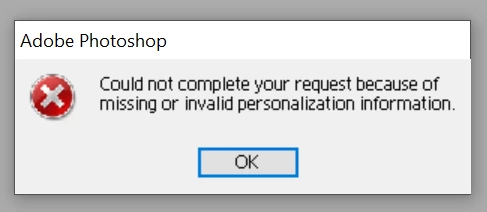
This is what pops up when I try to open Photoshop .  What does it mean? How can I fix it?

3 replies

Jeff Arola
Community Expert
Community Expert
May 26, 2020

The link should work now, but in case it doesn't here is the body of the text:


Error "Could not personalize your copy...missing or invalid personalization information" occurs when you start Photoshop 7.x or Photoshop Elements 1.0-2.0 (Windows XP)

Issue

When you try to start Adobe Photoshop or Photoshop Elements, it returns the error "Could not personalize your copy of Photoshop because of missing or invalid personalization information."

Solutions

Do one or more of the following:

Solution 1: Add your serial number to the Windows registry.
Edit the Windows registry so that it references your Photoshop or Photoshop Elements serial number.

Disclaimer: This solution involves editing the Windows registry. Adobe doesn't provide support for editing the registry, which contains critical system and application information. Make sure to back up the registry before editing it. For information on the Windows Registry Editor, see the documentation for Windows or contact Microsoft Technical Support.

To edit the Windows registry:
1. Choose Start > Run.
2. Type regedit in the Open text box, and then click OK.
3. In the Registry Editor, navigate to and select the following key:
-- Photoshop 7.x: Hkey_Local_Machine/Software/Adobe/Photoshop/7.0/Registration
-- Photoshop Elements 2.0: Hkey_Local_Machine/Software/Microsoft/Windows/CurrentVersion/Uninstall/Adobe Photoshop Elements 2.0
-- Photoshop Elements 1.0: Hkey_Local_Machine/Software/Adobe/Photoshop Elements/1.0/Registration
4. Do one of the following:
-- Right-click the Serial data value in the right pane, and choose Modify from the pop-up menu. If the serial number in the Value Data text box differs from your Photoshop or Photoshop Elements serial number, delete the existing serial number, and type your Photoshop or Photoshop Elements serial number (without dashes or spaces).
-- If the Serial data value is missing, continue as follows:
a. Make sure that nothing is selected, and then right-click in the right pane.
b. Choose New > String Value from the pop-up menu.
c. Type SERIAL for the name of the value.
d. Double-click the value you just created, and type your Photoshop or Photoshop Elements serial number (without dashes or spaces) in the Value Data text box.
5. Click OK.
6. Choose File > Exit to close the registry editor.

Solution 2: Check for a .sif file in the Required folder.
Check for a PS.sif (Photoshop) or PSElements.sif (Photoshop Elements) file in the Adobe/Photoshop 7.0/Required or the Adobe/Photoshop Elements [version]/Required folder. If the file is missing, remove Photoshop or Photoshop Elements, and then reinstall it.

To remove and reinstall Photoshop or Photoshop Elements:
1. Exit from all applications.
2. Choose Start > Settings > Control Panel, and double-click Add/Remove Programs.
3. Select Adobe Photoshop 7.0 or Adobe Photoshop Elements [version] from the Currently Installed Programs list, and then click Remove.
4. Follow the on-screen instructions.
5. Restart Windows, and reinstall Photoshop or Photoshop Elements.

Background Information

The Serial data value for the Photoshop or Photoshop Elements registry key must match the serial number for the installed copy of Photoshop or Photoshop Elements. If the data value doesn't match, Photoshop or Photoshop Elements returns an error when it starts. Photoshop or Photoshop Elements also returns an error if the PS.sif or the PSElements.sif file is missing from the Required folder.


cynrichAuthor
Participant
June 2, 2020

Thanks, Jeff_Arola I'll look at this and see if I can manage it.

Jeff Arola
Community Expert
Community Expert
May 25, 2020

Try the steps outlined here:


https://web.archive.org/web/20040823193053/http://www.adobe.com/support/techdocs/30456.htm


For windows 10 look here


HKEY_CURRENT_USER\Software\Adobe\Photoshop\7\Registration


-USER

cynrichAuthor
Participant
May 26, 2020

Thanks, but the first link says page not found.


Mylenium
Legend
May 25, 2020

It means wht it means - your twenty years old program is unable to deal with your modern operating system and is unable to store the serial info in the Registry. In the past this could be hacked by manually adding the respective info to the Registry, but I have no idea if it even works with Win 10, since the Registry works differently on it and the values may not be readable even if they are there.


Mylenium

cynrichAuthor
Participant
May 25, 2020

Thanks, I was just hoping, but I have Elements on it, so at least that's something.