

PS 7 - png comes in flat w weird background not white, can't edit
Hello.
I was sent a press packet, with several pngs. I have received similar in previous years without issue.
When I open a png, it comes in flat (can't separate the product image from the background). I get no option screen, it just opens.
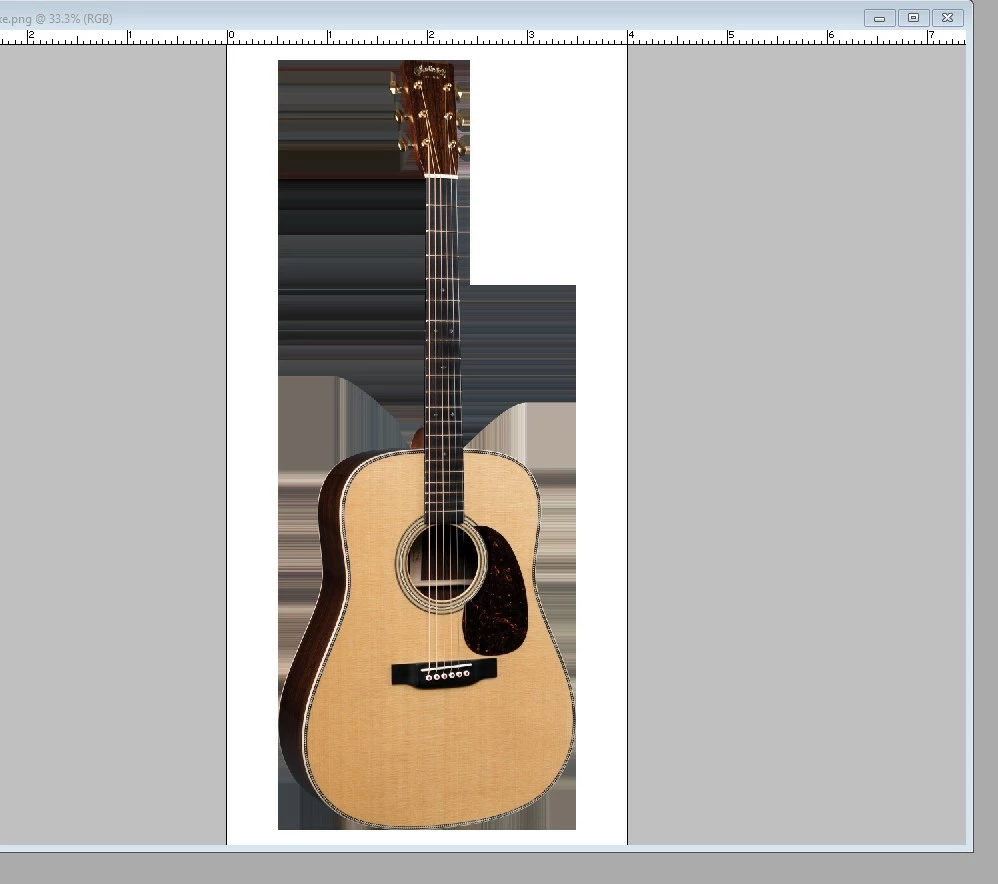
Also, although it looks white in other photo viewers, the background is bands of various hues, mainly grays, with odd 3D shapes, but only in a portion of the background, other parts are white. (see image below.)
Also, I can do NOTHING to it. I can select but cannot copy, or edit. I am told I must convert to 8 bit from 16 bit.
ALL of the pngs I was sent do this.
Never seen anything like it before.
BUT - My computer crashed and I reinstalled PS 7 just a week before I received the press pack. I am under the impression that the re-install of PS 7 was working as it always had before.
Any thoughts on how I can access this png without the weird background, and better yet if I can get it with a transparent background?
I can get 72 dpi jpgs from the web but I really need this 300.dpi so I can copy and paste sections of this larger images.
Thanks
 AdChoices