

Answered
PS CC 2019 No Longer Anti Aliasing
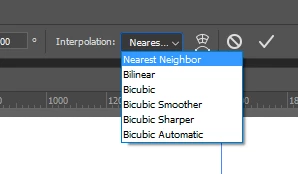
I have just recently updated my Photoshop CC to 2019 (20.0.0) and my objects no longer smooth out when I rescale. I used to grab the sizing square to reduce the size and then get a dialog box asking me to "Apply". I click OK and the object would smooth out but it doesn't do that any more. Now I scale down the object and it looks like a jagged pixel mess. Any help is appreciated.
 AdChoices