Shan-Dysigns
Inspiring
March 14, 2012
Answered

PS CS4 Actions - Inserting A Pop Up Dialog Window

  • March 14, 2012
  • 1 reply
  • 2785 views

I think I've seen this before in a Photoshop action. During the action (maybe it was at the end), a dialog window appears with copyright information (or something along those lines) of the creator of that action. What I would like is to be able to create an action and have a little pop up window appear (before the actions begins) which would contain some notes (custom notes from me) concerning how this action works. There are many actions in which I make, but only use every other month. These actions usually have several stops in them where I have to adjust dimensions. I would like to be able to create a pop up dialog window (at the beginning of an action) which would contain those types of notes. Otherwise, I have to revert back to hand-written notes in which I've made (that's if I can find those notes).

Is this even possible?
This topic has been closed for replies.
Correct answer Jeff Arola

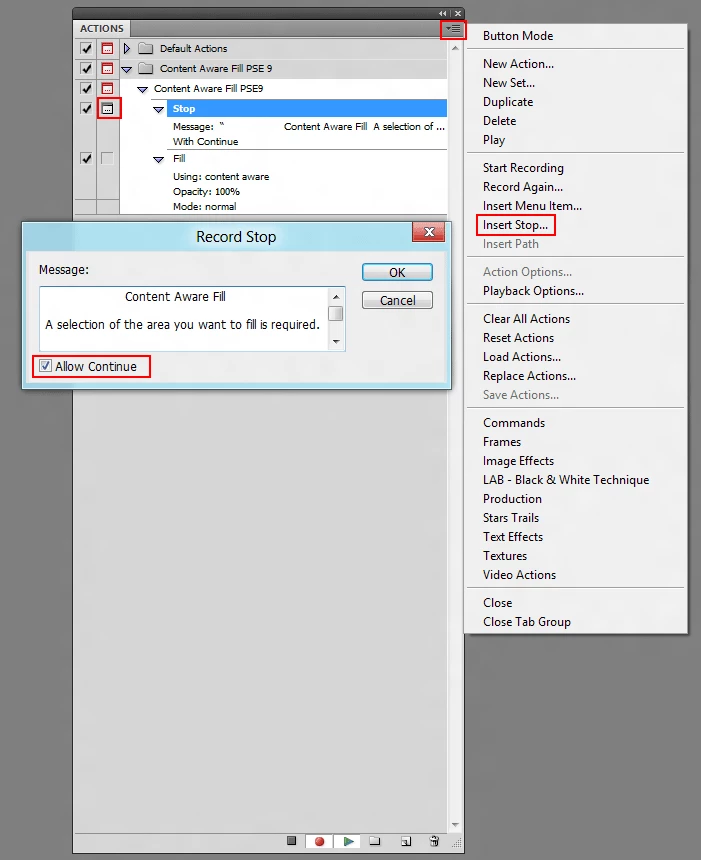
You can use the Insert Stop from the actions panel flyout menu, type your message (anything you care to type), and check Allow Continue.

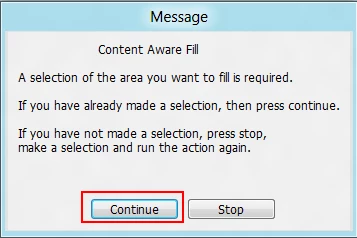
Dialog when running the action, before the action does anything:

1 reply

Jeff Arola
Community Expert
Jeff ArolaCommunity ExpertCorrect answer
Community Expert
March 14, 2012

You can use the Insert Stop from the actions panel flyout menu, type your message (anything you care to type), and check Allow Continue.

Dialog when running the action, before the action does anything:

Shan-Dysigns
Inspiring
March 14, 2012

Thanks R_Kelly.

When I previously noticed that option on that fly out menu, I just thought it was the same as clicking that little box just to the right of the arrows (see image below). It was just something I overlooked.I guess I confused pausing the action to inserting a stop.

Thanks again...