
TEF_DAVMO
Participant
June 28, 2018
Answered

PS - refus de démarrage - sur PC Win 10

  • June 28, 2018
  • 1 reply
  • 718 views

PS refuse de démarrer et affiche le message d'erreur suivant :
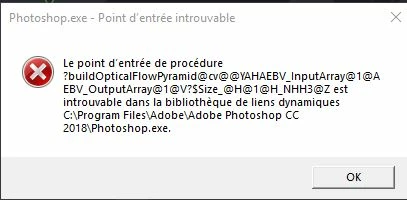
J'ai re-télécharger le programme d'installation, je l'ai lancé (en mode administrateur) mais rien ne se passe.

J'ai redémarrer l'ordinateur en mode sans échec, anti-virus désactivé, réinstallation, même résultat.

J'ai voulu essayer de relancer une installation via Créative cloud, malheureusement créative cloud ne s'ouvre pas, mais il n'y a pas de message d'erreur, il n'apparait juste pas à l'écran.

J'ai fait la procédure de désinstallation/réinstallation de creative cloud telle que décrite sur le site, l'installation se passe sans problème, après l'installation un message apparait disant que créative cloud va se lancer mais rien ne se passe.

J'ai fait des recherches sur le site Adobe sur base du message d'erreur de PS, mais là encore je n'ai rien trouvé.

Seul Lr accepte encore de démarrer.

Merci pour toute aide.

This topic has been closed for replies.
Correct answer Sahil.Chawla

Hi there,

We're sorry to hear about the entry point not found error, could you please try the steps mentioned on this forum thread and let us know if it helps? Photoshop CC (64 bit): Entry Point not found

Regards,

Sahil

1 reply

Sahil.Chawla
Adobe Employee
Sahil.ChawlaCorrect answer
Adobe Employee
June 28, 2018

Hi there,

We're sorry to hear about the entry point not found error, could you please try the steps mentioned on this forum thread and let us know if it helps? Photoshop CC (64 bit): Entry Point not found

Regards,

Sahil

TEF_DAVMO
TEF_DAVMOAuthor
Participant
June 28, 2018

Dear Sahil,

It's ok, problem is solved with below procedure.

Many thanks.

--

Envoi sécurisé avec Tutanota. Obtenez votre adresse email chiffrée aujourd'hui!

https://tutanota.com <https://tutanota.com>

28. Juin 2018 19:34 de forums_noreply@adobe.com <mailto:forums_noreply@adobe.com>:

> PS - refus de démarrage  - sur PC Win 10> created by > Sahil.Chawla <https://forums.adobe.com/people/Sahil.Chawla>> in > Photoshop> - > View the full discussion <https://forums.adobe.com/message/10472483#10472483>

Hi there,


We're sorry to hear about the entry point not found error, could you please try the steps mentioned on this forum thread and let us know if it helps? > Photoshop CC (64 bit): Entry Point not found <https://forums.adobe.com/thread/1299794>>


Regards,

Sahil

If the reply above answers your question, please take a moment to mark this answer as correct by visiting: > https://forums.adobe.com/message/10472483#10472483 <https://forums.adobe.com/message/10472483#10472483>> and clicking ‘> Correct> ’ below the answer

Replies to this message go to everyone subscribed to this thread, not directly to the person who posted the message. To post a reply, either reply to this email or visit the message page: <https://forums.adobe.com/message/10472483#10472483]>

Please note that the Adobe Forums do not accept email attachments. If you want to embed an image in your message please visit the thread in the forum and click the camera icon: > https://forums.adobe.com/message/10472483#10472483 <https://forums.adobe.com/message/10472483#10472483>

To unsubscribe from this thread, please visit the message page at <https://forums.adobe.com/message/10472483#10472483]>> , click "Following" at the top right, & "Stop Following"

Start a new discussion in Photoshop by > email <mailto:discussions-community-photoshop@adobe-v8.hosted.jivesoftware.com>> or at > Adobe Community <https://forums.adobe.com/choose-container.jspa?contentType=1&containerType=14&container=4694>

For more information about maintaining your forum email notifications please go to > https://forums.adobe.com/thread/1516624 <https://forums.adobe.com/thread/1516624>> .

This email was sent by Adobe Community because you are a registered user.

You may > unsubscribe <https://forums.adobe.com/unsubscribe.jspa?email=dmouffet%40tutanota.com&token=11457a585d845be50934fd9a4c0171a437701537556da6dcaae080859cd7d822>> instantly from Adobe Community, or adjust email frequency in your > email preferences <https://forums.adobe.com/user-preferences!input.jspa>>

>

Sahil.Chawla
Adobe Employee
Adobe Employee
June 28, 2018

Glad we got it working, please feel free to reach out to us for any future queries.