
ToffeeCoo
Inspiring
November 24, 2019
Answered

Question about Saving Files (PDF to PSD)

  • November 24, 2019
  • 1 reply
  • 1168 views

I lost a work file because of some silly error- I don't know if it was on my end or if it was a bug. I was working on some label designs and saved a few different PDF files. I then went back and resaved the PSD file so I could keep saving my progress. Throughout the process though, when I would save again it would refer back to the PDF file instead of the more recent PSD. I thought this was odd but didn't want to waste time figuring it out. So I spent my time saving my progress navigating back to the folder and psd file for every save. I went to open it this morning and theres only 1 layer everything is compressed into. I opened an earlier save (I only had 2 ) and it's the same way- only 1 layer. What did I do wrong in my initial saving of the PDF that is wasn't properly saving into a PSD?
This topic has been closed for replies.
Correct answer davescm

You have fallen into a trap set by poor interface design.

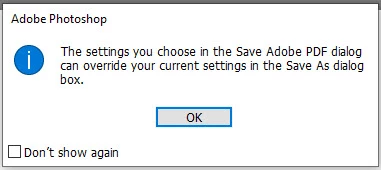
When you save as a PDF you get a warning :

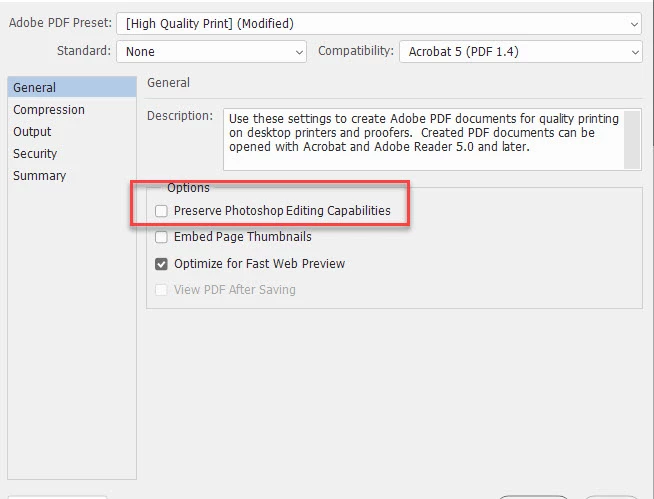
If you then choose to uncheck "Preserve Photoshop Editing Capabilities" the saved PDF is flattened


That is all well and good BUT...

When you go back to your document and use Save As and select PSD you will find the Layers checkbox has been unchecked. There is a warning , but it is easy to miss:

It is a very poor design, in my view, and it catches many people out once !

If you know about it , you just check that layers checkbox when saving the PSD


Dave

1 reply

davescm
Community Expert
davescmCommunity ExpertCorrect answer
Community Expert
November 24, 2019

You have fallen into a trap set by poor interface design.

When you save as a PDF you get a warning :

If you then choose to uncheck "Preserve Photoshop Editing Capabilities" the saved PDF is flattened


That is all well and good BUT...

When you go back to your document and use Save As and select PSD you will find the Layers checkbox has been unchecked. There is a warning , but it is easy to miss:

It is a very poor design, in my view, and it catches many people out once !

If you know about it , you just check that layers checkbox when saving the PSD


Dave

ToffeeCoo
ToffeeCooAuthor
Inspiring
November 25, 2019

ahh, it didn't used to do that! Thank you ;___;

davescm
Community Expert
Community Expert
November 25, 2019

It's been like that as far back as I remember. Like I said, many people get caught out once with it.

Dave
