
Inspiring
June 17, 2021
Answered

Question about setting the black point

  • June 17, 2021
  • 3 replies
  • 3298 views

My document has a Gray Gamma 2.2 profile. The image consists of 53 cells arranged left-to-right and top-to-bottom (like English text). The first cell (at the upper left) has an RGB value of 255 and the last cell (at the lower right) has an RGB value of 151. Each cell is 2 RGB units darker than the previous cell : 255, 253, 251, ..., 153, 151.
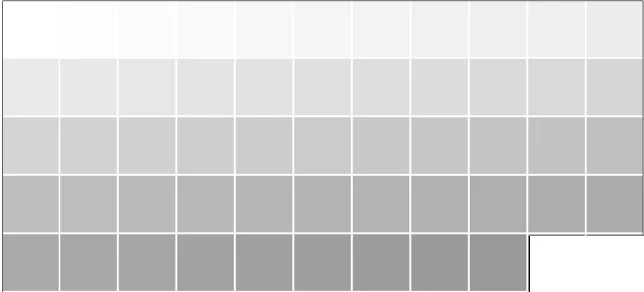
 

I want to normlize this image to have a full tonal range from white to black. In other words, I want the first cell to remain white, the last cell to become black, and the intermediate tones to be evenly distributed over the range 0 to 255.


Using a Curves adjustment layer, I set the black point on the last cell. But instead of setting its RGB value to 0, it sets the value to 1: 
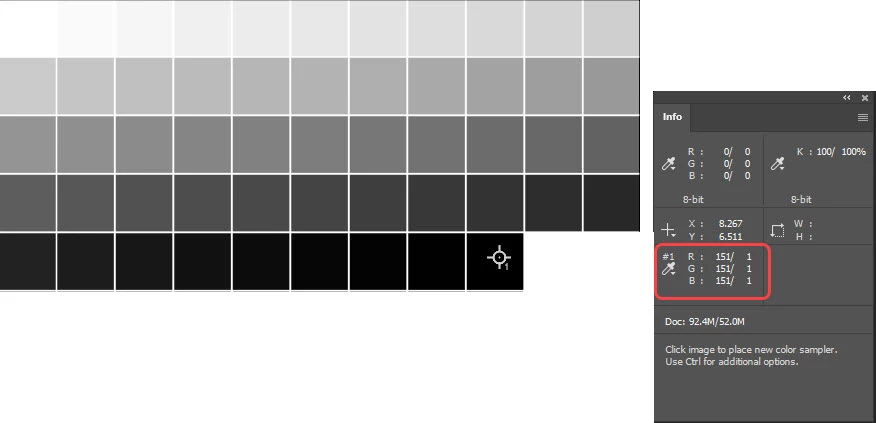
Clearly there's something I don't understand about black point. I always thought black was 0.


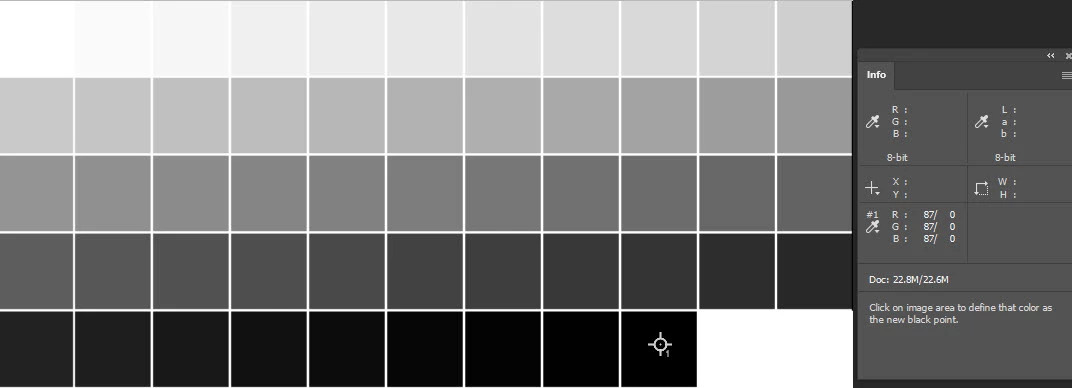
Why does this happen, and what should I be doing? It is essential for my application that the last cell have an RGB value of 0.
This topic has been closed for replies.
Correct answer J Isner

You're missing the point. If the image has a grayscale profile, all RGB numbers will be recalculated based on working spaces. You're not inputting or reading the numbers directly.


If the file has an RGB profile, then the RGB numbers you set are direct input. If you set 0-0-0, it is 0-0-0.


I'm convinced it's a numerical problem that has nothing to do with the document profile. In the grid I attached, each cell is 5 RGB units darker than the previous cell. If I use a grid with the same number of steps, but where each cell is 3 units darker than the previous cell, setting the black point on the last cell makes that cell (0,0,0). The result is the same regardless of the document profile.


3 replies

Norman Sanders
Legend
June 17, 2021

Consider creating the grid in device-independent Lab Color where the Lightness (L) values run from 0 to 100 and may be set in the increment that serves your purpose. In addition you are not limited by a choice of a specific profile. That  would increase the file's utility. The  a  and  b  values should be set to zero assuring you of a neutral black. 

Stephen Marsh
Community Expert
Community Expert
June 17, 2021

For photographic editing, setting the endpoint is usually done at a less than full black value and the tonal range is set in the relative darkest part of the photo with detail, as opposed to the absolute darkest part. So perhaps your values are not set to 0r0g0b? Although this screenshot uses curves, it is also available using levels, double-click the eyedropper.


J IsnerAuthor
Inspiring
June 17, 2021

The inverted image is printed on film using a RIP to control ink density (I mean actual transmission density, a logarithmic value). I need black (which, after inversion becomes white) not to lay down any ink on the film. I prepare the file in Photoshop (which is what you see here), then export a tif which I print with the RIP from another application.


I tried several ways of doing it, all with the same result. In fact, the first way I tried was using a curve adjustment and sliding the Black Input over to 151, just as you did in your screenshot.  But wait, I see you used 152.  Sure, that will give you black in the last step, but the tone won't be evenly distributed. 0, 3, 8, 13, 18, ...


By masking black over the last cell, I localized the non-linearity: 0, 6,11,16,21.


Even if there's no clean way to fix it, I would like to understand why Photoshop does this.

J IsnerAuthor
Inspiring
June 17, 2021

You're missing the point. If the image has a grayscale profile, all RGB numbers will be recalculated based on working spaces. You're not inputting or reading the numbers directly.


If the file has an RGB profile, then the RGB numbers you set are direct input. If you set 0-0-0, it is 0-0-0.


Maybe you missed what I said in the preceding post:


"If I convert to profile Adobe RGB, I get the same numerical problem:  setting the black point on any cell gives that cell an RGB value of (1,1,1)."

Inspiring
June 17, 2021

In your Color Settings you will find "se Black Point Compensation".  Is that selected?  Try applying a Gamma of 1.4 instead of 2.2, just to see if there is a change.  Gray Gamma may not be the same as Gamma.  In your first chart, obviously you have Grays, but I am not sure why you would be interested in Blacks at all?  What do you mean by "it is essential for my application"?

J IsnerAuthor
Inspiring
June 17, 2021

In Color Settings I have Relative Colorimetric and black point compensation set. I converted to RGB profile and the same thing happens. I think it's a numerical problem.


I'm printing on clear film to make digital negatives for darkroom printing. Black is needed to fully block light during exposure. If it's not pure black, some light will get through and the print will not achieve paper white.


I solved the problem temporarily by masking pure black over cell 53. But I'd still very much like to understand why this happens.