
Participant
February 8, 2020
Answered

Quick Select Tool Reversed

  • February 8, 2020
  • 1 reply
  • 1793 views

While I was editing and using the quick select tool it began working as though I was holding down the alt button, and no longer selecting anything. It has the - in it as well. I've tried holding down alt to see if that makes it go back to selecting but it still isn't working. I've looked it up and nothing online has helped. I can't provide a screenshot because my computer makes the mouse disappear when I take screenshots. If somebody has a solution please let me know.
This topic has been closed for replies.
Correct answer Just Shoot Me

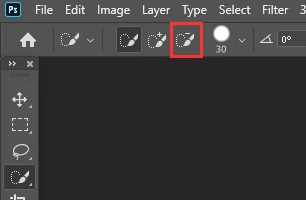
Icon in the tool bar at the top of the screen. Somehow it got changed to Remove, Deselect, objects.


There is the Select, Add to the selection ( + ) and Remove ( - ) from the selection.


1 reply

Just Shoot Me
Just Shoot MeCorrect answer
Legend
February 8, 2020

Icon in the tool bar at the top of the screen. Somehow it got changed to Remove, Deselect, objects.


There is the Select, Add to the selection ( + ) and Remove ( - ) from the selection.


Participant
February 9, 2020

Thank you so much!