
Raw vs Jpeg Mystery
When I work with beginning digital photography students, I attempt to get them familiar with the adjustments available in Adobe Camera Raw so that they will be willing to save their image capture in a Raw format. Typically, these beginning students are saving their captures in jpeg format because they consider Raw to be an advanced technique. I have found that when I show them how to open their jpeg files in Adobe Camera Raw and apply basic exposure adjustments there, they are more likely to switch over to saving their captures in a Raw format.
Well, here is my mystery. If I have both a jpeg and a Raw version of the same capture and I open each in Adobe Camera Raw and apply exactly the same adjustments to them, I expect that the jpeg version will have a "damaged" histogram when viewed in the Editor. It seems to make sense that when the Raw adjustments are applied directly to the pixels of a jpeg image, one would see a similar effect as if those adjustments were applied in the Editor via a Levels Adjustment Layer.
Much to my surprise, the jpeg adjusted via Adobe Camera Raw shows a histogram in the Editor which is almost as fine in quality as the Raw file. If I take the same jpeg image directly into the Editor and make the exposure adjustments via a Levels Adjustment Layer the resulting histogram has been severely damaged.
The Mystery: Why would the controls in Adobe Camera Raw protect the pixels of a jpeg image?
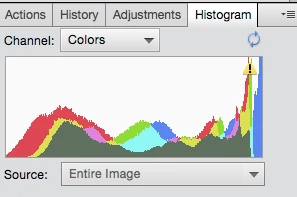
Raw file, adjusted & opened in Editor
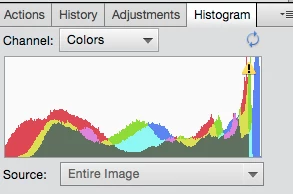
Jpeg file, adjusted in Camera Raw & opened in Editor
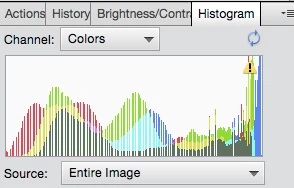
Jpeg file, adjusted with Levels Adjustment Layer
It looks like Adobe Camera Raw protects the jpeg image's pixels. Is this correct? If so, all people saving image captures in jpeg format should be doing their adjustments via Adobe Camera Raw.
Mary Lou
 AdChoices