


RegExp problem

Copy link to clipboard
Copied
Hey.
If here is a RegExp guru?
I rarely use RegExp myself.
Who knows why in photoshop does not work Negative Lookbehind (?<!...)
And how to make an analog?
var s = "123abc123aac"
alert( s.search(/(?<!ab)c/) )
I want this alert to say 11.



Explore related tutorials & articles
 15
Replies
15
15
Replies
15




Copy link to clipboard
Copied
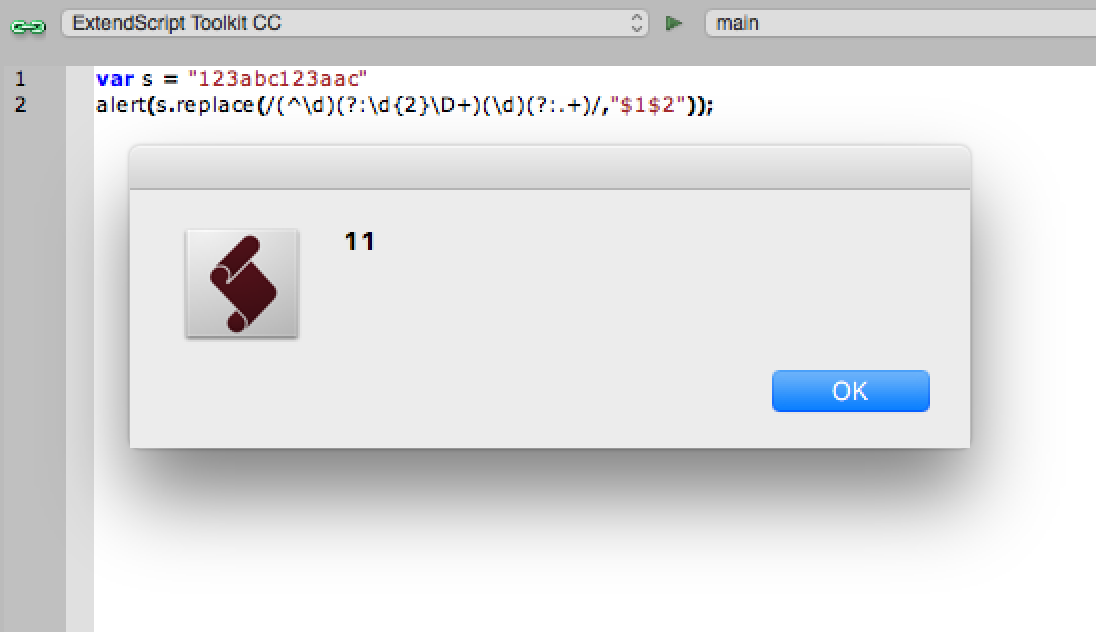
The great thing about regex is that there are many valid answers to the same problem. This is just what I came up with first. I like capture groups and back references, there will of course be other ways to the same answer.
So if the pattern is to return the first digit at the beginning of the string, then skip 2 digits, skip 3 alphas, return the next digit, then skip everything else thereafter...
var s = "123abc123aac"
alert(s.replace(/(^\d)(?:\d{2}\D+)(\d)(?:.+)/,"$1$2"));
Copy link to clipboard
Copied
No, I need exactly this
(?<!foo)bar finds the 2nd bar ("bar" which does not have "foo" before it)

Copy link to clipboard
Copied
So you need the position of the "c" which does not have "ab" before?
Please give some more examples. And what is if there more "c"s exists in one string?
Copy link to clipboard
Copied
Yes.Yes.Yes.
I, specifically, want to find everything with "_relight" but without the "GI" in front of him
GI_relight - skip.
G_relight - valid.
I_relight - valid.
Someting_relight - valid.
Copy link to clipboard
Copied
I, specifically, want to find everything with "_relight" but without the "GI" in front of him
GI_relight - skip.
G_relight - valid.
I_relight - valid.
Someting_relight - valid.
I am not a regex expert, however I have tried so many patterns and I keep coming back to capture groups… So if your criteria is that specific, why not just delete GI_relight and leave everything else?
var s = "GI_relight\nG_relight\nI_relight\nSometing_relight"
alert(s.replace(/(GI_relight)/gm,""));
Anyway it’s late and I’m off to bed, I hope you get the answer you need.
Copy link to clipboard
Copied
r-bin schrieb
Yes.Yes.Yes.
I, specifically, want to find everything with "_relight" but without the "GI" in front of him
GI_relight - skip.
G_relight - valid.
I_relight - valid.
Someting_relight - valid.
Hi r-bin,
your examples are not really clear for me.
Do you mean something like this?
var arr = ["GI_relight", "G_relight", "bla bla G_relight", "I_relight", "Something_relight"];
var reg1 = /^GI_/;
var reg2 = /\b\w+_relight/;
for (i=0; i<arr.length; i++) {
find (arr, i);
};
function find (str, cnt) {
if (!reg1.test (str) ) {
var found = str.match (reg2);
if ( found != -1) {
alert ( found + " found in arr[" + cnt + "]" );
};
};
};
… or more something like that?
var arr = ["GI_relight", "G_relight", "bla bla G_relight", "I_relight", "Something_relight"];
var reg1 = /^GI_/;
var reg2 = /_relight/;
for (i=0; i<arr.length; i++) {
find (arr, i);
};
function find (str, cnt) {
if (!reg1.test (str) ) {
if ( str.match (reg2) != -1) {
var result = reg2.exec(str);
alert ( result[0] + " found in arr[" + cnt + "] at position " + eval(result.index+1));
};
};
};
Try these workarounds and
have fun

Copy link to clipboard
Copied
It would take a long time to explain this.
I only needed one search and only with one RegExp specific.
Now it is not necessary. 🙂
Copy link to clipboard
Copied
?
Copy link to clipboard
Copied
Like that.
Suppose there is an array where the group name and a variable number of expressions for RegExp are specified.
It was necessary to cycle through all the layers. And if the layer name is match with one of the RegExps for this group, then place the layer in the group with that name.
Everything worked until such a condition appeared for the layer name. I couldn’t think of a single RegExp for it, or rather it didn’t work.
I had to redo all the code.
Clear? 🙂
Copy link to clipboard
Copied
Ok …
… and post #10 does not help you out? Did you tried both codes?

Copy link to clipboard
Copied
Thank.
I have not tried.
This also works, but I no longer need it.
var s1 = "thgiler_IG" // reverse string
alert(s1.match(/thgiler_(?!IG)/i))
var s1 = "thgiler_IG0"
alert(s1.match(/thgiler_(?!IG)/i))
var s1 = "thgiler_I"
alert(s1.match(/thgiler_(?!IG)/i))
var s1 = "thgiler_G"
alert(s1.match(/thgiler_(?!IG)/i))
var s1 = "thgiler_SomeThibg"
alert(s1.match(/thgiler_(?!IG)/i))
var s1 = "thgiler_"
alert(s1.match(/thgiler_(?!IG)/i))
It's a pity that adobe did such an unfinished RegExp
Copy link to clipboard
Copied
Then I believe that you are out of luck r-bin, as the flavour of ECMA/JavaScript/ExtendScript used in Adobe apps is rather old and does not support negative or positive lookbehinds (only lookaheads are supported).
Copy link to clipboard
Copied
Then I believe that you are out of luck r-bin, as the flavour of ECMA/JavaScript/ExtendScript used in Adobe apps is rather old and does not support negative or positive lookbehinds (only lookaheads are supported).
Where about it can be read?
Copy link to clipboard
Copied
Regex Tutorial - Lookahead and Lookbehind Zero-Length Assertions
regex - Javascript: negative lookbehind equivalent? - Stack Overflow
You can just Google “is negative lookbehind supported in JavaScript” or similar terms.

Copy link to clipboard
Copied
I am just a little guru and found Photoshop RegEx implementation is very lame. It was sometimes corrected with another releases, but generally it has own broken rules. I also had some problem with 'search', maybe it's related to your problem:


Get ready! An upgraded Adobe Community experience is coming in January.
Learn more
 AdChoices