

Question
Remembering Export Settings
In Photoshop CS6, when I exported a file and changed any of the settings in the export window, the next time I exported a file those settings were remembered and I didn't have to reset them all for each export.
In Photoshop CC 2019, the Export settings are reset each time I do an export to these settings:
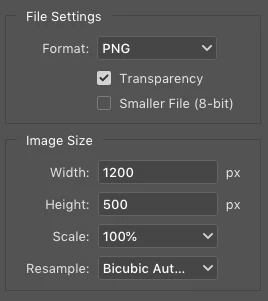
I want to export a JPEG at 70% quality most of the time, which means I have to change a few settings every time I do an export. Is there no way to make these settings stick as it worked in PS CS6? I don't like the Quick Export option because it doesn't allow me to alter any of the settings before saving the export, and sometimes I like to tweak the quality setting for a JPEG to get a good file size, which I can't do with Quick Export.
 AdChoices