
bradsh44
Participant
March 10, 2018
Answered

removing a line over text

  • March 10, 2018
  • 1 reply
  • 2958 views

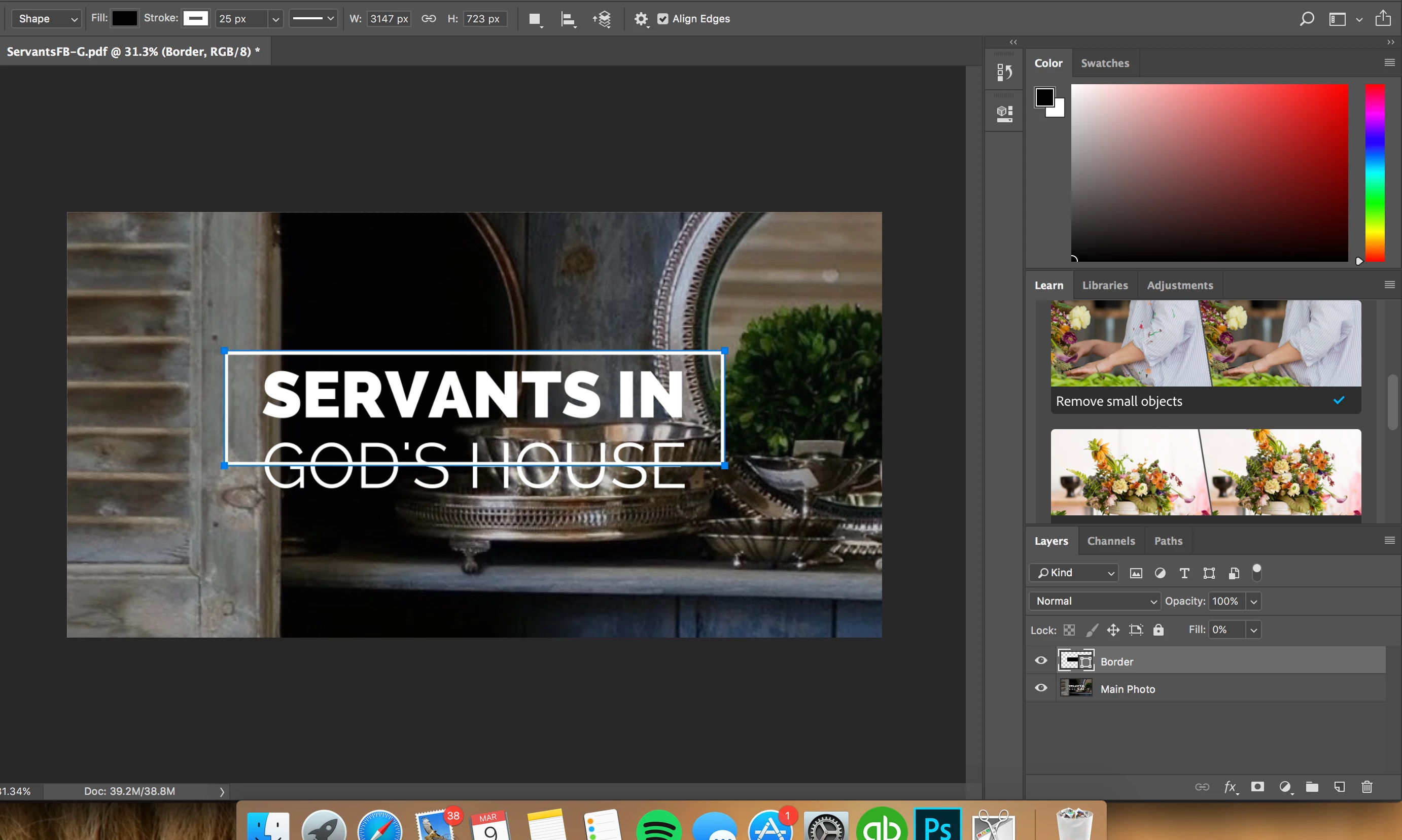
I'm trying to figure out how to remove the line that is behind the text. The photo already has the text saved to it and I added the border through PS. To be more clear, I'm trying to leave a portion of the bottom line but only about a .25" to the left of the G and .25" to the right of the E.

Any and all help would be appreciated!
This topic has been closed for replies.
Correct answer Abambo

Create a layer mask (button right to the fx at the bottom of the layer’s panel). The mask is a greyscale image, white is fully visible, black is masked out and any scale of grey makes the picture left to the mask more or less transparent. As the mask is a greyscal image, you can paint on it with most of the Ps paint tools.

1 reply

Abambo
Community Expert
AbamboCommunity ExpertCorrect answer
Community Expert
March 10, 2018

Create a layer mask (button right to the fx at the bottom of the layer’s panel). The mask is a greyscale image, white is fully visible, black is masked out and any scale of grey makes the picture left to the mask more or less transparent. As the mask is a greyscal image, you can paint on it with most of the Ps paint tools.

ABAMBO | Hard- and Software Engineer | Photographer