
Doc_Pit
Inspiring
June 23, 2019
Answered

RGB values in Info Panel

  • June 23, 2019
  • 4 replies
  • 6540 views

When working with the Info panel, I get 5-digit values for RGB colors.  For example, if I create a square, fill it with R=255, G=0, B=0, and pass my cursor over it, the color appears in the Info panel as 32768, 0, 0.  I have no idea how to interpret that.

Also, I notice that in some files, my corresponding CMYK colors are represented as percentages; however, in some files, CMYK values are followed by an exclamation point.  Again, I have no idea what that means.

Anyone?
    This topic has been closed for replies.
    Correct answer Semaphoric

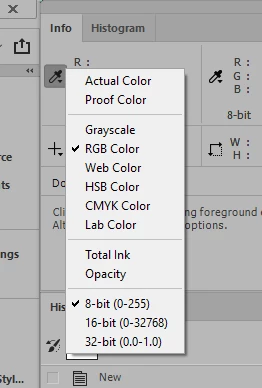
    If you right-click on the eyedropper icon, y9ou will see a menu of what the readout will display:


    Looks like you have 16-bit selected..

    4 replies

    rob day
    Community Expert
    Community Expert
    June 23, 2019

    in some files, CMYK values are followed by an exclamation point.  Again, I have no idea what that means.

    The exclamation point means the color you are sampling is outside of the current Color Settings’ Working CMYK Space.

    So this sampled RGB color is out-of -gamut to US Sheetfed Uncoated, but is in gamut (printable) to US Sheetfed Coated

    Doc_Pit
    Doc_PitAuthor
    Inspiring
    June 23, 2019

    The information is much appreciated.  Thank you.

    Doc_Pit
    Doc_PitAuthor
    Inspiring
    June 23, 2019

    I thought 16-bit color information was always categorized down to 8-bit just because 16-bit values are difficult to interpret.  We live and learn.  I guess that's the purpose of this forum.  Many thanks.

    D Fosse
    Community Expert
    Community Expert
    June 23, 2019

    It is in the color picker and curves/levels etc, because it's used for input. Inputting 17346 instead of 17350 makes no sense, you can't tell them apart anyway even under the best of circumstances. But you might just be able to tell the difference between 135 and 136.

    The info panel reads output, so here you might actually have use for 16 bit values - for instance forensic or diagnostic use.

    Stephen Marsh
    Community Expert
    Community Expert
    June 23, 2019
    Semaphoric
    Community Expert
    SemaphoricCommunity ExpertCorrect answer
    Community Expert
    June 23, 2019

    If you right-click on the eyedropper icon, y9ou will see a menu of what the readout will display:


    Looks like you have 16-bit selected..