
Known Participant
December 26, 2017
Answered

Rotate a layer through a script?

  • December 26, 2017
  • 5 replies
  • 5253 views

Hello friends good afternoon everyone!

How to rotate in (+ 90 degrees) whenever the active layer has the width size smaller than the height? Unfortunately I did not succeed in my searches here in this community.

Thank you!
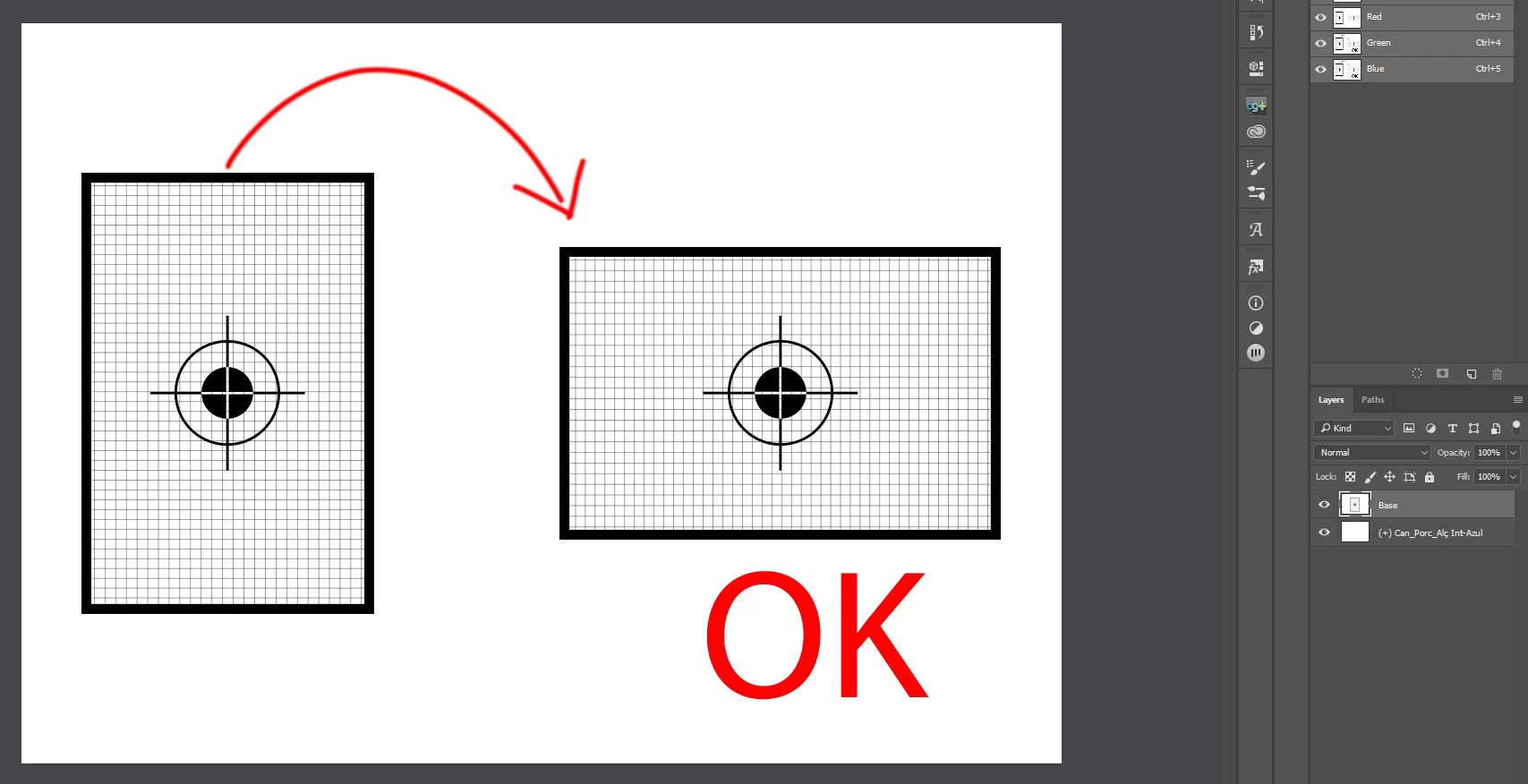
This topic has been closed for replies.
Correct answer r-bin

Probably this.)

with (activeDocument.activeLayer) { bounds[3]-bounds[1] > bounds[2]-bounds[0] ? rotate(90):{} }


REM: does not work if the rulerUnits is set to percentages

5 replies

JJMack
Community Expert
Community Expert
December 28, 2017

You can rotate a layer about any point and any angle. Duplicating a layer and rotating can create many interisting objects.

RotateLayerAbout.jsx

// 2015  John J. McAssey (JJMack)

// ======================================================= */

// This script is supplied as is. It is provided as freeware.

// The author accepts no liability for any problems arising from its use.

// enable double-clicking from Mac Finder or Windows Explorer

#target photoshop // this command only works in Photoshop CS2 and higher

// bring application forward for double-click events

app.bringToFront();

// ensure at least one document open

if (!documents.length) alert('There are no documents open.', 'No Document');

else {

//Set First Time Defaults here

var dfltCpys = 12; // default number of copies including the original

var dfltPos = 4; // default Middle Center

//End Defaults

var Prefs ={}; //Object to hold preferences.

var prefsFile = File(Folder.temp + "/RotateLayerAboutPreferences.dat");

//If preferences do not exit use Defaults from above

if(!prefsFile.exists){

Prefs.Cpys  = dfltCpys;

Prefs.Pos  = dfltPos;

prefsFile.open('w');

prefsFile.write(Prefs.toSource());

prefsFile.close();

}

else{//Preferences exist so open them

prefsFile.open('r');

Prefs = eval(prefsFile.read());

prefsFile.close();

}

try {

function createDialog(){

// begin dialog layout

var DupRotateDialog = new Window('dialog');

DupRotateDialog.text = 'Duplicate and Rotate Layer';

DupRotateDialog.frameLocation = [78, 100];

DupRotateDialog.alignChildren = 'center';

DupRotateDialog.NumLayerPnl = DupRotateDialog.add('panel', [2, 2, 300, 56], 'Number of Layers and Rotation Anchor Point');

DupRotateDialog.NumLayerPnl.add('statictext', [10, 16, 50, 48], 'Copies ');

DupRotateDialog.NumLayerPnl.imgCpysEdt = DupRotateDialog.NumLayerPnl.add('edittext', [50, 13, 90, 34], Prefs.Cpys, {name:'imgCpys'});

DupRotateDialog.NumLayerPnl.imgCpysEdt.helpTip = 'Number of copies of selected Layer';

DupRotateDialog.NumLayerPnl.add('statictext',[96, 16, 240, 48],'Location');

var position =['Top Left','Top Center','Top Right','Center Left','Center','Center Right','Bottom Left','Bottom Center','Bottom Right','Doc Center','Samples','Path Points'];

DupRotateDialog.NumLayerPnl.dd1 = DupRotateDialog.NumLayerPnl.add('dropdownlist',[150, 13, 260, 34],position);

DupRotateDialog.NumLayerPnl.dd1.selection=Prefs.Pos;

var buttons = DupRotateDialog.add('group');

buttons.orientation = 'row';

var okBtn = buttons.add('button');

okBtn.text = 'OK';

okBtn.properties = {name: 'ok'};

var cancelBtn = buttons.add('button');

cancelBtn.text = 'Cancel';

cancelBtn.properties = {name: 'cancel'};

return DupRotateDialog;

}

dispdlg(createDialog());

function dispdlg(DupRotateDialog){

// display dialog and only continues on OK button press (OK = 1, Cancel = 2)

DupRotateDialog.onShow = function() {

var ww = DupRotateDialog.bounds.width; 

var hh = DupRotateDialog.bounds.height; 

DupRotateDialog.bounds.x  = 78; 

DupRotateDialog.bounds.y  = 100; 

DupRotateDialog.bounds.width  = ww; 

DupRotateDialog.bounds.height  = hh; 

}

if (DupRotateDialog.show() == 1) {

//variables passed from user interface

var copies = String(DupRotateDialog.NumLayerPnl.imgCpys.text); if (copies=="") { copies = Prefs.Cpys;}

if (isNaN(copies)) { alert("Non numeric value entered"); dispdlg(createDialog());}

else {

if (copies<2 || copies>360) { alert("Number of layer allow is 2 to 360"); dispdlg(createDialog());}  // Not in range

else {

var AnchorPoint = Number(DupRotateDialog.NumLayerPnl.dd1.selection.index) + 1;

cTID = function(s) { return app.charIDToTypeID(s); };

sTID = function(s) { return app.stringIDToTypeID(s); };

// Save the current preferences

Prefs.Cpys  = copies;

Prefs.Pos  = Number(DupRotateDialog.NumLayerPnl.dd1.selection.index);

prefsFile.open('w');

prefsFile.write(Prefs.toSource());

prefsFile.close();

var startRulerUnits = app.preferences.rulerUnits;

var startTypeUnits = app.preferences.typeUnits;

var startDisplayDialogs = app.displayDialogs;

// Set Photoshop to use pixels and display no dialogs

app.preferences.rulerUnits = Units.PIXELS;

app.preferences.typeUnits = TypeUnits.PIXELS;

app.displayDialogs = DialogModes.NO;

app.togglePalettes();

try { app.activeDocument.suspendHistory('RotateLayerAbout','main(copies, AnchorPoint)' );}

catch(e) {alert(e + ': on line ' + e.line);}

// Return the app preferences

app.togglePalettes();

app.preferences.rulerUnits = startRulerUnits;

app.preferences.typeUnits = startTypeUnits;

app.displayDialogs = startDisplayDialogs;

}

}

}

else {

//alert('Operation Canceled.');

}

}

}

catch(err){

// Lot's of things can go wrong, Give a generic alert and see if they want the details

if ( confirm("Sorry, something major happened and I can't continue! Would you like to see more info?" ) ) { alert(err + ': on line ' + err.line ); }

}

}

function main(stemsAmount, Position) {

if  (  Position == 11 && app.activeDocument.colorSamplers.length==0 ) {

alert("No Color Sampler set");

return;

}

if  (  Position == 12 ) {

var thePath = selectedPath();

if (thePath == undefined) {

alert("No Path Selected");

return;

}

var myPathInfo = extractSubPathInfo(thePath); 

}

// Save selected layer to variable:

var originalStem = app.activeDocument.activeLayer;

// Run the copying process

if(stemsAmount != null){

// Calculate the rotation angle

var angle = 360 / parseInt(stemsAmount);

// Create a group for stems

var stemsGroup = app.activeDocument.layerSets.add();

stemsGroup.name = originalStem.name + " ("+stemsAmount+" stems)";

// Place original layer in group

originalStem.move(stemsGroup, ElementPlacement.INSIDE);

// Duplicate and rotate layers:

for(var i = 1; i < stemsAmount; i++){

// Duplicate original layer and save it to the variable

var newStem = originalStem.duplicate();

// Rotate new layer

switch (Position){

case 1 : newStem.rotate(angle * i, AnchorPosition.TOPLEFT); break;

case 2 : newStem.rotate(angle * i, AnchorPosition.TOPCENTER); break;

case 3 : newStem.rotate(angle * i, AnchorPosition.TOPRIGHT); break;

case 4 : newStem.rotate(angle * i, AnchorPosition.MIDDLELEFT); break;

case 5 : newStem.rotate(angle * i, AnchorPosition.MIDDLECENTER); break;

case 6 : newStem.rotate(angle * i, AnchorPosition.MIDDLERIGHT); break;

case 7 : newStem.rotate(angle * i, AnchorPosition.BOTTOMLEFT); break;

case 8 : newStem.rotate(angle * i, AnchorPosition.BOTTOMCENTER); break;

case 9 : newStem.rotate(angle * i, AnchorPosition.BOTTOMRIGHT); break;

case 10 : app.activeDocument.activeLayer = newStem; rotateAroundPosition(angle * i,activeDocument.width/2,activeDocument.height/2); break;

case 11 : for (var s=0,len=app.activeDocument.colorSamplers.length;s<len;s++) {

if (s!=0) {

// Duplicate original layer and save it to the variable

var newStem = originalStem.duplicate();

}

newStem.name = originalStem.name + " " + (i+1) + " p" + (s+1) ;

app.activeDocument.activeLayer = newStem;

var colorSamplerRef = app.activeDocument.colorSamplers;

//alert("angle=" + (angle * i) +  " ,x=" + colorSamplerRef.position[0].value + " ,y=" + colorSamplerRef.position[1].value);

rotateAroundPosition(angle * i,colorSamplerRef.position[0].value,colorSamplerRef.position[1].value);

newStem.move(stemsGroup, ElementPlacement.PLACEATEND);

                };

break;

case 12 : for(var k=0;k<myPathInfo.length;k++){ 

for(var j=0;j<myPathInfo.entireSubPath.length;j++){

if (k!=0 || j!=0) {

// Duplicate original layer and save it to the variable

var newStem = originalStem.duplicate();

}

newStem.name = originalStem.name + " " + (i+1) + " p" + (j+1) ;

app.activeDocument.activeLayer = newStem;

rotateAroundPosition(angle * i,myPathInfo.entireSubPath.anchor[0],myPathInfo.entireSubPath.anchor[1]);

newStem.move(stemsGroup, ElementPlacement.PLACEATEND);

}

}

break;

default : break;

}

// Add index to new layers

if (Position!=11) {

newStem.name = originalStem.name + " " + (i+1);

// Place new layer inside stems group

newStem.move(stemsGroup, ElementPlacement.PLACEATEND);

}

};

// Add index to the original layer

if (Position!=11) originalStem.name += " 1";

else originalStem.name += " 1 p1";

};

}

function rotateAroundPosition(_angle,x,y) { 

    var desc1 = new ActionDescriptor(); 

    var desc2 = new ActionDescriptor(); 

    var ref1 = new ActionReference(); 

    ref1.putEnumerated(charIDToTypeID('Lyr '), charIDToTypeID('Ordn'), charIDToTypeID('Trgt')); 

    desc1.putReference(charIDToTypeID('null'), ref1); 

    desc1.putEnumerated(charIDToTypeID('FTcs'), charIDToTypeID('QCSt'), stringIDToTypeID("QCSIndependent")); 

    desc2.putUnitDouble(charIDToTypeID('Hrzn'), charIDToTypeID('#Pxl'), x); 

    desc2.putUnitDouble(charIDToTypeID('Vrtc'), charIDToTypeID('#Pxl'), y); 

    desc1.putObject(charIDToTypeID('Pstn'), charIDToTypeID('Pnt '), desc2); 

    desc1.putUnitDouble(charIDToTypeID('Angl'), charIDToTypeID('#Ang'), _angle); 

    desc1.putEnumerated(charIDToTypeID('Intr'), charIDToTypeID('Intp'), charIDToTypeID('Bcbc')); 

    executeAction(charIDToTypeID('Trnf'), desc1, DialogModes.NO); 

}

////// determine selected path //////

function selectedPath () {

try {

var ref = new ActionReference();

ref.putEnumerated( charIDToTypeID("Path"), charIDToTypeID("Ordn"), charIDToTypeID("Trgt") );

var desc = executeActionGet(ref);

var theName = desc.getString(charIDToTypeID("PthN"));

return app.activeDocument.pathItems.getByName(theName)

}

catch (e) {

return undefined

}

};

////// michael l hale’s code //////

function extractSubPathInfo(pathObj){ 

    var pathArray = new Array();// each element can be used as the second arugment in pathItems.add ie doc.pathItems.add("myPath1", [pathArray[0]]); 

    var pl = pathObj.subPathItems.length; 

    for(var s=0;s<pl;s++){ 

        var pArray = new Array(); 

          for(var i=0;i<pathObj.subPathItems.pathPoints.length;i++){ 

             pArray = new PathPointInfo; 

             pArray.kind = pathObj.subPathItems.pathPoints.kind; 

             pArray.anchor = pathObj.subPathItems.pathPoints.anchor; 

//alert("Anchor " + pathObj.subPathItems.pathPoints.anchor );

             pArray.leftDirection = pathObj.subPathItems.pathPoints.leftDirection; 

             pArray.rightDirection = pathObj.subPathItems.pathPoints.rightDirection; 

          }; 

        pathArray[pathArray.length] = new Array(); 

        pathArray[pathArray.length - 1] = new SubPathInfo(); 

        pathArray[pathArray.length - 1].operation = pathObj.subPathItems.operation; 

        pathArray[pathArray.length - 1].closed = pathObj.subPathItems.closed; 

        pathArray[pathArray.length - 1].entireSubPath = pArray; 

    }; 

    return pathArray; 

}; 

JJMack
Ps-DesignAuthor
Known Participant
December 27, 2017

Great job, Perfect! Thank you. r-bin I also thank my friends Kukurykus and geppettol66959005 for the attention.

Thank you all!

Kukurykus
Legend
December 27, 2017

I started using 'binary' numbers in my scripts. This is first one I wrote which should be useful for many users of Photoshop. As perhaps not everyone knows you can't determine by scripting is current width & height aspect ratio correlated to actual preview in your system when doing it a .jpg file isn't Photoshop opened at the moment. You can check file width & height but if a file wasn't saved then you can't be sure of an image orientation. It always says width is longer / shorter than height, but without specifying these properties are from before or after rotation. People often rotate .jpg's during browsing (outside of Photoshop) and then scripts 'see' original (if they weren't saved yet) files orientation.

If that was .png then there is no problem. Unsaved .png files right after rotation change their binary code that you can check current orientation of file (basing on width and height ratio, as sole orientaion property doesn't exist in .png code). But they are .png's while with .jpg's it's different. It is why I wrote my newest very cute code, which checks if your files were rotated...

function bin(v1, v2) {

     while(!/18(0)3\1{3}1\1[1368]/.test(v2)){ 

          if (((b = fle.readch().charCodeAt()

          .toString()) == 18)) v2 = b; v1++

          if (b != 18 && v2 != '') v2 += b

     }

     return v2.slice(-1)

}

(fle = File.openDialog('.jpg only!')).open('r')

fle.encoding = 'BINARY', r = bin(0, ''), fle.close()

for(i in obj = {1: 0, 6: 15, 3: 60, 8: 33.75}) {

     rot = i * (d = obj) + '\u00B0 rotated'

     if (d == obj) {alert(rot); break} 

}

btw r-bin, now I know what's your nickname origin

r-binCorrect answer
Legend
December 26, 2017

Probably this.)

with (activeDocument.activeLayer) { bounds[3]-bounds[1] > bounds[2]-bounds[0] ? rotate(90):{} }


REM: does not work if the rulerUnits is set to percentages

Geppetto Luis
Legend
December 26, 2017

you can register with ScriptingListenerJS

or use an action

in photoshop you can go to the appropriate menu

Kukurykus
Legend
December 26, 2017

// it works only for documents saved with portrait orientation:

if (!ExternalObject.AdobeXMPScript) ExternalObject.AdobeXMPScript = new ExternalObject('lib:AdobeXMPScript')

XMP = new XMPFile((aD = activeDocument).fullName.fsName, XMPConst.UNKNOWN, XMPConst.OPEN_FOR_READ).getXMP()

function XY(v) {return XMP.getProperty(XMPConst.NS_EXIF, 'Pixel' + v + "Dimension")}

if(XY("X")<XY("Y"))aD.rotateCanvas(Math.ceil((72/aD.resolution)*aD.width.as("px")/aD.width.as('cm')*Math.PI))