
Participating Frequently
May 31, 2017
Answered

Salt art effect on object/logo

  • May 31, 2017
  • 2 replies
  • 2568 views

Hello

Please help

I believe what i am trying to achieve is easy but i am a PS Novice so not quite sure how to get this done. I am trying to replace the yellow in the below logo to a salt/sugar like texture, so that it gives off a handmade art feel. I've seen this being done with text, just wondering how to achieve the same with an object.

Thanks in advance
This topic has been closed for replies.
Correct answer davescm

If you mean you want an image of sugar to appear then

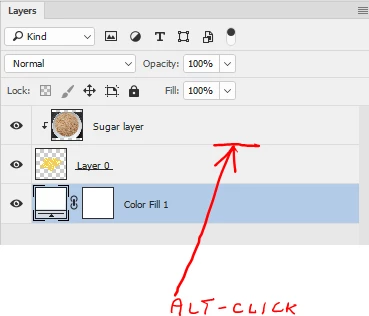
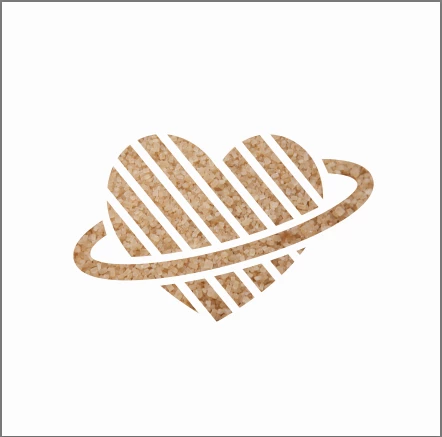
Place a sugar image above it. Alt click on the border between the sugar layer and the object so a liitle arrow appears. The sugar image will not be clipped to the object

If that is not what you were after - please ask further

Dave

2 replies

JJMack
Community Expert
Community Expert
May 31, 2017

You have the yellow on a layer all you need do is add a layer style to it. Layer styles have all sort of layer effects satin overlays textures patterns, contours. 

If I had a logo that simple I would create a custom shape so I could drag out one any size I needed and then style the shape layer.

JJMack
davescm
Community Expert
davescmCommunity ExpertCorrect answer
Community Expert
May 31, 2017

If you mean you want an image of sugar to appear then

Place a sugar image above it. Alt click on the border between the sugar layer and the object so a liitle arrow appears. The sugar image will not be clipped to the object

If that is not what you were after - please ask further

Dave

cosmozachAuthor
Participating Frequently
May 31, 2017

Hello Dave,

Thanks for the help & demonstrative images. Nearly what I was getting at! I wanted to try and keep some of the natural grainy edges instead of the sharp edges the logo has,

Little like this art (couldn't find a simple one):

http://mashlot.com/wp-content/uploads/2015/12/12.png

Thanks,

Zach

davescm
Community Expert
Community Expert
May 31, 2017

Hi

You could try something along these lines.

With the two layers as in my previous post temporarily turn off the clipping mask (Alt click at border)

Save the image which should show the sugar as a PSD called Displace 1

Invert the red channel and Save the image as Displace 2

Go back in history so you have the clipping mask again (and the red channels are not inverted)

Turn the two layers (the logo and the sugar) into a smart object.

Apply Filter > Distort > Displace Using Displace 1 as the map

Apply Filter > Distort Displace and this time use Displace 2 as the map

Save the image

I hope that helps you

Dave