

Save changes made to my current Workspace?
Workspace is an integral part in any designers workflow. Its the bread and butter of our every day as we move between platforms and screen setups. Workflows develop, change, adapt and evolve at pace with our own development as designers. Its therefore a vital dependency that we are able to change and modify workspaces.
Maybe I am retarded but I cannot find the Workspace manager. There simply is no option to save the changes I made to the current Workspace. The only option for me is to make a new workspace with the same name, try to remeber which workspace is the old one and the new one and then delete the old one. That is not a viable solution.
Window > Workspace > New Workspace.
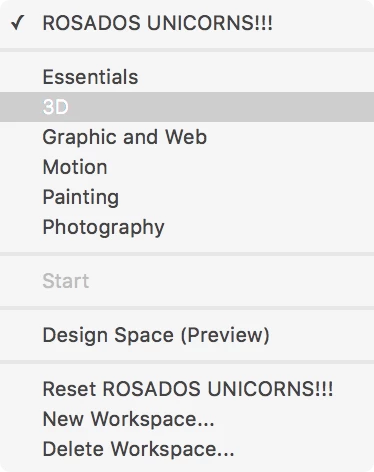
This is my Photoshop CC Workshop window: no manager?!
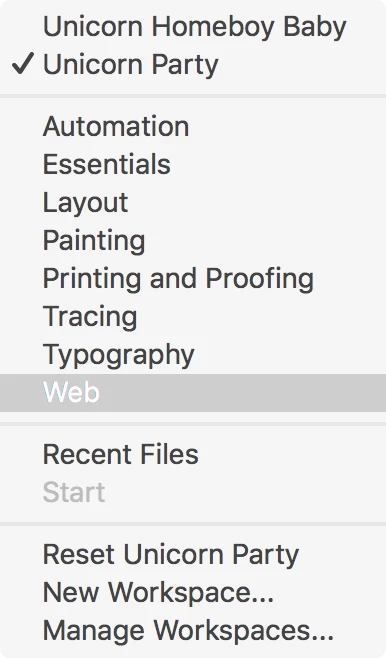
This is my Illustrator workshop window: Manager exist.
I have a suggestion, maybe they should try something like this!
*Illustrator HQ* (phone rings)
*Illustrator HQ*: Yo dog, its Illustrator. Waddap?
*Photoshop HQ*: Yo homeboy, its Photoshop
*Illustrator HQ*: Yo man!
*Photoshop HQ*: I see you got some fancy bling-bling in ya UX flow man, some crazy workspace manager. Whats up with that?
*Illustrator HQ*: That some top-notch usability yo. Yo want it? I send you my trippin wireframes and design sketches so you guys can do it too!.
*Photoshop HQ*: Sweet bro. U know, we should do this more often man. Like colaborate, you feelin it?
*Illustrator HQ*: Sweet man, lets do that. I hit ya up on Mondays and we can get going k?
...
Or are these develop teams rival enemies or what?
 AdChoices