

Save for Web animated GIF color issues
I am trying to take a video produced in After Effects and turn it into an animated GIF in photoshop. The steps I am taking are as follows:
1. Open Photoshop CC, select File > Import > Video Frames to Layers
2. Trim Video and Import
3. Open Timeline Window, change all frames to no delay.
4. Deleting extra frames. The file winds up having between 310 - 320 frames in total at the end.
5. File > Export > Save for Web
6. Settings: 256 colors, 100% dither, Selective, Matte color is white, transparency is checked, and reduced the file size by 50%.
Here is a screenshot:
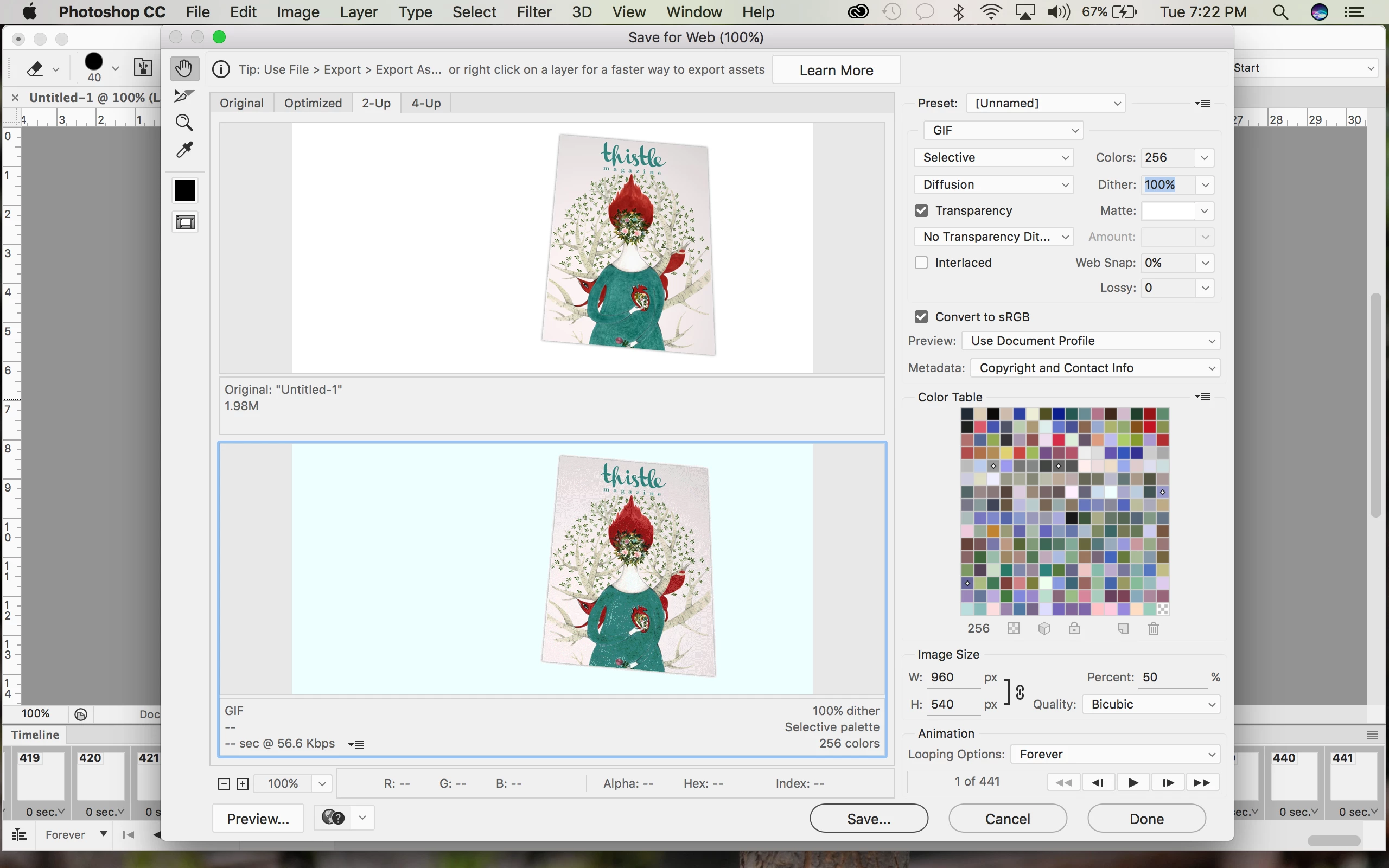
(There are 441 frames in this because I wanted to test it before I wasted my time deleting frames for the fourth time)
I cannot for the life of me understand why the background turns blue. I have used this same template several times before and followed the exact same steps and sometimes it works perfectly fine and sometimes it has a blue background. I updated my apps, I checked the image mode and color settings, I have played with all the options in the Save for Web screen and I have googled endlessly with no results. I know that there are only 256 colors, but why is WHITE not one of them? Can I change the background color to transparent?
Any help would be much appreciated - this is for a magazine I work on and it's extremely frustrating.
Thank you!
 AdChoices