arildh13222549
Participant
November 13, 2017
Answered

Save for web boosts contrast and saturation?

  • November 13, 2017
  • 2 replies
  • 3178 views

Hi!

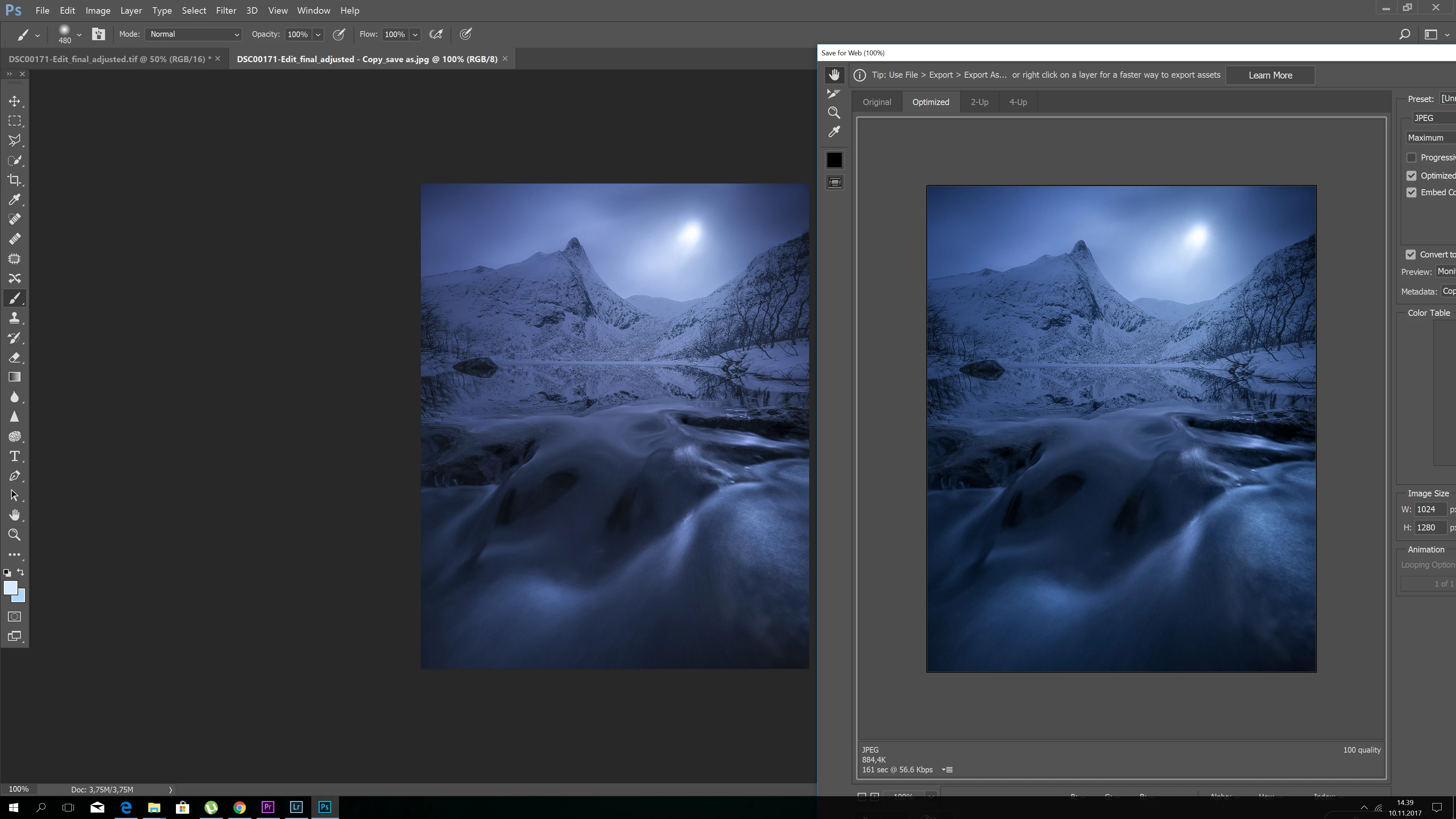
I am experiencing a weird problem when using "save for web". The preview in the save for web is different than the original. My entire workflow is sRGB. I have no proofing checked or anything.

Heres a screenshot showing the difference in saturation and contrast.

Any idea whats wrong?? They should match 100%.
This topic has been closed for replies.
Correct answer Jeff Arola

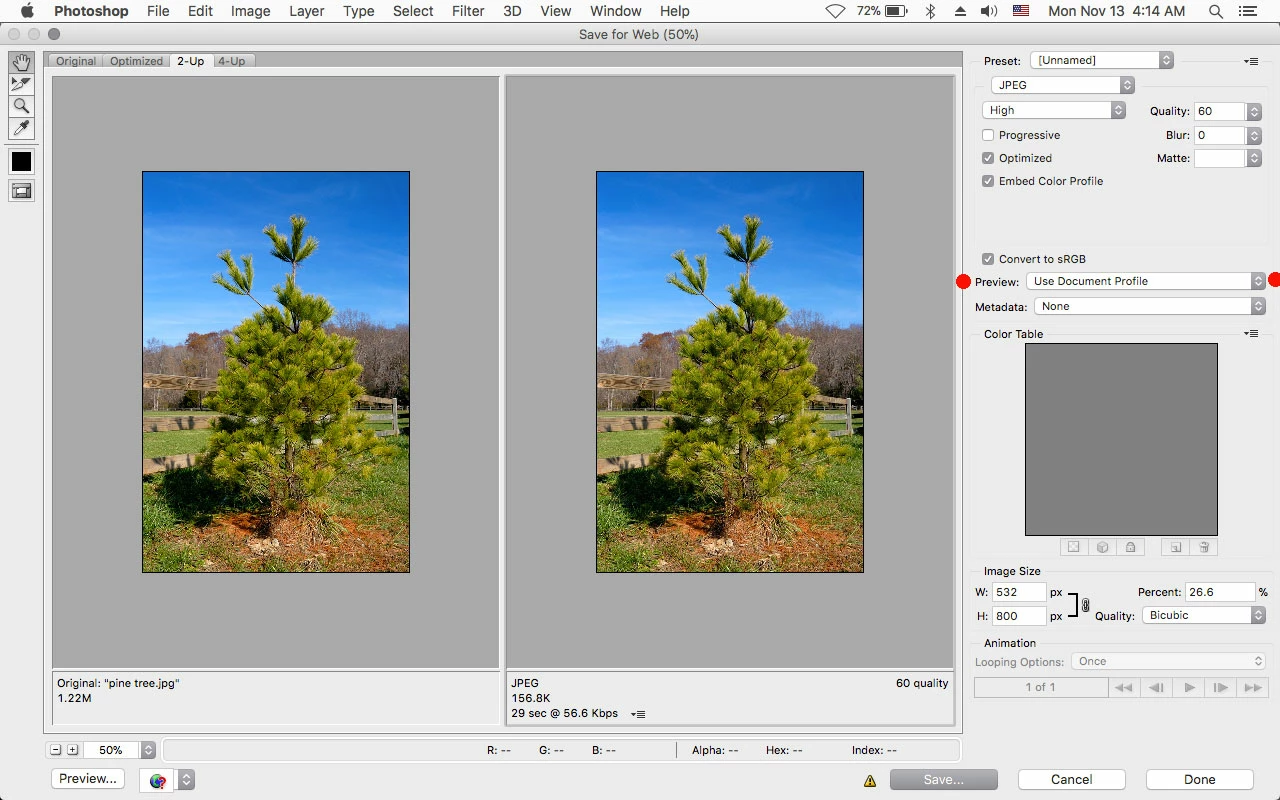
In Save for Web where is says Preview set it to Use Document Profile.

2 replies

NB, colourmanagement
Community Expert
Community Expert
November 13, 2017

Hi arildh13222549

are you using a large (wide) gamut monitor?

If you are - when colourmanagement is not part of the display process an image will look oversaturated on that display.

I expect that what you are seeing is that the "save for web" image display is non colourmanaged - why?  to simulate what would happen in a non colourmanaged web display of that image.

I see above that checking document profile in save for web makes the images match.

Also that Windows viewer isn't doing colourmanagament properly either.

If you save for web then reopen the image in Photoshop how does it look?

Do you have the sRGB profile embedded, I presume so - then in Photoshop it looks right I imagine?

So, what I think you are seeing here is why it is inadvisable to view images in a non colourmanaged way on a large (wide) gamut display.

I hope this helps

if so, please do mark my reply as "helpful" and if you're OK now, please mark it as "correct" below, so others who have similar issues can see the solution

thanks

neil barstow, colourmanagement

arildh13222549
Participant
November 13, 2017

Thanks a lot. So when i reopen the saved file in photoshop it looks fine.

However, when i upload the file to look on my website, or any other website, the image looks exactly like the windows version. And this is in Chrome, IE, Firefox etc... These browsers should all be colourprofiled now, right?

This is driving me nuts. Why isnt the browsers showing me the photoshop version?

D Fosse
Community Expert
Community Expert
November 13, 2017

arildh13222549  wrote

These browsers should all be colourprofiled now, right?

Yes and no...but only as long as you embed the profile - which Save For Web for some reason does not do at default settings. You have to go in and check the "embed color profile" box.

Firefox handles everything with an embedded profile correctly - but it can also be set to assign sRGB to all untagged material. This is the "mode 1 setting" (google it)  - which in fact means that everything you see in Firefox is fully color managed in all scenarios.

IE reads the document profile correctly, but not the monitor profile (using sRGB instead). That makes it useless for people with wide gamut displays, and merely inaccurate for everybody else.

I don't use Chrome and don't know the current color management status.

In short - Firefox in mode 1 should always display identically to Photoshop. If you embed the profile, that should also be the case in the default mode 2.

Jeff Arola
Community Expert
Jeff ArolaCommunity ExpertCorrect answer
Community Expert
November 13, 2017

In Save for Web where is says Preview set it to Use Document Profile.

arildh13222549
Participant
November 13, 2017

Yeah, i know that takes care of the mismatch shown. But the resulting saved image does not match up, so i end up having a mismatch between what i save in photoshop and the final image. On the right is the saved file shown in windows:

D Fosse
Community Expert
Community Expert
November 13, 2017

Windows "Photos" is not color managed. That's the difference. The document profile is ignored, your monitor profile is ignored.

To get a visual preview of what this looks like inside Photoshop, turn on Proof to Monitor RGB. As long as you understand that this is no indication whatsoever of how the file will look like on any other system than your own.

Assuming your monitor profile is good, the Photoshop version is the correct one, Windows Photos will never be entirely correct.