
Participant
December 29, 2019
Answered

Save for web previews transparency on Slices, does not support it in exported files

  • December 29, 2019
  • 3 replies
  • 3586 views

Photoshop 21.0.2

  • Background of artboard is set to transparent
  • Export > Save for Web (Legacy)
  • Check boxes PNG with transparency, can see it is transparent in preview


Exported files have white background, error file only says "Unsupported extension: tools"


Is slices no longer supported in Photoshop? If so it should be removed from the Toolbox because I don't see a work around with the file I have set up. This is absolutely infuriating.
This topic has been closed for replies.
Correct answer Bojan Živković11378569

To ensure that you are doing right thing do the following:


  • Go to File > Export > Save for Web.
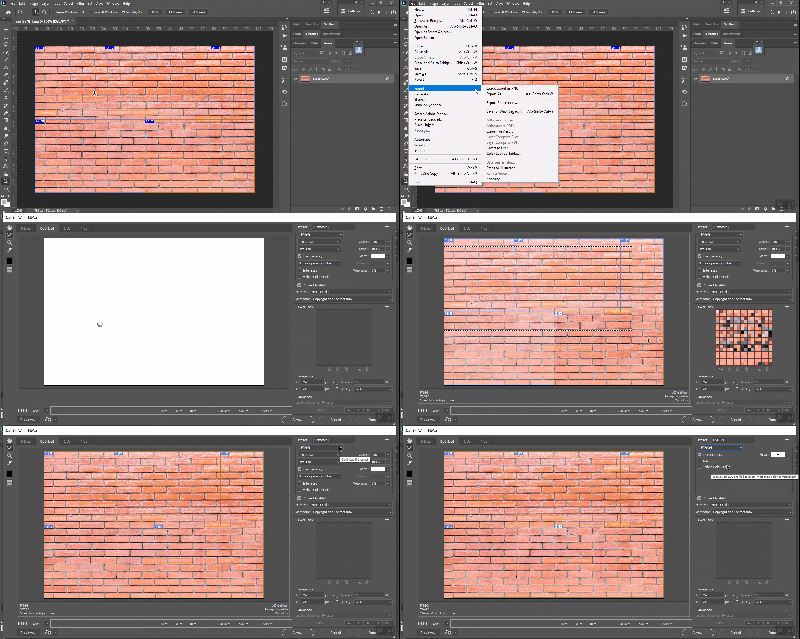
  • In Save for Web drag marquee over all slices. Hopefully you understand how to do that. Watch animation below it can help you undersand what I mean to drag marquee. Click outside of preview, hold down mouse button and drag over.
  • Choose file format.
  • Export, actually Save.

3 replies

Bojan Živković11378569
Community Expert
Community Expert
December 29, 2019

To ensure that you are doing right thing do the following:


  • Go to File > Export > Save for Web.
  • In Save for Web drag marquee over all slices. Hopefully you understand how to do that. Watch animation below it can help you undersand what I mean to drag marquee. Click outside of preview, hold down mouse button and drag over.
  • Choose file format.
  • Export, actually Save.

Participant
December 29, 2019

Thank you this has resolved my problem, the marquee drag was not indicated in the instructions I had seen.


Have a Happy New Year!

Bojan Živković11378569
Community Expert
Community Expert
December 29, 2019

Same to you! Have a healthy and succesfull New Year!

Participant
December 29, 2019

Hi Bojan, thanks for replying.


On closer inspection it turns out that although PNG is selected, the files exported are JPGs (?) with only 1 file being exported as PNG with transparency (number 23). Tried reinstalling with deleting preferences, did not help.


Bojan Živković11378569
Community Expert
Community Expert
December 29, 2019

Can you post some screenshot please? You are mentioning artboards and slices.

If you have artboard set to Transparent, do you see checkerboard? I am testing things as I understand them from your description and everything works fine. You may need to set export option for each slice.

And by the way, have you checked and how that your exported files have white background instead of transparent? If you are looking at files in Explorer then you may see white background which is actually transparent. Open files in Photoshop to check whether background is transparent or white.