
Participant
August 3, 2017
Answered

Saving Photoshop CC2015 PSD file for Older Version CS6

  • August 3, 2017
  • 1 reply
  • 27541 views

I have a file I am preparing to send to a printing company. I am using Photoshop CC 2015. I have saved the file as a PSD file. The printing company is using CS6 and are unable to open the file. They have asked me to save the PSD file for older versions. It still needs to be editable and have layers. How do I do this? I know I must be missing something simple. Any assistance would be awesome. Thank you in advance.
This topic has been closed for replies.
Correct answer Barb Binder

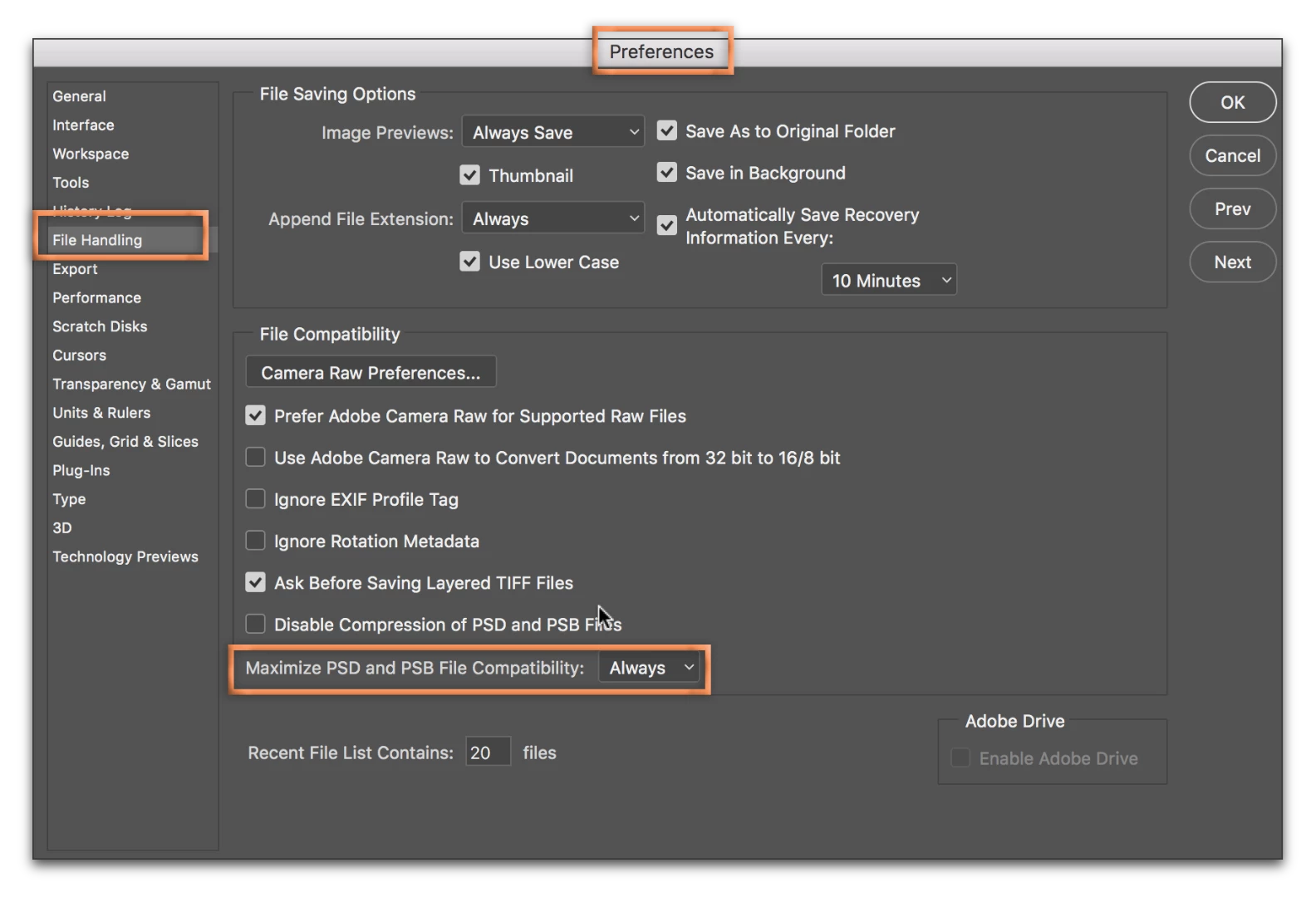
Edit > Preferences > File Handling (Windows) or Photoshop > Preferences > File Handling (Mac OS):

Set Maximize PSD and PSB File Compatibility to Always, the save the file again. (This provides backward compatibility.)

1 reply

Barb Binder
Community Expert
Barb BinderCommunity ExpertCorrect answer
Community Expert
August 3, 2017

Edit > Preferences > File Handling (Windows) or Photoshop > Preferences > File Handling (Mac OS):

Set Maximize PSD and PSB File Compatibility to Always, the save the file again. (This provides backward compatibility.)

~Barb at Rocky Mountain Training