


Participant
February 23, 2019
Answered

Script not in Scripts List

  • February 23, 2019
  • 2 replies
  • 3285 views

As we all know, "The scripts list includes all the script files saved with a .js or .jsx extension and saved in the Photoshop CS5/Presets/Scripts folder."

I have installed Image Processor Pro.jsx into the proper folder but it does not appear in the scripts list. (It also will not launch when called from Bridge menu).

Other custom scripts do appear in the menu.

The Image Processor Pro script works just fine if launched from File→Scripts→ Browse.

Anyone know how to get it into the scripts list or to launch from the Bridge menu Tools→Dr Brown Services→Image Processor Pro?
This topic has been closed for replies.
Correct answer JerryKT

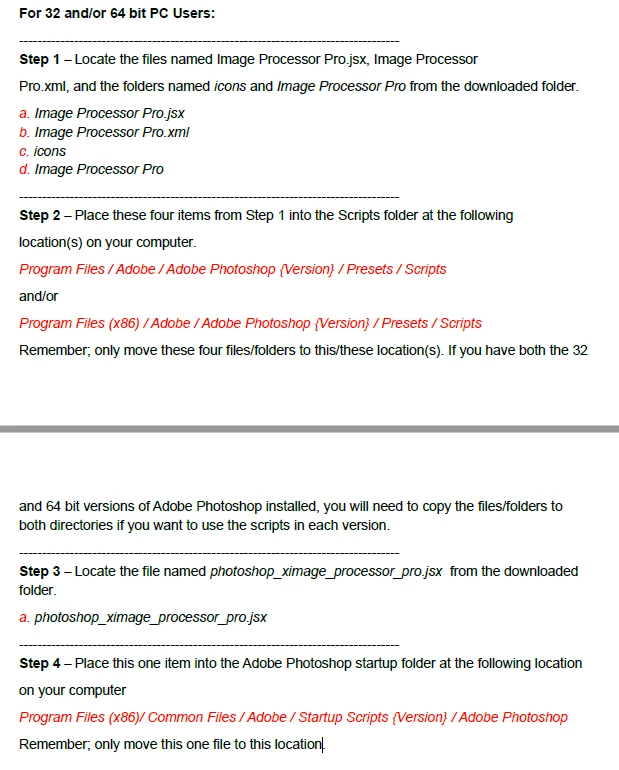
Please read the Image Processor Pro manual installation instructions PDF. There is also an Image Processor Pro folder that should be copied into all Photoshop versions Presets\Scripts\ folder as well as the script copied into the common Startup Scripts folder Adobe Photoshop folder that I showed.


You have a different version from what I downloaded from the Russel Brown Show website. The version I had downloaded has different files and instructions from what you pasted.

So, I found a different download on SourceForge that has the same files that you showed.

After installing this version, everything is working properly and my issue is resolved.

So, thanks for showing the screenshots so I could find the correct version to download.

2 replies

JJMack
Community Expert
Community Expert
February 23, 2019

Image Processor Pro script is programmed as a Photoshop Plug-in so it installs itself like other Plug-in in menu File>Automate>Plug-inName... Like menu File>Automate>Fit Image..., File>Automate>Photomerge...,  File>Automate>Contact Sheet II..., File>Automate>Lens Correction... etc.... I install my plug-in scripts in menu  File>Automated>Name also:  You should see menu File>Automate>Image Orocessor Pro... its the <menu>automate</menu> statement that does it.  A startup script is required the add Image processor Pro to the Bridges tool menu as a Photoshop item.

// BEGIN__HARVEST_EXCEPTION_ZSTRING

<javascriptresource>

<name>$$$/JavaScripts/AspectRatioSelection/Name=Aspect Ratio Selection...</name>

<about>$$$/JavaScripts/AspectRatioSelection/About=Aspect Ratio Selection Plug-in Version 0.0 By JJmack a Hacker use at your own risk Quality forget about it.</about>

<menu>automate</menu>

<category>JJMack's</category>

<enableinfo>true</enableinfo>

<eventid>3caa3434-cb67-11d1-bc43-0060b0a13dc5</eventid>

<terminology><![CDATA[<< /Version 1

                         /Events <<

                          /3caa3434-cb67-11d1-bc43-0060b0a13dc5 [($$$/AdobePlugin/AspectRatioSelection/Name=Aspect Ratio Selection) /imageReference <<

                               /width [($$$/AdobePlugin/AspectRatioSelection/Width=width) /pixelsUnit]

                               /height [($$$/AdobePlugin/AspectRatioSelection/Height=height) /pixelsUnit]

                               /flagCENTER [($$$/AdobePlugin/AspectRatioSelection/Center=center) /boolean]

                               /flagBORDER  [($$$/AdobePlugin/AspectRatioSelection/Border=border) /boolean]

                               /flagRECTANGLE [($$$/AdobePlugin/AspectRatioSelection/Rectangle=rectangle) /boolean]

                               /flagELLIPSE  [($$$/AdobePlugin/AspectRatioSelection/Ellipse=ellipse) /boolean]

                               /flagREPLACE [($$$/AdobePlugin/AspectRatioSelection/Replace=replace) /boolean]

                               /flagADD [($$$/AdobePlugin/AspectRatioSelection/add=add) /boolean]

                               /flagSUBTRACT [($$$/AdobePlugin/AspectRatioSelection/Subtract=subtract) /boolean]

                               /flagINTERSECT [($$$/AdobePlugin/AspectRatioSelection/Intersect=intersect) /boolean]

                               /flagSLT [($$$/AdobePlugin/AspectRatioSelection/Selection=selection) /boolean]

                               /flagPTH [($$$/AdobePlugin/AspectRatioSelection/Path=path) /boolean]

                               /feather [($$$/AdobePlugin/AspectRatioSelection/Feather=feather) /pixelsUnit]

                               /flagANTIALIAS [($$$/AdobePlugin/AspectRatioSelection/anti-alias=anti-alias) /boolean]

                          >>]

                         >>

                      >> ]]></terminology>

</javascriptresource>

// END__HARVEST_EXCEPTION_ZSTRING

// BEGIN__HARVEST_EXCEPTION_ZSTRING

<javascriptresource>

  <about>$$$/JavaScripts/ImageProcessor/About=Image Processor Pro^r^rCopyright 2012 Adobe Systems Incorporated. All rights reserved.^r^rProcesses multiple input and output files.^rNOTE:It's better than the Image Processor!</about>

  <category>DrBrown</category>

  <name>$$$/JavaScripts/ImageProcessor/Name/ImageProcessorPro=Image Processor Pro...</name>

  <menu>automate</menu>

  <eventid>611736f0-9c46-11e0-aa82-0800200c9a66</eventid>

  <terminology><![CDATA[<< /Version 3.2

    /Events <<

       /611736f0-9c46-11e0-aa82-0800200c9a66 [($$$/JavaScripts/ImageProcessor/Name/ImageProcessorPro=Image Processor Pro...) /imageProcessorProSettings <<

           /ImageProcessorProSettings [(ImageProcessorPro Settings) /typeText]

           /Msge [(Message) /typeText]

         >>]

     >>

   >>

]]></terminology>

</javascriptresource>

// END__HARVEST_EXCEPTION_ZSTRING

JJMack
JerryKTAuthor
Participant
February 25, 2019

Thanks for the assistance.

It does appear in the bridge menu (under Tools→Dr Brown's Services→Image Processor Pro), but when I click on it, it switches focus to PS then stops (does not open the image processor pro dialog).

Any idea what might be happening?

JJMack
Community Expert
Community Expert
February 25, 2019

The way Image Processor Pro is coded requires that its folders and script code to be in every Photoshop version you use  Preset\Scripts folder it can not be in a common location used by all PS versions installed. Only the Bridges startup script is common to PS CC versions of bridge.

JJMack
Kukurykus
Legend
February 23, 2019

It should be copies to 'Presets / Scripts' of Ps folder that is in 'Program Files' for 64 bit v. or 'Program Files x86' for 32 bit v.

I don't know wheter there was 64 bit version for CS5, and probably there is other problem I don't see now...