mo54891077
Participant
March 14, 2019
Answered

Script to remove all meta data from the photo

  • March 14, 2019
  • 11 replies
  • 19391 views

Hi

I am looking for a Script to remove all meta data from the photo (main issue is camera and lens info)

if i give my  client a flat image with no layers, i can do it while i export from lightroom.

but i want a way to do it while i keep the layers

is there a photoshop script to do that?

Thank you in advance

This topic has been closed for replies.
Correct answer Stephen Marsh

Thanks, so pretty much the same hack as adding a new blank layer to force the dupe to work correctly. I was hoping for something magic! :]


I have it sorted now, thanks r-bin...


Now I have discovered a different issue to fix!


As previously mentioned, this can (mostly) be performed using an action, duplicating the layers to a new file. With conditional actions it can gracefully handle a flattened file.  


This is performed by duplicating the layers to a new file. NOTE: Paths, alpha channels, guides, colour samplers and other document-level objects will not carry over to the new file (which may be a good thing if this is for a client, they usually don’t require your intermediate “workings”, you are just supplying a layered file if that is the requirement over a flattened file).


(action download)
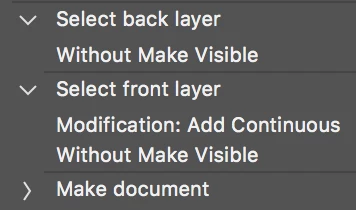


I have used “relative” keyboard shortcuts to navigate and select the layers rather than “absolute” recordings.


NOTE: The updated script code has been removed for reworking...

 

11 replies

Participant
April 21, 2024

Hello,

Removing metadata from photos, particularly camera and lens information, can be crucial for maintaining privacy or anonymity. While Lightroom offers an option to strip metadata during export, retaining layers complicates the process. Fortunately, there's a solution for Photoshop users.

You can achieve this through a script in Photoshop. However, since metadata handling varies based on file formats and Photoshop versions, you might need to tweak or combine existing scripts to fit your needs perfectly.

I recommend exploring Adobe's official scripting resources, such as the Adobe Developer Connection or Adobe Community forums, to find or request a script tailored to your requirements. Alternatively, you might consider hiring a developer proficient in Photoshop scripting to create a custom solution for you.

Legend
April 22, 2024

Bot bot bot bot

Legend
February 2, 2024

You can't remove lens and camera data with Adobe's XMP tools unless you wipe out ALL XMP data. That's not helpful. And you are likely a bot since you haven't posted the script.

Stephen Marsh
Community Expert
Community Expert
February 2, 2024

@Herey35101500twuj 


This is the second time that you have supposedly posted a script, that isn't there.


If you're not a bot, please post the code.

Legend
January 29, 2024

I use EXIFTool. I wrote a script to run EXIFTool in Bridge and Photoshop, so its easy to do. Same issue with lens and camera data.

The EXIFTool command I use is:

-XMP-exifEX:All= -XMP-aux:All= -EXIFIFD:LensInfo= -EXIFIFD:SerialNumber= -EXIFIFD:LensModel= -XMP-xmpMM:All= -EXIF:All= -tagsfromfile @ -EXIF:ImageWidth -EXIF:ImageHeight -EXIF:XResolution -EXIF:YResolution
dublove
Legend
January 29, 2024

@Herey35101500twuj 

hello

Where is your updated version?

Stephen Marsh
Community Expert
Community Expert
January 29, 2024

@Herey35101500twuj 


There's no script 

Stephen Marsh
Community Expert
Community Expert
November 3, 2022
Stephen Marsh
Community Expert
Community Expert
April 10, 2019

mo54891077 I’m curious, has your issue been resolved, is there any feedback etc? If resolved, can you mark the appropriate answer as correct so that others with the same issue know of the fix?

Stephen Marsh
Community Expert
Community Expert
March 15, 2019

I would like to offer a different brute force approach to removing non-XMP metadata such as EXIF – which is a script to “rebuild” a copy of the original layered file without the original document-level metadata.


And here is the “final” scripted version which offers more possibilities than the action method:


NOTE: The original script code has been removed for reworking...

 

Stephen Marsh
Community Expert
Community Expert
July 16, 2020

I thought that the script that I cobbled together from various sources was "bullet-proof", however, I have just found a flaw.


Using the Layer > Duplicate Layer feature to move layer content to a new file to avoid copying common file related metadata works fine for a flattened or multi-layered file... I just tested again and a single layer file has issues, whether using the GUI or a script!


If the layer is a single layer, it is flattened when duplicated to a new file. This is not too much of a problem if the original layer did not have any canvas transparency, however, I'd like to retain transparency and layer content positioning to the original image/canvas.


It is possible to add a temp blank layer to such a single layer file and then select all layers and dupe, however I would then need to remove the temp from both the new file and the original. Surely there is a better way?


Can anybody offer code and or advice?

Legend
July 16, 2020

1. select all layers

2. make group

3. duplicate to new doc

3. switch to new doc

4. ungroup or remove group


It is alleged that this bug is fixed in 21.2.

Photoshop: Duplicating floating layer to new doc flattens the layer
I did not check due to the lack of 21.2.

SuperMerlin
Inspiring
March 14, 2019

#target photoshop

removeXMP();

function removeXMP(){

if(!documents.length) return;

if (ExternalObject.AdobeXMPScript == undefined) ExternalObject.AdobeXMPScript = new ExternalObject("lib:AdobeXMPScript");

var xmp = new XMPMeta( activeDocument.xmpMetadata.rawData);

XMPUtils.removeProperties(xmp, "", "", XMPConst.REMOVE_ALL_PROPERTIES);

app.activeDocument.xmpMetadata.rawData = xmp.serialize();

}

JJMack
Community Expert
Community Expert
March 14, 2019

I believe after you strip the metadata you still need to save over the original file to remove it from the files. If you want to strip it from the raw files you man need to use the bridge or some utility  application to strip metadata from raw files.   I do not use LR so I do not know what it can do or if it supports scripting.

With Photoshop and his script you could set up an open event handler to strip meda.

JJMack

