Participant
May 28, 2021
Answered

P: Select and Mask preview not working in Photoshop 22.4.1 on macoS (FIXED)

  • May 28, 2021
  • 7 replies
  • 4026 views

Hello,

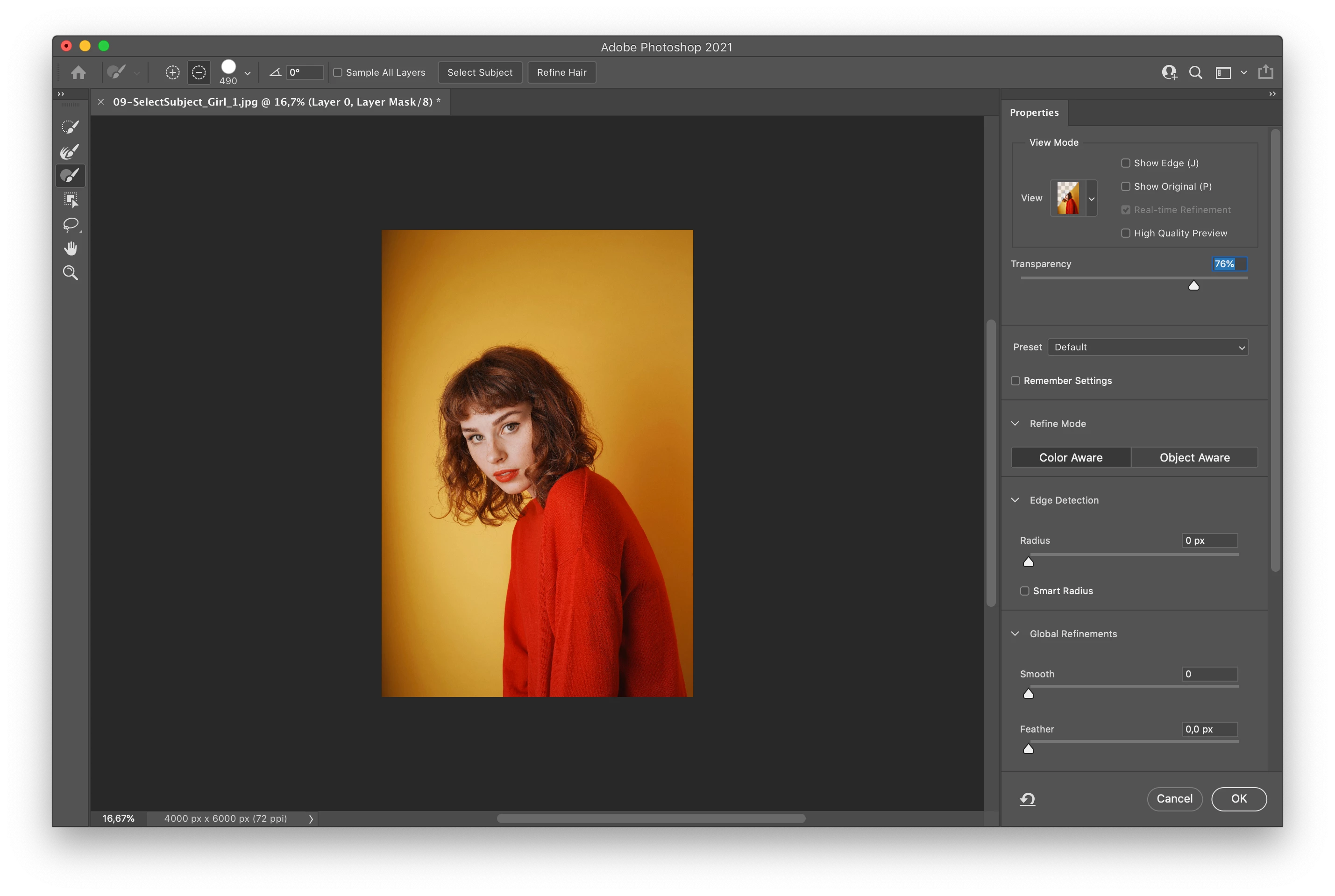
I was wondering if someone could help me with a Select and Maks window issue. When I open it, and try to edit my mask with the tools, nothing happens in my preview screen. Changes are only visible in the top right thumbnail, which is too small to be useful to guide me with my edits.

I already tried to uninstall and reinstall Photoshop, but nothing happened. I'm working with Photoshop 2021 (22.4.1).

I also tried to uncheck "UseOpenCL" in the Performance panel.


Here is a screenshot of the window where you can see the difference between the top right thumbnail and the bigger image.

Thank you
 
{Thread title edited by moderator}
This topic has been closed for replies.
Correct answer PECourtejoie

Hello, I suggest to update to 22.4.2 as it is supposed to fix the issue: https://helpx.adobe.com/photoshop/kb/fixed-issues.html

7 replies

PECourtejoie
Community Expert
PECourtejoieCommunity ExpertCorrect answer
Community Expert
June 8, 2021

Hello, I suggest to update to 22.4.2 as it is supposed to fix the issue: https://helpx.adobe.com/photoshop/kb/fixed-issues.html

Mariano López Sanchiño
Participant
June 9, 2021

Hello PECourtejoie,

The update fixed the problem.

Mariano López Sanchiño
Participant
June 4, 2021

I am having the same problem.

The solutions you are suggesting are not working. I think an update is required to fix the problem.

The solutions that include disabling super useful features, deleting information that is useful for assiduous use of the program or downloading previous versions seem very bad to me.

I think it is a very serious error for them to have escaped in a new version as it is a practically indispensable function.

Totally dissatisfied.


melissapiccone
Community Expert
Community Expert
June 4, 2021

I'm not having a problem on either of my Macs but I am having lots of screen redraw issues. What if you hold down the spacebar to get the hand tool and just "wiggle" the screen? That's what I've been doing when my transform box doesn't show up and my screen is blank when I open a new document and all of the other new infuriating  stuff that is happening with this release. 

Melissa Piccone | Adobe Trainer | Online Courses Author | Fine Artist
Participant
June 3, 2021

I'm having the same issue. Removing preferences or disabling the option to Use Graphics Processor does NOT help.

I'm running MacOS Big Sur 11.4 and Photoshop version 22.4.1


Any new thoughts on how to fix this yet?

nikunj.m
Legend
June 4, 2021

Hi,


We're sorry about the trouble with Photoshop due to the Select & mask issue. If resetting the Preferences didn't help, you can roll back to the previous version of Photoshop using the steps suggested here: https://adobe.ly/2wH0JjE

Please uninstall the latest version of Photoshop first & select the option to Keep Preferences prior to installing the previous version.


Regards,

Nikunj

Known Participant
June 1, 2021

Not working for me either. On Mac Big Sur 11.4. Turning off the 'use graphics processor' did not fix the issue.

smKarp
Inspiring
June 1, 2021

I am experiencing the exact same issue! It's so frustrating that the properties panel thumbnail shows the changes but the main image does not. I thought that I must be doing something wrong, but your post reassures me that this is software not user related. 

May 22, 2022

Same problem, nothing fixes it, I see this problem shared in Reddit as well and no one has a solution that works

nikunj.m
Legend
May 28, 2021

Hi,


We're sorry about the trouble with Select and Mask in Photoshop 22.4.1. Would you mind telling us which macOS version are you working on?

This is a known issue with Photoshop 22.4 & 22.4.1 & our product team is working on a fix. For some users resetting the preferences has helped.


You can try to reset the preferences of Photoshop using the steps mentioned here: https://adobe.ly/2Qzc0K3

Please backup your settings prior to resetting the preferences. You can check: https://adobe.ly/2vNz6FG


You can also try disabling the option to Use Graphics Processor from Photoshop by going to Preferences, then Performance. Once done, quit & relaunch Photoshop to check if that helps.


You can add your vote to the issue here: https://feedback.photoshop.com/conversations/photoshop/photoshop-v224-select-and-mask-workspace-prev...

You can also follow the thread for updates related to the developments regarding this.


Regards,

Nikunj