mauricior6328708
Inspiring
June 1, 2016
Answered

Selecting tools via scripts

  • June 1, 2016
  • 3 replies
  • 1804 views

Hello personal greetings to all:

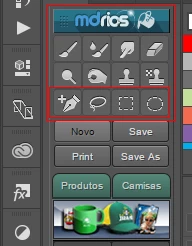
Is there any possibility to select tools via scripts? I need to add the command a few buttons on a panel HTML5. I tried to create actions for each of them but some of them does not work actions:

Are they:

• Pen Tool

• Freeform Pen Tool

• Add Anchor Point Tool

• Delete Anchor Point Tool

--------------------------------------------

• Rectangular Marquee Tool

• Elliptical Marquee Tool

---------------------------------------------

• Polygonal Lasso Tool

• Magnetic Lasso Tool

This topic has been closed for replies.
Correct answer SuperMerlin

SuperMerlin You as always very atensioso thank you!

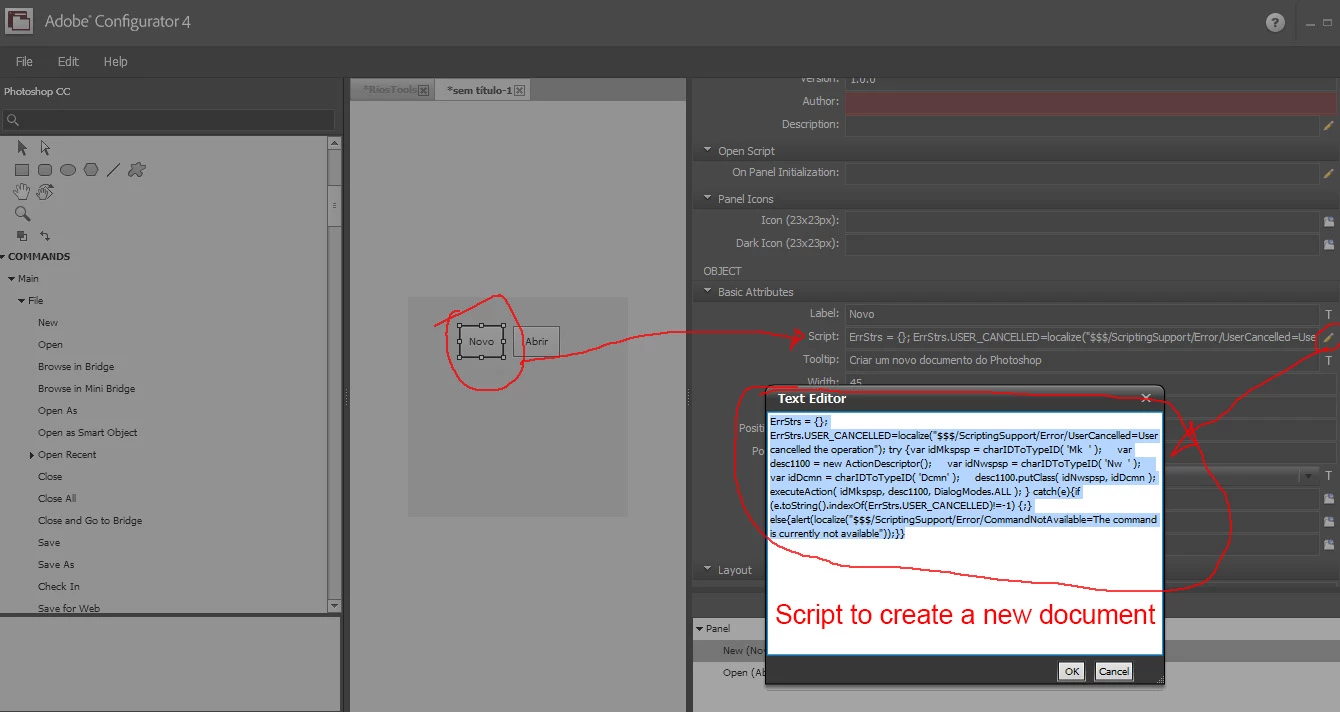
Forgive my lack of knowledge about programming. JSX is too compricado for me. To simplify I just wanted to know the scripts of each of these tools for me sitados. Example: What is the command to call the pen tool? For you to understand my question when I want some script any Photoshop menu, we refer to Adobe Configurator and select a particular menu and identify your code (script) through the attributes of the menu in question and that selected scripit I add to arquivo.jsx model generated by Builder extension. Thank you!

This is only an example to better understand my question, the scripts I need are some tools.


Hope these help....

/////// Pentool

var desc = new ActionDescriptor();

var ref = new ActionReference();

ref.putClass( app.stringIDToTypeID('penTool') );

desc.putReference( app.charIDToTypeID('null'), ref );

executeAction( app.charIDToTypeID('slct'), desc, DialogModes.NO );

////////freeform pentool

var desc = new ActionDescriptor();

var ref = new ActionReference();

ref.putClass( app.stringIDToTypeID('freeformPenTool') );

desc.putReference( app.charIDToTypeID('null'), ref );

executeAction( app.charIDToTypeID('slct'), desc, DialogModes.NO );

//////////Add anchor point tool

var desc = new ActionDescriptor();

var ref = new ActionReference();

ref.putClass( app.stringIDToTypeID('addKnotTool') );

desc.putReference( app.charIDToTypeID('null'), ref );

executeAction( app.charIDToTypeID('slct'), desc, DialogModes.NO );
//////////Delete anchor point tool

var desc = new ActionDescriptor();

var ref = new ActionReference();

ref.putClass( app.stringIDToTypeID('deleteKnotTool') );

desc.putReference( app.charIDToTypeID('null'), ref );

executeAction( app.charIDToTypeID('slct'), desc, DialogModes.NO );
//////////rectangular marquee tool

var desc = new ActionDescriptor();

var ref = new ActionReference();

ref.putClass( app.stringIDToTypeID('marqueeRectTool') );

desc.putReference( app.charIDToTypeID('null'), ref );

executeAction( app.charIDToTypeID('slct'), desc, DialogModes.NO );

//////////Elliptical Marquee Tool

var desc = new ActionDescriptor();

var ref = new ActionReference();

ref.putClass( app.stringIDToTypeID('marqueeEllipTool') );

desc.putReference( app.charIDToTypeID('null'), ref );

executeAction( app.charIDToTypeID('slct'), desc, DialogModes.NO );

//////////Polygonal Lasso Tool

var desc = new ActionDescriptor();

var ref = new ActionReference();

ref.putClass( app.stringIDToTypeID('polySelTool') );

desc.putReference( app.charIDToTypeID('null'), ref );

executeAction( app.charIDToTypeID('slct'), desc, DialogModes.NO );

//////////Magnetic Lasso Tool

var desc = new ActionDescriptor();

var ref = new ActionReference();

ref.putClass( app.stringIDToTypeID('magneticLassoTool') );

desc.putReference( app.charIDToTypeID('null'), ref );

executeAction( app.charIDToTypeID('slct'), desc, DialogModes.NO );

3 replies

mauricior6328708
Inspiring
June 1, 2016

Please could you send me some I forgot. Lasso tool, gradient tool and Custom shape tool.

In the future I will add new tools on other projects, it would be possible adiquir a list with only the id so that I can replace only the script ??

Thank you!

SuperMerlin
Inspiring
June 1, 2016

////Lasso tool

var desc = new ActionDescriptor();

var ref = new ActionReference();

ref.putClass( app.stringIDToTypeID('lassoTool') );

desc.putReference( app.charIDToTypeID('null'), ref );

executeAction( app.charIDToTypeID('slct'), desc, DialogModes.NO );

////gradient tool

var desc = new ActionDescriptor();

var ref = new ActionReference();

ref.putClass( app.stringIDToTypeID('gradientTool') );

desc.putReference( app.charIDToTypeID('null'), ref );

executeAction( app.charIDToTypeID('slct'), desc, DialogModes.NO );

////Custom shape tool

var desc = new ActionDescriptor();

var ref = new ActionReference();

ref.putClass( app.stringIDToTypeID('customShapeTool') );

desc.putReference( app.charIDToTypeID('null'), ref );

executeAction( app.charIDToTypeID('slct'), desc, DialogModes.NO );

///////////////////////////////////////////////

/////This will give you the tool name of the selected tool

var ref = new ActionReference();

ref.putEnumerated( charIDToTypeID("capp"), charIDToTypeID("Ordn"), charIDToTypeID("Trgt") );

alert(typeIDToStringID(executeActionGet(ref).getEnumerationType(stringIDToTypeID('tool'))));

mauricior6328708
Inspiring
June 1, 2016

SuperMerlin, thanks again! A hug.

SuperMerlin
Inspiring
June 1, 2016

This function gives the current tool.

function findCurrentTool(){

var ref = new ActionReference();

ref.putEnumerated( charIDToTypeID("capp"), charIDToTypeID("Ordn"), charIDToTypeID("Trgt") );

var cTool = typeIDToStringID(executeActionGet(ref).getEnumerationType(stringIDToTypeID('tool')));

return cTool;

};

This function will select the tool.

function selectTool(tool) {

    var desc = new ActionDescriptor();

        var ref = new ActionReference();

        ref.putClass( app.stringIDToTypeID(tool) );

    desc.putReference( app.charIDToTypeID('null'), ref );

    executeAction( app.charIDToTypeID('slct'), desc, DialogModes.NO );

};

mauricior6328708
Inspiring
June 1, 2016

I add this command JSX, Native Extension Bulder 3

$ ._ = {Ext_frm09

run: function () {

/ ********** Replace sample code below with your own JSX code ********** /

selectTool (tool) function {

var desc = new ActionDescriptor ();

var ref = new ActionReference ();

ref.putClass (app.stringIDToTypeID (tool));

desc.putReference (app.charIDToTypeID ('null'), ref);

ExecuteAction (app.charIDToTypeID ('SLCT'), desc, DialogModes.NO);

};

/ ************************************************* *********************** /

return appName;

},

};

Before I had put the code generated by ScriptingListener.plugin

I did a test here and in both situations aparceu me the following message image:

SuperMerlin
Inspiring
June 1, 2016

You have 'SLCT" in uppercase this is incorrect it should be lowercase.

As an example.

#target photoshop;

alert(findCurrentTool());

selectTool('sliceSelectTool');

function findCurrentTool(){

var ref = new ActionReference();

ref.putEnumerated( charIDToTypeID("capp"), charIDToTypeID("Ordn"), charIDToTypeID("Trgt") );

var cTool = typeIDToStringID(executeActionGet(ref).getEnumerationType(stringIDToTypeID('tool')));

return cTool;

};

function selectTool(tool) {

    var desc = new ActionDescriptor();

        var ref = new ActionReference();

        ref.putClass( app.stringIDToTypeID(tool) );

    desc.putReference( app.charIDToTypeID('null'), ref );

    executeAction( app.charIDToTypeID('slct'), desc, DialogModes.NO );

};

c.pfaffenbichler
Community Expert
Community Expert
June 1, 2016

Have you tried using ScriptingListener.plugin to record the selection of the Tools in question?