
Resuelto
Selezionare Sampled Colors
There is a script to select color range items
Sampled colors
as in picture
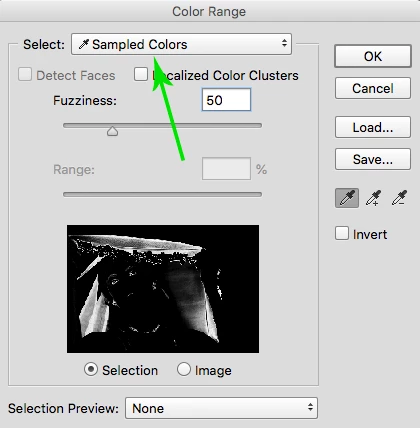

There is a script to select color range items
Sampled colors
as in picture
You can try this method.
Works in CC2018, but for some reason it does not work in CS6.
The method is based on creating and using a temporary preset file for the Color Range.
var c = new SolidColor();
//c.lab.l = 1;
//c.lab.a = 2;
//c.lab.b = 3;
color_range(c, 50, true);
/////////////////////////////////////////////////////////////////////////////////////
function color_range(color, fzns, dlg)
{
var file = new File(Folder.temp.fsName + "\\" + "_TMP_");
try {
var l = Math.round(0x8000 * color.lab.l/100);
var a = Math.round(0x4000 + color.lab.a*128);
var b = Math.round(0x4000 + color.lab.b*128);
var f = Math.round(fzns*128.5);
var l_min = l;
var l_max = l;
var a_min = a;
var a_max = a;
var b_min = b;
var b_max = b;
var data = word(2) + word(6) + // something like the type and version of the file
dword(l_min) + dword(l_max) +
dword(a_min) + dword(a_max) +
dword(b_min) + dword(b_max) +
dword(f) +
dword(0) + dword(0) + dword(0);
file.open("w");
file.encoding = "BINARY";
file.write(data);
file.close();
var d = new ActionDescriptor();
d.putPath(stringIDToTypeID("using"), file);
executeAction(stringIDToTypeID("colorRange"), d, dlg?DialogModes.ALL:DialogModes.NO);
}
catch(e) { throw(e); }
file.remove();
function word(r)
{
var r1 = r%256;
var r2 = ((r - r1)/256)%256;
return String.fromCharCode(r2, r1);
}
function dword(r)
{
var r1 = r%256;
var r2 = ((r - r1)/256)%256;
var r3 = ((r - r1 - r2*256)/(256*256))%256;
var r4 = ((r - r1 - r2*256 - r3*256*256)/(256*256*256))%256;
return String.fromCharCode(r4, r3, r2, r1);
}
}
Enter your E-mail address. We'll send you an e-mail with instructions to reset your password.
 AdChoices