
Participant
September 22, 2020
Answered

Shortcut to create clipping mask on oppening of adjustment layer

  • September 22, 2020
  • 3 replies
  • 914 views

Hi guys.


I know, there is a short cut which allows me to open an adjustment layer already as a clipping mask. This makes the option / click procedure redundant.

Anybody can help me out with this one, google coulnd't help me so far.

(I work an mac)

Thx in advance and have a nice day 🙂
This topic has been closed for replies.
Correct answer Marianne-Deiters

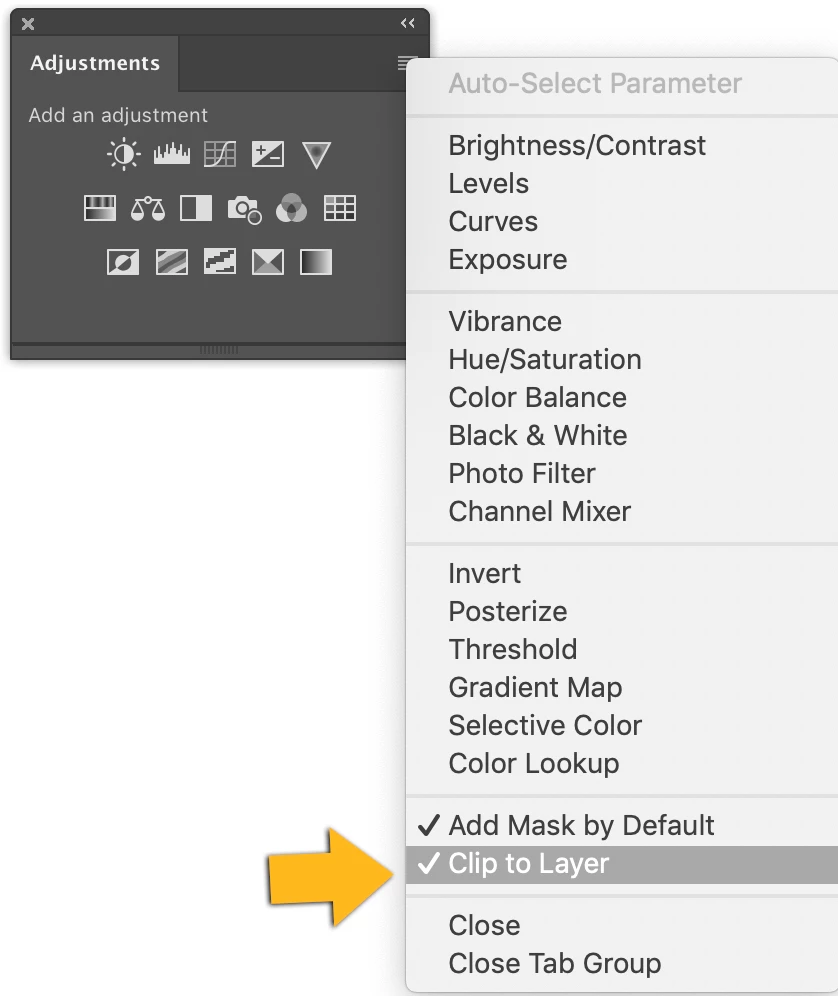
You could activate the option "Clip to layer" in the panel menu of the adjustment panel

3 replies

Marianne-Deiters
Marianne-DeitersCorrect answer
Participating Frequently
September 22, 2020

You could activate the option "Clip to layer" in the panel menu of the adjustment panel

c.pfaffenbichler
Community Expert
Community Expert
September 22, 2020

Good one! Hadn’t even noticed it so far … 

c.pfaffenbichler
Community Expert
Community Expert
September 22, 2020

Alternatively you could also hit cmd-alt-G (Layer > Create Clipping Mask) after creating the Adjustment Layer. 

Participant
September 22, 2020

Thanks for you quick replies. I m pretty sure I knew a quick and easy way to do this.

c.pfaffenbichler
Community Expert
Community Expert
September 22, 2020

I suppose you could create Actions in which you record alt-creating the various Adjustment Layers (with »Use Previous …« checked) you use most often.