
Inspiring
November 25, 2020
Answered

Something happened to the color picker

  • November 25, 2020
  • 1 reply
  • 691 views

Windows 10 Pro, Photoshop 2021. 

I've done SOMETHING bizarre...  Everything has been working fine.  Somehow, yesterday I did SOMETHING that has caused my color picker to show drastically different colors than it did previously.  Here's what it looks like in Photoshop 19.?
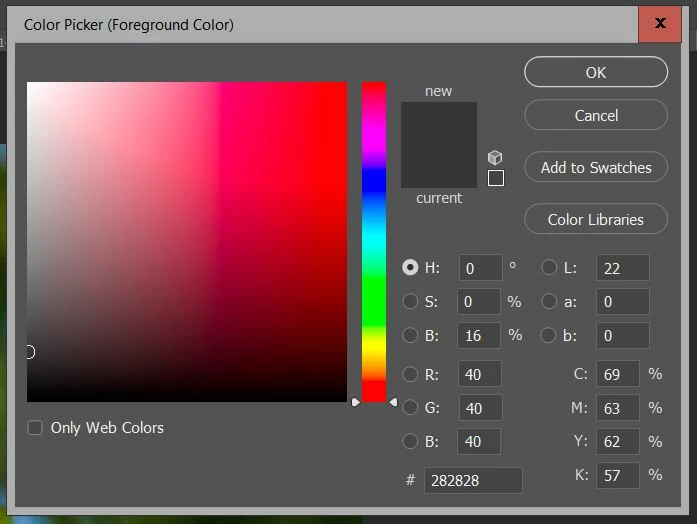
 The bar next to the colors is the whole color wheel or set or whatever.

Whatever I've done, this is how it looks in Photoshop 2021.
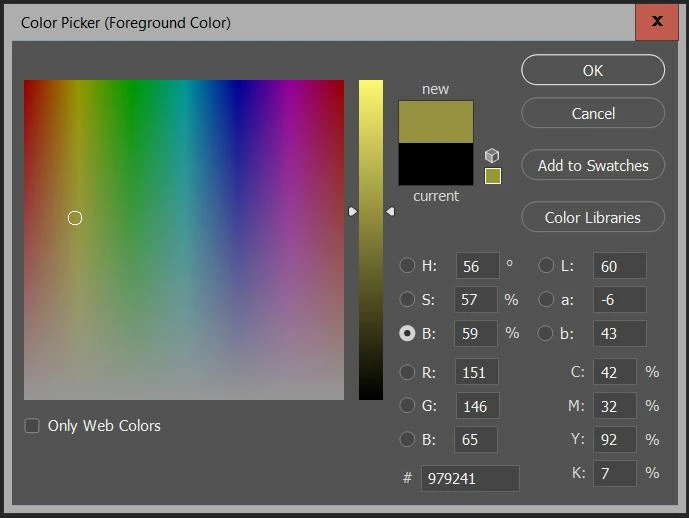
I need it to go back to normal so I can pick colors...

Correct answer c.pfaffenbichler

Have you tried clicking the radio-button left of the »H«? 

1 reply

c.pfaffenbichler
Community Expert
c.pfaffenbichlerCommunity ExpertCorrect answer
Community Expert
November 25, 2020

Have you tried clicking the radio-button left of the »H«? 

Inspiring
November 25, 2020

<Hangs head in shame> No...

I've been messing with this for a week, trying to figure out WHAT I did that messed this up, and I kept trying to get all 3 of the RGB ones to be selected...  Never mind... 


Thanks for fixing my brain fart!

c.pfaffenbichler
Community Expert
Community Expert
November 26, 2020

Don’t beat yourself up, I suspect Photoshop has frustrated and/or mystified most of its users at one time or another …