
badfranco
Participating Frequently
June 20, 2018
Answered

Style Distortion

  • June 20, 2018
  • 4 replies
  • 885 views

Good afternoon,

im a bit new to Photoshop but i enjoy using it as a hobby...a couple of months a go i purchased  some font styles and they worked fine and looked beautiful. Now i try and use them and they are distorted almost as if Photoshop keeps the last setting every time i change a style...Sorry im not sure how ells to describe it.

here is an example
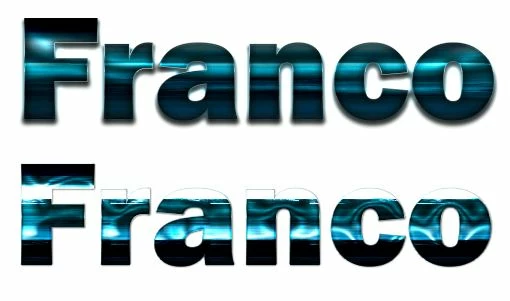
the top image is applied by opening the PSD & copying the style & pasting it on the font , the 2nd image is by load the style and applying it(they are both the same styles)...how can i fix this? it didnt do this before.

    This topic has been closed for replies.
    Correct answer c.pfaffenbichler

    The image you provided has a resolution of 72ppi.

    If you change it to 300ppi (Image > Image Size with »Resample« unchecked) and apply the Style from the Styles Panel again does it look as expected?

    4 replies

    c.pfaffenbichler
    Community Expert
    Community Expert
    June 20, 2018

    I recommend undertaking a simple experiment:

    Create a Layer Style Stroke with a 10px Stroke in a file with 300ppi and save it.

    Then create a new file with 72ppi and apply the Layer Style to a Layer.

    Does the result look different when viewed at View > 100%?

    badfranco
    badfrancoAuthor
    Participating Frequently
    June 20, 2018

    ok ill try this

    c.pfaffenbichler
    Community Expert
    c.pfaffenbichlerCommunity ExpertCorrect answer
    Community Expert
    June 20, 2018

    The image you provided has a resolution of 72ppi.

    If you change it to 300ppi (Image > Image Size with »Resample« unchecked) and apply the Style from the Styles Panel again does it look as expected?

    badfranco
    badfrancoAuthor
    Participating Frequently
    June 20, 2018

    these are not the only values that change...

    inner shadow

    inner glow

    stain

    etc.

    they all change for some reason...

    c.pfaffenbichler
    Community Expert
    Community Expert
    June 20, 2018

    What is the image’s resolution and what is the resolution of the image that you copied the Style from?

    badfranco
    badfrancoAuthor
    Participating Frequently
    June 20, 2018

    https://drive.google.com/file/d/1SAian6ByxQP1AjuL2ple43m8g6WBz2AU/view?usp=sharing

    that's the test PSD link so you can see it...the canvas size 1020x1080 and the font is @ 300

    badfranco
    badfrancoAuthor
    Participating Frequently
    June 20, 2018

    i understand that the #s are different and i have to change them...but im not sure why they change if the style is preset.

    c.pfaffenbichler
    Community Expert
    Community Expert
    June 20, 2018

    Which Styles are applied?

    What are the Pattern Overlay settings for the two?

    (Please post screenshots instead of trying to type them up.)

    badfranco
    badfrancoAuthor
    Participating Frequently
    June 20, 2018

    Top image

    Bottom image

    c.pfaffenbichler
    Community Expert
    Community Expert
    June 20, 2018

    Just look at the Scale percentage value.