

Peteris Karklins
Known Participant
March 17, 2017
Answered

Tab - width, displayed info and other options

  • March 17, 2017
  • 10 replies
  • 10428 views

Is there an option to change what file tab displays? Or set width?

My patience is over...

  1. Is there an option to choose the displayed info?
    Let's pretend, that I know in other ways on witch layer I'm on, at what zoom size I currently work and in what color mode...  can I disable displaying of it on my files tabs?! Isn't the whole deal of tabs is working on multiple of them?! Would you use a browser with tabs, which displays Page zoom level, the full title and lead of the column you are reading and some other worthless information, which blocks you from seeing at least four of your other tabs?
  2. Is there an option to set tab width?
    If, it's too hard for Adobe to make these check boxes in UI preferences, then maybe there's a simple option... a slider for tab width? The default would be checked at auto, but if the user doesn't want to see all the crap, he can manually slide the width of a tab to lover value?
  3. Tabs occupied space in "standard" and "full screen with menu" mode
    So there's no option that tabs could occupy the whole top of the application window? The side menu steals that space? I should switch to full screen mode with menus in order for that to work, cause document window occupies full width only in that display mode?! Well - there's no tabs in full screen mode at all! Awesome! Have anyone ever used a modern (last 10 years) internet browser?! They have these options, but in none of them the tabs disappear! Well, they disappear in full screen mode, but they are always available!
  4. Will there be a time, when Photoshop will understand, that it's tads are rearranged?
    Would you use a internet browser, witch, after rearranging the tabs in your desired order would start to jump around like a rabid rabbit, when you try to choose the next tab with Ctrl+tab?
  5. Some scroll options, maybe?
    Do you know, that after opening too many tabs in internet browser, so they don't fit in a screen any more, there's an option to mose over them and use a scroll wheel on your mouse to scroll through them? I suggest you try! As we can understand that there's never more than two tabs open on your browsers, according to what you have done to Photoshop tabs, cause that would be too much reading work... but others have more things to do, than clicking through poorly made Photoshop tabs!!!
  6. To advance over browser would be implementing app specific features!
    Imagine features like: Save all open tabs as..., Export open tabs as..., close all other tabs...(ups! that's already in the browsers),

Maybe someone know a work around with this tab width [Profanity removed]?!

Thanks in advance
Correct answer davescm

Hi

As far as I know the tab width and content cannot be altered. You can enter a feature request/idea at the link below where it is more likely to be viewed by Adobe staff.

Photoshop Family Customer Community

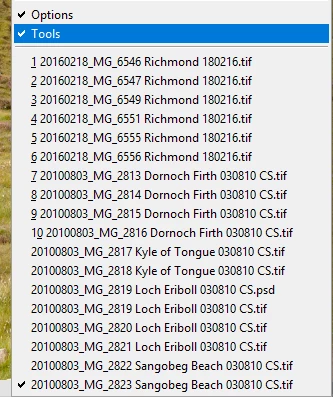
In the meantime - if you have many files open as tabs you can also use the list at the bottom of the Window menu to switch tabs directly

Dave

10 replies

Participant
August 22, 2025

I love the passion Peteris Karklins put on every one of his words. I totally agree in each one of them. There should be a setting for tabs, the kind of info they show, and an easy wheel scroll navigation feature.  Davescm advice works... but I must say those extra clicks turns consciously tedious when you are working everyday with 50 files opened at once (not an uncommon thing when designing assets for web). Today is 2025. And competitors like CANVA are not the same they were on 2017... So, in a history moment when we have technology wonders like A.I. implementation, fixing these kind of things should be peanuts for a company like Adobe. 

Participant
June 21, 2024

No comment on how many lines of code it might take, but just want to voice my support for some other tab paradigm. It's a pain to use on a laptop if you have more than three documents open. Web browsers will shrink the tab and hide the overflow text that doesn't fit. I think all of that info could (and often already does) fit in the status bar at the bottom of the window.

Participant
May 7, 2024

Please just add option to restrict tab title length by like 10 characters max, it's literally 3 lines of code and 20 minutes of testing for you to do this...

Participant
March 7, 2024

everyone uses tabs in browsers for ages and adobe literally cant figure it out how to scale them and make them more user friendly for people who works with more than 3 images at the time. 


Legend
July 29, 2022

Tabs drive me batty- the absolute WORST of Windows-style UI. I turn them off on both platforms.

Participant
July 22, 2022

Dear lord who the UI designer what invented scrolling tabs should be hung up by his noes hair, in my professional opinion.  It seems its become a bad fad.  

  Every time I try to work between mulitple open documents, more than will fit on the tab bar, I end up wanting to poke my eyes out. 


Humans orient them selves, their work spatially. Both in the world and in their concputual represntations.  Many tasks requre you to refere to a base docuemnt or documents.  When tabs stay in one place, you can develop speed and accuracy of your mouse/input motions, and ultimately work efficiendy, which by the way translates to dollars in my work. 

When tabs are shifting arround it makes exponentially harder to get the work done becuase the frame of reference shifts.  That is freakin' basic UI/UX 101 folks.

Please, this has gone too far.  Now matter how cool your UI designers think it is, pity user and at least give us the option of squeezing all the tabs they want down to fit the current window frame - leave it up to us!

arefm30326888
Participant
July 29, 2022

Man I really can't believe we're still having this problem in 2022! How hard can it be to implement browser-like tab management in PS?! Most of the time I can only have instant access to 4-5 tabs because file names are usually longer than a single number! The quality of UI/UX in PS is so bad I wanna hurt myself sometimes...

ChrisNZL
Participant
June 2, 2022

+1. It is very unhelpful having tab widths change when selecting different layers.


Adobe, can you please add options to Photoshop:

  • Only display filename in tab (I don't need to know what layer I have selected)

  • Options for "maximum tab width" and "minimum tab width"
  • Show thumbnail previews when hovering over a tab

  • Implement a visual tab overview mode, much like when pressing Alt+Tab on Windows to display all open apps – a shortcut to display all open windows/tabs, with a thumbnail for each, would be super handy

  • Add options for "tab groups", or even specifying a colour for a tab, would be helpful

  • Pinned tabs

  • Tab scrolling
ChristianMala
Known Participant
June 18, 2022

Yes this is long overdue, like the title of the currently selected layer is even important info.... it's not.

Participating Frequently
December 3, 2021

There's no proper solution to this but my workaround is Window - Arrange - 'Tile All Vertically' - or some other option in that menu.  It lets you navigate between open documents in a more visual way and yes you can get it so all your tabs are visible at once and you don't have to click the drop down >> menu.


Participant
April 6, 2020

Any news or updates on this for the new 2020 Photoshop CC? I work in multiple files at once so to only see 2-3 tabs in Photoshop visible in the interface is pointless. It would be the internet browser equivalent to having tabs display the full URL and page titles. HELP.

balfour
Participant
September 11, 2021

100% agree!!!

Sergio29614212nyhe
Participant
April 27, 2023

1000% agree!

davescm
Community Expert
davescmCommunity ExpertCorrect answer
Community Expert
March 17, 2017

Hi

As far as I know the tab width and content cannot be altered. You can enter a feature request/idea at the link below where it is more likely to be viewed by Adobe staff.

Photoshop Family Customer Community

In the meantime - if you have many files open as tabs you can also use the list at the bottom of the Window menu to switch tabs directly

Dave