Participant
January 14, 2021
Question

Technique: Reflective CDs (How to)

  • January 14, 2021
  • 1 reply
  • 727 views

Hello Photoshop Community,


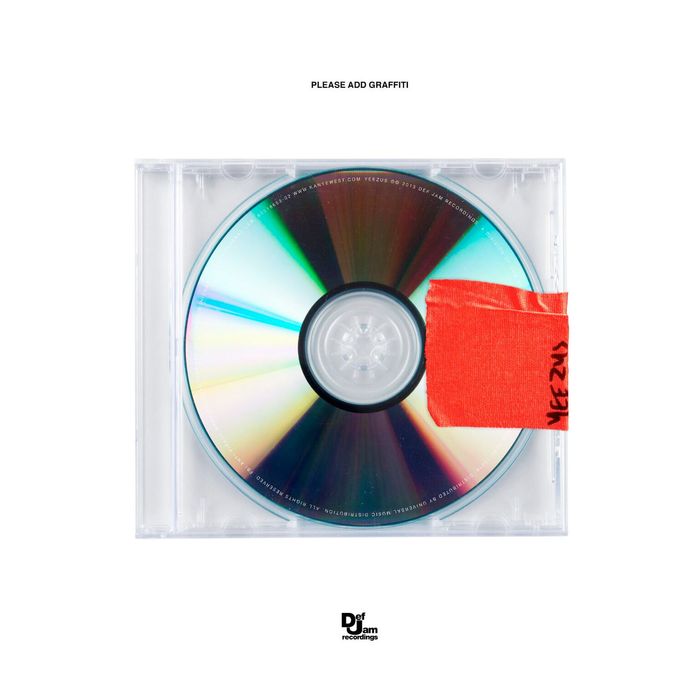
I was wondering about the technique used to make two album covers I'm fascinated by. I have tried my hand at replicating one of them by overlapping one color gradient and a grey metallic looking one but it doesn't look remotely close. I also tried all blend modes but nothing seems to create a similar effect.

I would be very grateful if someone could show me how to make something similar.


Any input on how the casings might have been made are also very welcome. 


Here are the album covers and the result of my attempt:


This topic has been closed for replies.

1 reply

c.pfaffenbichler
Community Expert
Community Expert
January 15, 2021

What is the problem exactly? 

You know you can pick Color Stops from the images? 


The casings are likely photographs (the whole things maybe). 

Participant
January 15, 2021

I did not realize you can pick color stops from the images. I'll try that as well.


Further, to me it looks like there is a certain glare those images have that mine just doesn't and as a result makes it look kinda flat. This might suggest they're pictures but nonetheless, do you know how I might achieve that effect?

c.pfaffenbichler
Community Expert
Community Expert
January 15, 2021

The Filter Polar Coordinates can be used to warp a Smart Object containing a linear Gradient into a circular shape.