
Participant
November 9, 2020
Answered

The blur gallery field blur is missing the pin adjustments options?

  • November 9, 2020
  • 2 replies
  • 3334 views

In the newest version of Photoshop, the blur gallery field blur is missing the pin adjustments options previous version had. The dial was outside of the blur pin area. 
 

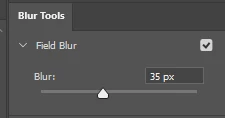
There is only pixel selection on the right menu...
Correct answer DWEITZMAN

Hi,

Thanks for the suggestion, PECourtejoie. I tried this, with no change to the issue. But, I did just happen to install a new GPU, going from integrated Intel HD to AMD Radeon RX550 4GB, and that did fix the issue. Pins and blur dial now work as expected.


2 replies

Participating Frequently
February 10, 2024

Select View > Show > Edit Pins.


I did that and it showed me the little dial

Participant
February 20, 2024

Thanks!

Inspiring
December 13, 2021

Having the same issue. Pins are visible, but no blur dial.

Photoshop v. 23.0.2, Windows 10, 16 meg.64 bit

PECourtejoie
Community Expert
Community Expert
December 13, 2021

Hi, try to check "Deactivate Native Canvas" in the menu Edit/Preferences/Technology preview (Pc) or Photoshop/Preferences/Technology preview (Mac), then restart Photoshop.
This is not a fix, but rather a way to check if the issue appears only with the new technology, and should be reported to the Ps team.

DWEITZMANCorrect answer
Inspiring
December 13, 2021

Hi,

Thanks for the suggestion, PECourtejoie. I tried this, with no change to the issue. But, I did just happen to install a new GPU, going from integrated Intel HD to AMD Radeon RX550 4GB, and that did fix the issue. Pins and blur dial now work as expected.