gus7777
Inspiring
February 26, 2019
Answered

The Refine Edge tool no longer works!

  • February 26, 2019
  • 3 replies
  • 1870 views

I am an experienced Photoshop user on a recent version, and I have watched the refine edge tool become less and less workable with each new update - where it now doesn't work anymore.

Please restore this tool back to the way it used to operate - when it actually worked.

    This topic has been closed for replies.
    Correct answer davescm

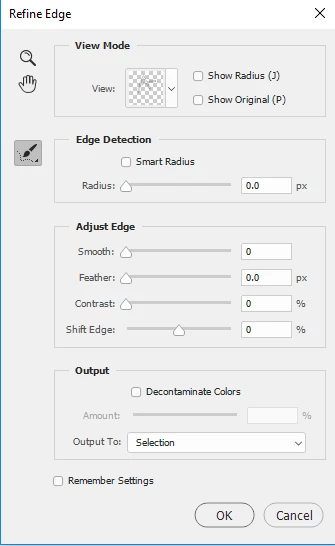
    You can still access the old (pre-select and mask) refine edge tool.

    With a selection made, go to the Select menu and hold down the Shift key  whilst clicking on "Select and Mask". The old refine edge will open.

    Dave

    3 replies

    gus7777
    gus7777Author
    Inspiring
    March 1, 2019

    Sorry, the previous tool doesn't work either.  Please fix this tool - it quite simply no longer works.  Try it on hair or trees - nothing!

    gus7777
    gus7777Author
    Inspiring
    March 1, 2019

    Sorry, please ignore the above - the problem was trying to use the refine edge tool on a mask in a folder with multiple layers - when I tried it again on a single layer - it worked again.

    davescm
    Community Expert
    davescmCommunity ExpertCorrect answer
    Community Expert
    February 26, 2019

    You can still access the old (pre-select and mask) refine edge tool.

    With a selection made, go to the Select menu and hold down the Shift key  whilst clicking on "Select and Mask". The old refine edge will open.

    Dave

    Participant
    July 18, 2019

    I have been able to access it intermittently. I usually have to hold down shift and "Select and Mask" from the select menu at least 10 times for the correct dialogue box to come up. Very frustrating!! We need to just get rid of the Select and Mask feature and make the Refine Selection box more easily accessible.

    Leslie Moak Murray
    Community Expert
    Community Expert
    February 26, 2019

    Agree.