
Participant
January 7, 2021
Answered

The Windows Ink Pressure Problem, but somehow worse.

  • January 7, 2021
  • 1 reply
  • 1263 views

Hi, everyone


I'm sure you've seen the above problem asked about many times. I had the same issue, but none of the solutions posted have worked for me. If I have the PsUserConfig txt file in my Photoshop Settings folder, I can't use the pen to paint at all. It just acts as an eraser, no matter what tool I have selected. But then without that file, I'm back to square one, where I can't enable Windows Ink because my pen won't work at all, and I can't disable Windows Ink without losing pressure opacity.


I use an XP-Pen Pro E 22, and it worked beautifully up until today. Please tell me someone found a Plan B to this problem, because Plan A truly did not work for me. Thank you so much!
This topic has been closed for replies.
Correct answer JJMack

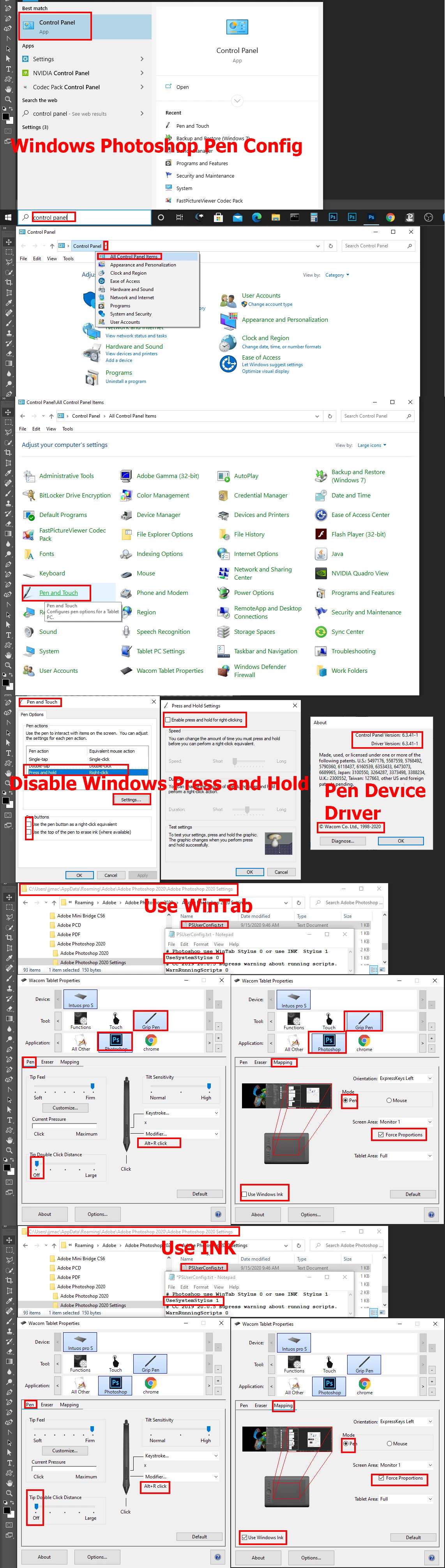
If you are using Windows can you set the XP-Pen Pro E 22 to use either WinTab or INK application interfaces? If you cans toe cans set Photoshop up the use WinTab or INK interface.  However both need to be set to use the same interface.   Make sure your PsUserConfig.txt settings match your XP-Pen settings.  You should also change some of Microsoft Windows settings if you will be using a Pen with Photoshop.  Here is how I configure Windows, Photoshop, and My Wacom Tablet.  You need the  set your XP-Pen like I set my Wacom Pen.

1 reply

JJMack
Community Expert
JJMackCommunity ExpertCorrect answer
Community Expert
January 7, 2021

If you are using Windows can you set the XP-Pen Pro E 22 to use either WinTab or INK application interfaces? If you cans toe cans set Photoshop up the use WinTab or INK interface.  However both need to be set to use the same interface.   Make sure your PsUserConfig.txt settings match your XP-Pen settings.  You should also change some of Microsoft Windows settings if you will be using a Pen with Photoshop.  Here is how I configure Windows, Photoshop, and My Wacom Tablet.  You need the  set your XP-Pen like I set my Wacom Pen.

JJMack
Participant
January 7, 2021

JJMack!! Thank you for such a quick & in-depth answer.


Honestly, it didn't work at first - probably to do with the pen settings since they look so different to your Wacom ones. But after an hour of messing around with random settings, it's working again! Thank you so much for your help.