
Participant
December 15, 2016
Question

Tools have changed and are unusable in 2D after working in 3D

  • December 15, 2016
  • 3 replies
  • 3917 views

Hello,

I was doing normal stuff on photoshop 2d image using paint and "pipette". I was curious of the 3d features so I just created a new layer in that mode. I erased everything and went back to my work when I notice my tools had changed.

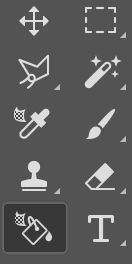
The pipette and painting now have this 3d small grid and since then have not been working. I went back in the history, left my document, created a new one, reset the tools, but the tools stay like that. I am unable to apply any paint with the jar and use the pipette since in 2d mode. All the other tools work perfectly.

I am stuck since 30 mn please help me. Do you have any idea how to make my tools back to normal or use them since they've become 3d tool in the 2d mode.

THANKS YOU
This topic has been closed for replies.

3 replies

davescm
Community Expert
Community Expert
December 15, 2016

When you use 3D, Photoshop gives you the chance to use the 3D workspace which has tools and panels configured for 3D.

You  can switch back to another workspace at any time by going to the  top right of the options bar and choosing from the drop down list.

If you are not sure what to choose, click on Essentials.

If that does not put everything back to normal - in the same menu, after selecting Essentials,  you can reset the Essentials space back to its default.

Dave

rolandf35890406
Participating Frequently
August 10, 2017

oh what a stupid feature!!! took me 1 hour of research :/ i hate these mode-changes, makes the enduser quite confusing. Thank you for this great hint! :-)

JJMack
Community Expert
Community Expert
December 15, 2016

We can not tell anything about what you are trying to do from a partial capture of you tool bar. Did you customize your tool bar. Do you have any layer targeted?  Capture your whole Photoshop display and post that.  Also what OS you use what Photoshop Extended version

JJMack
c.pfaffenbichler
Community Expert
Community Expert
December 15, 2016

What is your current Workspace (Window > Workspace > …)?

Could you please post a screenshot with the pertinent Panels (Layers, Options Bar, …) visible?