WindWind
Participant
January 17, 2019
Answered

Transform perspective when cropping – Tool not found

  • January 17, 2019
  • 3 replies
  • 307 views

Hello, there was a great tool and now I can't find it in PS 2018/2019 – in German it called : perspektivisches Freistellungswerkzeug.

This is the Icon:

Here is the Link to the Article and more Information (I hope, the Link is working) – it is the 4th article from above:

Freistellen und gerades Ausrichten von Fotos in Photoshop

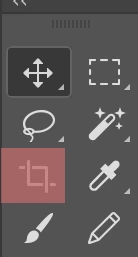
This is my actual Tool-list and there is no longer the tool shown above.

Where the red marked field is, there I could select the Icon.
I would be very happy if someone could tell me where to find the tool again.

Thank you and sunny greetings

Wind
    This topic has been closed for replies.
    Correct answer

    Hi

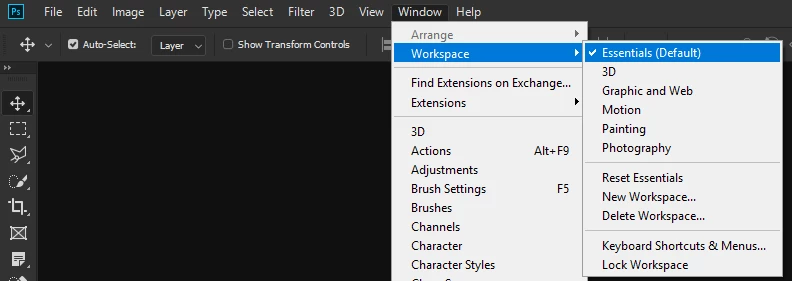
    Have you checked what workspace you're using

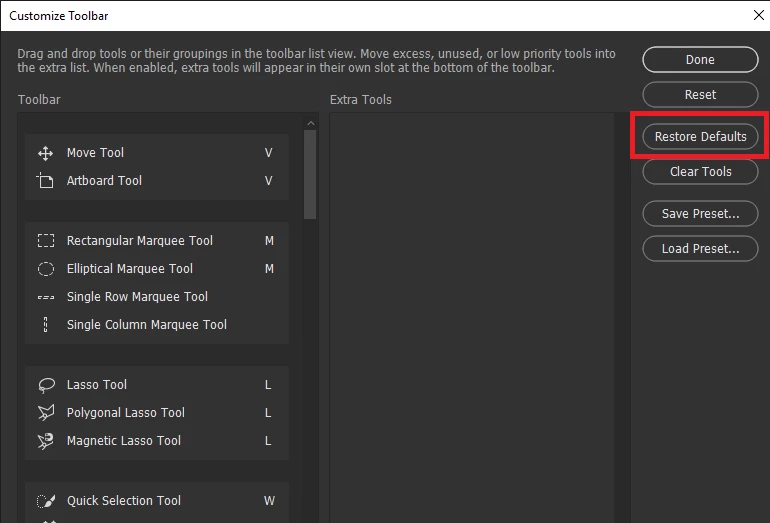
    If it's not that try restoring the defaults, go to Edit > Toolbar

    3 replies

    WindWind
    WindWindAuthor
    Participant
    January 17, 2019

    Dear Ged, that's great! Thanks a lot!

    In PS 2018 was that the right tip. In PS 2019 I put it in the 'photography' workspace and now I can select it again.

    I'm so happy!

    Wind

    January 17, 2019

    You're welcome

    davescm
    Community Expert
    Community Expert
    January 17, 2019

    Just click and hold down the mouse button on the crop tool and the others will appear

    If it is not in those extra choices then use Edit>Toolbar as shown by Ged

    Dave

    Correct answer
    January 17, 2019

    Hi

    Have you checked what workspace you're using

    If it's not that try restoring the defaults, go to Edit > Toolbar