Answered
trying to get marching ants when i create a rounded rectangle so that I can invert selection and delete outer selection
trying to get marching ants when i create a rounded rectangle so that I can invert selection and delete outer selection

trying to get marching ants when i create a rounded rectangle so that I can invert selection and delete outer selection
Set the rounded rectangle tool to make a path

then, in the paths panel, load path as a selection
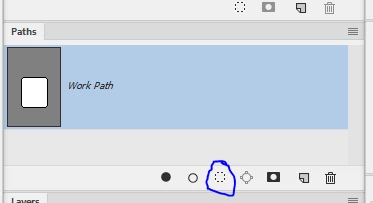
If you need to invert the selection Shift+Ctrl+I
Dave
Already have an account? Login
Enter your E-mail address. We'll send you an e-mail with instructions to reset your password.
 AdChoices