
Participant
July 14, 2017
Question

unable to access Essentials Workspace in photoshop CC

  • July 14, 2017
  • 1 reply
  • 1289 views

Hi, I´m unable to access Essentials or 3D or the rest here, the only thing I can access is "photografy" think it happend after program update, I get this message even if no picture is open in the program:
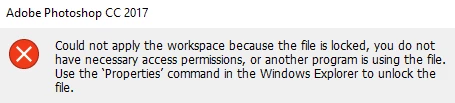
What can I do?

This topic has been closed for replies.

1 reply

Saif.Smeirat
Inspiring
July 14, 2017

Hello @twertown . can you reset your preferences in Photoshop

by Press and hold Ctrl+Alt+CShift (Windows) or Cmd+Option+Shift (Mac OS) when launching Photoshop. You will be prompted to delete the current settings.

if it doesn't work .. i think you have to reinstall the program due to " the app was moved, or some files have been moved/deleted.

The 3D workspace is not where it should be in the Photoshop Required/Workspaces folder. "

gener7
Community Expert
Community Expert
July 14, 2017

In Photoshop Preferences, try the "Restore Default Workspaces" button at the bottom.