
Participant
December 5, 2018
Answered

Unable to save file created in PS Windows 10 Computer

  • December 5, 2018
  • 2 replies
  • 440 views

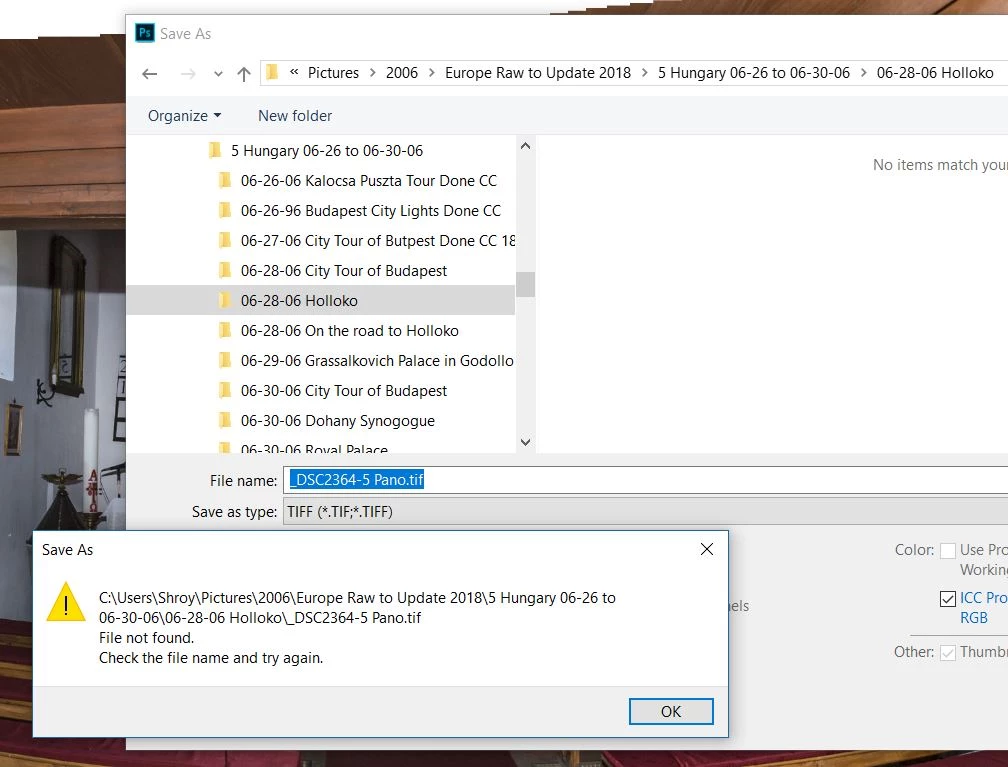
When I try to save (or save as) a file created in PS (either psd, tif or jpg) I receive a message "Check the file name and try again."  This is with CC2019.  See screen clip below.  I did not have this problem with CC2018. 
    This topic has been closed for replies.
    Correct answer Sahil.Chawla

    Hi Jon,

    Sorry to hear that you're not able to save a file, are you logged in as admin user?

    Also, there might be a permissions issue with the hard disk.

    Please try the steps mentioned in this video and see if it helps: Photoshop Error Message... - YouTube

    Regards,
    Sahil

    2 replies

    Participant
    December 5, 2018

    Found the problem.  Folder Access was blocked by Windows Defender Security Center.  Turned off Controlled folder access and now files save.  Problem was also with CC2018.  Windows Defender had been changed after I quit using CC2018.

    Sahil.Chawla
    Adobe Employee
    Sahil.ChawlaCorrect answer
    Adobe Employee
    December 5, 2018

    Hi Jon,

    Sorry to hear that you're not able to save a file, are you logged in as admin user?

    Also, there might be a permissions issue with the hard disk.

    Please try the steps mentioned in this video and see if it helps: Photoshop Error Message... - YouTube

    Regards,
    Sahil