

imagexREK
Known Participant
October 14, 2019
Answered

unwarp horizon

  • October 14, 2019
  • 8 replies
  • 4222 views

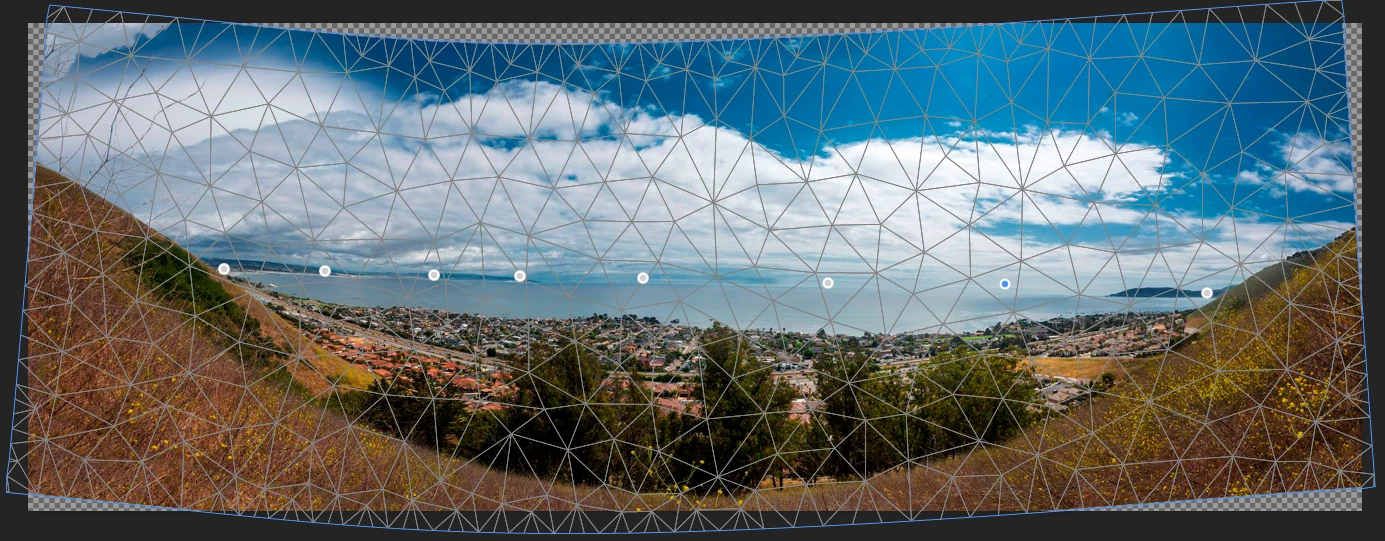
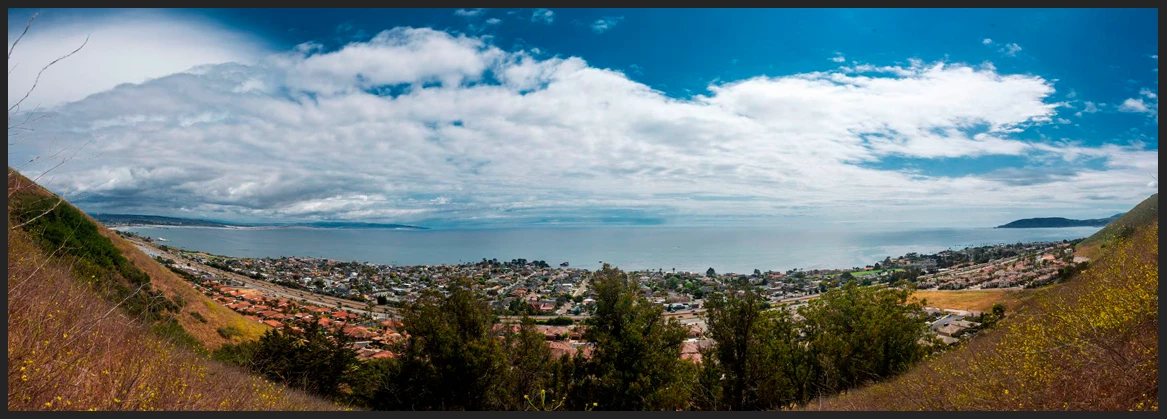
I have stitched a panorama which has a warped horizon.  The horizon is generally a downward arc, but with upward bends at both ends.  Is there a way I can define the horizon as a series of straight line segments then have Photoshop warp the image so the segments line up as a continuous straight line?
This topic has been closed for replies.
Correct answer Kevin Stohlmeyer

Have you tried using Puppet Warp in the Edit Menu? Convert your layers to one smart object and add pins to the horizon. Then move. Not perfect but better with practice.

8 replies

Kevin Stohlmeyer
Community Expert
Kevin StohlmeyerCommunity ExpertCorrect answer
Community Expert
October 16, 2019

Have you tried using Puppet Warp in the Edit Menu? Convert your layers to one smart object and add pins to the horizon. Then move. Not perfect but better with practice.

Chuck Uebele
Community Expert
Community Expert
October 16, 2019
Kevin, I think I have, but maybe not for this image.
Conrad_C
Community Expert
Community Expert
October 16, 2019

Have you tried the Adaptive Wide Angle filter already suggested by PECourtejoie in an earlier reply? If there is good lens metadata in your image, it should take care of the problem right away. The following video demonstrates it:

https://www.youtube.com/watch?v=Lp8QCR9f9UE


Although the video shows a single frame taken with a wide angle lens, I have used Adaptive Wide Angle on stitched panoramas. It doesn't always work, but when it does, it saves a lot of time.

Chuck Uebele
Community Expert
Community Expert
October 16, 2019

I used the warp tool to straighten the horison, and it wasn't the best way. I agree with you about a path used to correct the horizon, and many others have suggested this idea. We'll see if Adobe acts on that idea.

Chuck Uebele
Community Expert
Community Expert
October 15, 2019

My sample was done in ACR, it did have the correct lens profile. and I tried it again, and straighten the horizon, with the same results. Wide Angle adaptive filter doesn't work on this stitch, and many others. Once in a while it does.

imagexREK
imagexREKAuthor
Known Participant
October 16, 2019
Thanks for the suggestions on how to shoot better photos for producing panoramas. But that's not what I'm looking for. I now have a stitched panorama with a problem - warped horizon. I'd like suggestions on how I can fix this photo, not avoid the problem in the future. Chuck Uebele suggested warping the photo, but I'm not clear on what Photoshop tool he used and how he pushed the photo for aligning the horizon. It seems to me that there should be a way to draw a series of connected straight line segments then have the photo warped to align the segments into one continuous straight line. I haven't been able to dupe this out, but I'm not familiar with warping in Photoshop and I haven't found applicable help in the precast manuals or tutorials. Perhaps it can't be done.
D Fosse
Community Expert
Community Expert
October 15, 2019

Go back to the raw files and do it again. This time make sure you have lens corrections on, and check that it works properly. Sometimes the lens profile overdoes the geometric correction slightly - and sometimes it may actually not be for the right lens. Also make sure you have the right amount of vignette correction.


Then straighten the horizon on each frame.


In short, there is a lot of preparation that needs to be done before you run the merge. This isn't a magic button.


Another thing I would recommend is not to trust the "rolled-into-one" script Photomerge. Break it up into its individual components, that way you have much more control. Stack the images with the reference frame at the bottom. This is the one the others will align to. Then Auto-Align and finally Auto-Blend.

PECourtejoie
Community Expert
Community Expert
October 15, 2019

Hello, try the adaptive wide angle filter, it even works on Panos: https://helpx.adobe.com/photoshop/using/adaptive-wide-angle-filter.html

Chuck Uebele
Community Expert
Community Expert
October 14, 2019

kevin, I've had the same issue and neither option works. Here's a sample of what I was trying to correct. Notice how the horison is "S" shaped. I ended up just using warp and nudging everything - PIA!

Kevin Stohlmeyer
Community Expert
Community Expert
October 14, 2019

Have you tried using the options to remove geometric distortion or selecting one of the specific Panoramic settings on the left (not auto)?

Other wise post, you can try using Filter/Lens Correction to try to remove any horizon distortion.