usx40303570
Participating Frequently
February 16, 2018
Answered

Updating SmartObject Layer Comps according to their names

  • February 16, 2018
  • 6 replies
  • 4481 views

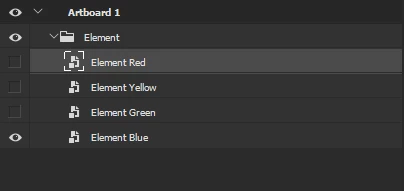
Layers structure:

Each of these Smart Objects has it's own LayerComps with names similar to the layer name:
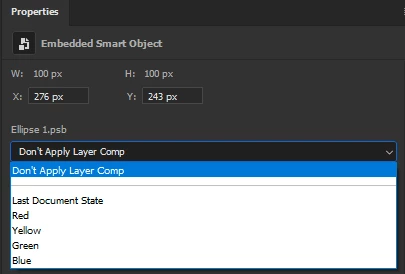
I need to switch on each of the Smart Objects in the LayerSet "Element" one by one and apply the specified LayerComp at the same time. E.g. "Element Red" got "Red" LayerComp applied, "Element Yellow" - "Yellow", etc.

What I have for now.
I've modified a bit Michael L Halecode posted here​ to switch layers one by one. It's all looks like that:

var DBG = 1;

var id = getSelectedLayerID();

var name = getLayerNameByID(id);

var variations = ["Red", "Yellow", "Green", "Blue"];

if(DBG) {alert("id="+id+"; name="+name); };

for( i=0; i<variations.length; i++ ) {

    layerName = name+" "+variations;

    showSetByOne( layerName, name );

    if(DBG) {alert(layerName)};

}

function showSetByOne( layerName, groupName ){

    var setFolder = app.activeDocument.activeLayer;

    if (setFolder.typename == 'LayerSet' && setFolder.name == groupName ) {

        for( var setIndex = 0; setIndex<setFolder.layers.length; setIndex++) {

            if(setFolder.layers[setIndex].name == layerName){

                setFolder.layers[setIndex].visible = true;

                switchPlacedLayerComp(setFolder.layers[setIndex].id, 1402355601); //exact ID of one of the LayerComps got from ScriptListener

            }else{

                setFolder.layers[setIndex].visible = false;

            }

        }

    }

}

function switchPlacedLayerComp(id, compID) {

        // (ref = new ActionReference()).putEnumerated(sTT('layer'), sTT('ordinal'), sTT('targetEnum'));

        (ref = new ActionReference()).putIdentifier( sTT("layer"), id );

        // (ref = new ActionReference()).putIndex( sTT("layer"), id );

        (desc = new ActionDescriptor()).putReference( sTT("null"), ref );

        // alert("Inside Func: "+id);

        desc.putInteger( sTT("compID"), compID );

        // desc.putString( sTT("comp"), "Red" );

        executeAction( sTT("setPlacedLayerComp"), desc, DialogModes.NO );

}

But I can not find any way to process the Smart Objects Layer Comps applying. If to select the exact SO layer and use the exact "compID" ( 1402355601) that was got from Script Listener then LayerComp applies to. But I have only LayerComps names but not IDs. And I could not apply LayerComp to SmartObject without selecting it. Neither by SmarObject id nor by name.

Kukurykus​ it seems I could not solve this puzzle without your help

Thanks to all for help in advance!

This topic has been closed for replies.
Correct answer Kukurykus

At the bottom you find script that should work. As you understand I can not test it as following part was not yet part of CS6:

(ref2 = new ActionReference()).putEnumerated(sTT('layer'),

sTT('ordinal'), sTT('targetEnum')); (dsc3 = new ActionDescriptor())

.putReference(sTT('null'), ref2), dsc3.putInteger(sTT('compID'), compID)

executeAction(sTT('setPlacedLayerComp'), dsc3, DialogModes.NO)

Anyway to see that works - for both files you sent - I alerted compID instead of above code nested in script you find below:

function sTT(v) {return stringIDToTypeID(v)}

(ref1 = new ActionReference()).putName(sTT('layer'), 'Element')

j = (dsc1 = executeActionGet(ref1)).getInteger(sTT('itemIndex')) - 1

while(typeIDToStringID(dsc1.getEnumerationValue(sTT(lS = 'layerSection'))) != lS + 'End') {

     (ref1 = new ActionReference()).putIndex(sTT('layer'), j--); (dsc1 = executeActionGet(ref1))

     .putReference(sTT('null'), ref1), dsc1.putBoolean(sTT('makeVisible'), false)

     executeAction(sTT('select'), dsc1, dmno = DialogModes.NO)

     if (nme = dsc1.getString(sTT('name')).match(/\w+$/)) {

          (function bin(){

               /*beginning*/e = sTT('placedLayerExportContents');

               (dsc2 = new ActionDescriptor()).putPath(sTT('null'), fle)

               executeAction(e, dsc2, dmno), fle.open('r'); var r = fle.read()

               length = nme[0].length * 2, reg = 'Nm  TEXT.{4}.{0,' + length

               + '}.{6}compIDlong.{4}'; var m = r.match(RegExp(reg, 'g'))

               for(; i < m.length;) {if (RegExp(nme).test(m[i++].slice(12, -20)

               .match(/[^\x00]/g).join(''))) {compID = eval('0x' + m[--i]

               .slice(-4).replace(/./g, function(v) {return v.charCodeAt()

               .toString(16)})); break}} fle.close(), fle.remove();/*end*/

               (ref2 = new ActionReference()).putEnumerated(sTT('layer'),

               sTT('ordinal'), sTT('targetEnum')); (dsc3 = new ActionDescriptor())

               .putReference(sTT('null'), ref2), dsc3.putInteger(sTT('compID'), compID)

               executeAction(sTT('setPlacedLayerComp'), dsc3, dmno)

          })((fle = File('~/desktop/.psb')).encoding = 'binary')

     }

}

6 replies

usx40303570
Participating Frequently
February 28, 2018

Kukurykus​, sorry man, was a bit out of PC.

Here is the code:

while(tSID(dsc1.getEnumerationValue(sTID(lS = 'layerSection'))) != lS + 'End') {

    (ref1 = new ActionReference()).putIndex(sTID('layer'), j--)

    (dsc1 = executeActionGet(ref1)).putReference(sTID('null'), ref1), dsc1.putBoolean(sTID('makeVisible'), false)

    executeAction(sTID('select'), dsc1, no = DialogModes.NO)

    lsop = (function getSelectedLinkedSOpath() {

    try {

        (ref9 = new ActionReference()).putEnumerated(sTID('layer'), sTID('ordinal'), sTID('targetEnum'))

        var layerDesc = executeActionGet(ref9)

        var soDesc = layerDesc.getObjectValue(sTID('smartObject'))

        var localFilePath = soDesc.getPath(sTID('link'))

    } catch(e) {}

        return localFilePath

    });

    if (nme = dsc1.getString(sTID('name')).match(/\w+$/)) {

        (function bin(){

            isEmbed = ( psbPath=='~/desktop/.psb' ) ? true : false

            (fle = File( psbPath )).encoding = 'binary'

            if(isEmbed) {

                (dsc2 = new ActionDescriptor()).putPath(sTID('null'), fle);

                executeAction(sTID('placedLayerExportContents'), dsc2, no);

            } fle.open('r'); var r = fle.read();

            length = nme[0].length * 2, reg = 'Nm  TEXT.{4}.{0,' + length + '}.{6}compIDlong.{4}'; var m = r.match(RegExp(reg, 'g'))

            for(i=0; i < m.length;) {

                if (RegExp(nme).test(m[i++].slice(12, -20).match(/[^\x00]/g).join(''))) {

                    compID = eval('0x' + m[--i].slice(-4).replace(/./g, function(v) {return v.charCodeAt().toString(16)})); break

                }

            } fle.close(); if(isEmbed){fle.remove()}

            (ref2 = new ActionReference()).putEnumerated(sTID('layer'), sTID('ordinal'), sTID('targetEnum'))

            (dsc3 = new ActionDescriptor()).putReference(sTID('null'), ref2), dsc3.putInteger(sTID('compID'), compID)

            executeAction(sTID('setPlacedLayerComp'), dsc3, DialogModes.NO)

        })( psbPath = ( undefined==(psbPath=lsop()) ? '~/desktop/.psb' : psbPath ))

    }

}

Kukurykus
Legend
February 28, 2018

You seem to be very smart if you knew how to modifiy that code I wrote (which even for me was hard while creating it, especially first time of this kind), and then combine it with parts given by r-bin. That's very usefull. Thanks for posting!

Still you did not answer for my question about spaces in reply no. 14 of this theard. I wonder was I close of point you did.

usx40303570
Participating Frequently
March 20, 2018

Hi Kukurykus

It seems that I've confused you with that "spaces" issue

Yes, you was close and it works. But I did not explain correctly what I need.

In general, I had an idea to make layer name to consist from two parts separated with some kind of separator ("@" in that case).

One part is the layer name itself and the other is the part that has to be compared with the layer comp name. E.g. "Element @Red" - where "Element" is the first part and "@Red" is the other to be compared.

So, if going with the simple words then the script works with your implementation as well ("Element @Red"). But if the second part consits of two or more words then of course it does not ("Element @Red with Yellow"). As a solution I've decided just to use simple words or join them with a underscore if more complex.

Best regards

Jarda Bereza
Inspiring
February 19, 2018

With this, you can get smart object comps of all smart objects in document with IDs and names without opening them

var docRef = new ActionReference(); 

  var desc = new ActionDescriptor(); 

  var JSONid = stringIDToTypeID("json"); 

  docRef.putProperty(charIDToTypeID('Prpr'), JSONid); 

  docRef.putEnumerated(stringIDToTypeID("document"), charIDToTypeID('Ordn'), charIDToTypeID('Trgt')); 

  desc.putReference(charIDToTypeID('null'), docRef); 

  desc.putBoolean(stringIDToTypeID("compInfo"), false);  // just return the Layer Comp settings 

  desc.putBoolean(stringIDToTypeID( "expandSmartObjects" ), true); // return Layer Comp settings for each layer 

  desc.putBoolean(stringIDToTypeID( "getCompLayerSettings" ), false); // return Layer Comp settings for each layer 

  var result = executeAction(charIDToTypeID( "getd" ), desc, DialogModes.NO).getString(JSONid); 

objectFromJSONString > placed > (item) > comps

This is code for generator plugin. Will work by default in modern Photoshop.

smartObjectMore property work properly in CC2015.5 and higher.

In lower version you have only "smartObject" property with less info.

Legend
February 19, 2018

As I hardly understood you need to find the LayerComp ID for the smart object.
This will probably help you.

try {

var r = new ActionReference();   

r.putProperty(charIDToTypeID("Prpr"), stringIDToTypeID("smartObjectMore"));   

r.putEnumerated(charIDToTypeID("Lyr "), charIDToTypeID("Ordn"), charIDToTypeID("Trgt"));

var list = executeActionGet(r).getObjectValue(stringIDToTypeID("smartObjectMore")).getObjectValue(stringIDToTypeID("compInfo")).getList(stringIDToTypeID("compList"));

for (var i = 0; i < list.count; i++)

    {

    var d = list.getObjectValue(i);

    var nm = d.getString(stringIDToTypeID("name"));

    var cm = d.getString(stringIDToTypeID("comment"));

    var id = d.getInteger(stringIDToTypeID("ID"));

    alert(nm + " ID:" + id, "COMP № "+0);

    }

}

catch(e) { alert("This layer has no layercomps") }

P.S. Or maybe not )

Kukurykus
Legend
February 19, 2018

Would be really cool that worked. I can't check it with CS6 of course but if Jarda Berezasaid there's needed plugin then I believe there is or you have to play with binaries I read today there was bug with smartObjectMore, but maybe not anymore and now it will be working

Jarda Bereza
Inspiring
February 18, 2018

Generator plugin is by default in CC and higher. Layers comps in properties panel are since CC only.

Try to google github page with generator examples of code.

usx40303570
Participating Frequently
February 18, 2018

Yes, I've already googled it and installed generator. Some test scripts work fine but still it's a bit difficuld for me to undersatand how to rewrite or adopt my code to be usable as generator plugin.

Kukurykus
Legend
February 18, 2018

There are no Artboards in CS6 EXTENDED I use as well as Properties panel doesn't show everything what you have in CC's. compID's aren't created for me by ScriptListener (however you could say what action you did to record them?), only names of comps, both for normal and placed layers, so I assume they were added in later versions, though I think they were earlier already avialable in binaries. I checked there're such key words so probably they existed before to be used one day in future.

I don't use Layer Comps and Smart Objects but was able to write script which makes a loop over layers in Element layerSet, then reads colour part name of certain layer and searches for it in binaries. When found it checks ID to use it in place of last selected layer comp by user before Smart Object got saved. Unfortunately though this switch really works (you can check it editing certain object), as it fills demanded checkbox it doesn't refresh SmartObject until checkbox will be clicked again (or applied by script when smart object is opened in case of CS6, but probably changed by Properties panel / compID by script in later versoin). To refresh layers (visibility, position and apperance for CS6) I had to write one part more of script that edits Smart Object to reclick / apply checkbox / layer comp found in binaries using colour name. After all - that step for browsing binaries isn't necessary in CS6. Sole applying layer comp basing on layer name is sufficient.

If I'm right you can edit Layer Comp of Smart Object without opening it by Properties? You can not use name of layer comp, but compID that I can read in binaries to compare with name. This way using comp name while binaries are beeing read by script you could have compID taken from them and applied by script. Send me a file (that with 'Element' folder contianing 4 Smart Objects (red, yellow, green and blue), also tell me exact compID's they were created for all of layer comps names and I'll make sure they are placed in the same spots I already found in binaries writing this script:

(HERE'S A PART OF POST THAT WAS REMOVED FOR SOME REASON BY MODERATION WITHOUT ANY EXPLANATION!)

function sTT(v) {return stringIDToTypeID(v)}

(ref1 = new ActionReference()).putName(sTT('layer'), 'Element')

j = (dsc1 = executeActionGet(ref1)).getInteger(sTT('itemIndex')) - 1

while(typeIDToStringID(dsc1.getEnumerationValue(sTT(lS = 'layerSection'))) != lS + 'End') {

     (ref1 = new ActionReference()).putIndex(sTT('layer'), j--); (dsc1 = executeActionGet(ref1))

     .putReference(sTT('null'), ref1), dsc1.putBoolean(sTT('makeVisible'), false)

     executeAction(sTT('select'), dsc1, no = DialogModes.NO)

     if (nme = dsc1.getString(sTT('name')).match(/\w+$/)) {

          function pL(v) {

               (dsc2 = new ActionDescriptor()).putPath(sTT('null'), fle)

               executeAction(sTT('placedLayer' + v + 'Contents'), dsc2, no)

          }

          (function bin(){pL('Export'), fle.open('r'); var r = fle.read()

               var m = r.match(/Nm  TEXT.{4}.*?.{6}compIDlong.{4}/g)

               for(; i < m.length;) {if (RegExp(nme).test(m[i++].slice(12, -20).match(/[^\x00]/g).join(''))) {

                    fle.open('w'), fle.write(r.replace(/(last.{11}long)(.{4})/, '$1' + m[--i].slice(-4)))

                    fle.close(), pL('Replace'); break}} fle.close(), fle.remove()

          })((fle = File('~/desktop/.psb')).encoding = 'binary')

          executeAction(sTT('placedLayerEditContents'));

          (ref2 = new ActionReference()).putName(sTT('compsClass'), nme[0]);

          (dsc2 = new ActionDescriptor()).putReference(sTT('null'), ref2)

          executeAction(sTT('applyComp'), dsc2, DialogModes.NO);

          (aD = activeDocument).save(), aD.close()

     }

}

In case of CS6 following part is not needed:

(function bin(){pL('Export'), fle.open('r'); var r = fle.read()

     var m = r.match(/Nm  TEXT.{4}.*?.{6}compIDlong.{4}/g)

     for(; i < m.length;) {if (RegExp(nme).test(m[i++].slice(12, -20).match(/[^\x00]/g).join(''))) {

          fle.open('w'), fle.write(r.replace(/(last.{11}long)(.{4})/, '$1' + m[--i].slice(-4)))

          fle.close(), pL('Replace'); break}} fle.close(), fle.remove()

})((fle = File('~/desktop/.psb')).encoding = 'binary')

It searches binaries for compID of layer comp name, and then replace last used layer compID to that pointed by script.

If I left above part, but removed this one:

executeAction(sTT('placedLayerEditContents'));

(ref2 = new ActionReference()).putName(sTT('compsClass'), nme[0]);

(dsc2 = new ActionDescriptor()).putReference(sTT('null'), ref2)

executeAction(sTT('applyComp'), dsc2, DialogModes.NO);

(aD = activeDocument).save(), aD.close()

the only change was that desired layer comp checkboxes inside SmartObjects were filled, but sole document not refresehed untill user reclicked / applied by script that layer comp (during editing of Smart Object in CS6). Fortunately for users of CC it seems above part can be replaced to that applying compID (found by script in binaries basing on layer comp names). It's all thx to Properties where you can edit LayerComps without opening smart object, right? As to reading compID from binaries it took just 50 milliseconds for me. Script does not work with background and non SO layers, so only like in your example).

usx40303570
Participating Frequently
February 18, 2018

Hi, Kukurykus.

however you could say what action you did to record them?

I've manually switched through the avaliable comps of the SmartObject in the Properties panel.

If I'm right you can edit Layer Comp of Smart Object without opening it by Properties?

You're right. Not exactly "edit" but switch on any LayerComp ("Red", "Yellow" etc.) present in a SmartObject. The main problem is that via script I've found only one way to do that. It's by putting compID value which I do not know:

desc.putInteger( sTT("compID"), compID );

So, I've used your code and noticed that all SO layers were renamed to the color names ("Element Red"->"Red" etc.). I can not distinguish if the script got this values from the SO directly or just renamed the layers. If it got, then would it be able to get according compIDs to this names? If it's possible then we are on the finishing line.

Here are the PSD file - with Artboard present and without it. I do not remember how CS6 understands newish file format, so just in case.

These are the compIDs of the every layerComp in the SmartObject:

1559146104 - Red

1563667187 - Yellow

1568356340 - Green

1572927844 - Blue

They are the same for both of the files with Artboard or without.

Btw, if I use not Embed SmartObjects but Linked (it's a bit new feature. It seems it's not avaliable in CS6) one - the function pL() does not work. It throws an error that:

"The command "Edit Contents" is not currently avaliable"

Kukurykus
KukurykusCorrect answer
Legend
February 18, 2018

At the bottom you find script that should work. As you understand I can not test it as following part was not yet part of CS6:

(ref2 = new ActionReference()).putEnumerated(sTT('layer'),

sTT('ordinal'), sTT('targetEnum')); (dsc3 = new ActionDescriptor())

.putReference(sTT('null'), ref2), dsc3.putInteger(sTT('compID'), compID)

executeAction(sTT('setPlacedLayerComp'), dsc3, DialogModes.NO)

Anyway to see that works - for both files you sent - I alerted compID instead of above code nested in script you find below:

function sTT(v) {return stringIDToTypeID(v)}

(ref1 = new ActionReference()).putName(sTT('layer'), 'Element')

j = (dsc1 = executeActionGet(ref1)).getInteger(sTT('itemIndex')) - 1

while(typeIDToStringID(dsc1.getEnumerationValue(sTT(lS = 'layerSection'))) != lS + 'End') {

     (ref1 = new ActionReference()).putIndex(sTT('layer'), j--); (dsc1 = executeActionGet(ref1))

     .putReference(sTT('null'), ref1), dsc1.putBoolean(sTT('makeVisible'), false)

     executeAction(sTT('select'), dsc1, dmno = DialogModes.NO)

     if (nme = dsc1.getString(sTT('name')).match(/\w+$/)) {

          (function bin(){

               /*beginning*/e = sTT('placedLayerExportContents');

               (dsc2 = new ActionDescriptor()).putPath(sTT('null'), fle)

               executeAction(e, dsc2, dmno), fle.open('r'); var r = fle.read()

               length = nme[0].length * 2, reg = 'Nm  TEXT.{4}.{0,' + length

               + '}.{6}compIDlong.{4}'; var m = r.match(RegExp(reg, 'g'))

               for(; i < m.length;) {if (RegExp(nme).test(m[i++].slice(12, -20)

               .match(/[^\x00]/g).join(''))) {compID = eval('0x' + m[--i]

               .slice(-4).replace(/./g, function(v) {return v.charCodeAt()

               .toString(16)})); break}} fle.close(), fle.remove();/*end*/

               (ref2 = new ActionReference()).putEnumerated(sTT('layer'),

               sTT('ordinal'), sTT('targetEnum')); (dsc3 = new ActionDescriptor())

               .putReference(sTT('null'), ref2), dsc3.putInteger(sTT('compID'), compID)

               executeAction(sTT('setPlacedLayerComp'), dsc3, dmno)

          })((fle = File('~/desktop/.psb')).encoding = 'binary')

     }

}

Jarda Bereza
Inspiring
February 16, 2018

You need to use generator plugin with action manager code. This code can see comps inside smart object event when it is not opened in the window and here you can read comps IDs and names so you can pair them. Then you can compare layer name with comp names and assign comp id from the pair into action which changes current smart object comp.

usx40303570
Participating Frequently
February 16, 2018

So with this generator plugin all the code stays the same? Or how should I use my script with this plugin?

I've installed Generator as described here. But what's the next?

The scripts still works as it was before.